Article body
Full article

Next-generation Agentic BI from Hengshi, Beijing.
Introduction
Why Hasn’t BI Been Replaced Yet?
People regularly ask whether BI will be replaced by AI. The grammar is fine, but the logic is confused. Replacement happens between things of the same type. BI is not a single technology. It is a market and an engineering system. It grew from data warehouses and OLAP scenarios, and it represents the full process by which enterprises use centralized warehouse data to calculate, correlate, and generate analytical insight. AI, by contrast, is a technology, not a clearly bounded market, so “replacement” is not the right framing.
The BI market continues to grow as digitalization and data-value realization accelerate, while AI technology is advancing rapidly. The industry consensus is clear: use AI to improve BI platforms and BI implementation. Mainstream vendors are investing heavily in next-generation BI, and that next generation is unquestionably an intelligent analytics platform for the AI Agent era. Hengshi was among the first to define Agentic BI, and on April 1 launched a key component, HENGSHI CLI. This means the platform can connect directly to Agent products such as OpenClaw, allowing an Agent to take over the full BI engineering workflow and complete detailed, repetitive, process-heavy BI work.
Even if we use the more intuitive interpretation that large AI models can analyze data and create charts directly, the answer is still grounded. In serious enterprise BI scenarios, there are still no proven cases where an AI platform directly connects to data and replaces BI. The reasons are practical:
- A deterministic warehouse query engine is essential for rigorous, reliable, continuous analysis. Even if an LLM can call a data warehouse directly, it still needs to convert intent into SQL, and BI platforms remain the best converters.
- LLM context is limited. Massive datasets cannot be fed into a model wholesale, and the inference cost would be too high. Data warehouses plus BI remain the best long-term balance of performance and cost.
- Enterprise-grade capabilities are non-negotiable: permission control, account systems, security auditing, and unified metric definitions are core parts of the BI pipeline.
Our view is therefore direct: the previous generation of BI platforms that relied on manual analyst implementation will be replaced by a new generation of Agent-oriented BI platforms. In that sense, we have already been replaced by our own new products.
The R&D Team Is Changing
Since 2026, our AI coding work has moved from exploration into real product development. Under this technical pressure, the team has changed in ways that exceeded our expectations, and the organization is evolving with it. We believe that AI-native development methods will create AI-native organization forms; advanced productivity brings advanced production relationships.
- Coordination surfaces are shrinking, while each individual covers more ground. The boundary between frontend and backend engineers is blurring, and AI enables end-to-end feature delivery. Product PRDs map more directly to code, and feature reviews increasingly encourage runnable prototypes.
- QA becomes even more valuable. From the perspective of Harness Engineering, QA strengthens quality constraints and uses AI to increase test coverage toward full automation and even saturation coverage.
- The OpenClaw + LLM agent model decouples and accelerates work, automatically handling many small but time-consuming tasks that previously required people, especially documentation tasks.
- We are building HENGSHI JARVIS, a product-decision hub that provides unified context for AI-native R&D. It complements Harness Engineering and helps the whole R&D organization move toward Agent-driven work.
Software and SaaS companies have clear processes and are well suited to AI Native transformation. Although software practitioners are facing major disruption from AI, a counter-consensus truth is emerging: AI improves the software industry most significantly, and the profitability of the industry as a whole is about to rise sharply.
HENGSHI SENSE 6.2 Innovation Overview
ChatBI Is Not Enough
In real and complex enterprise scenarios, ChatBI cannot solve the core implementation problems of BI engineering through simple dialogue alone. Heterogeneous data sources, dirty data, complex data models, and fine-grained permission control can easily produce hallucinations or broken logic. Long-running workflows are hard to handle, and one lower-layer error can interrupt the whole process, preventing a complete engineering loop.
What enterprises truly need is end-to-end Agentic BI, a data-autopilot engine based on an agent architecture. It upgrades the LLM from a “natural-language translator” into a “global coordinator.” Through a lightweight CLI or gateway, the Agent can autonomously explore data, solidify semantic models, retry and self-heal after database errors, and directly take over heavy data-engineering work.
Put simply, ChatBI helps people query data, while Agentic BI builds data infrastructure for people. Only by connecting data access, semantic modeling, permission control, and frontend presentation into a fully automated process, and by embedding AI into the BI foundation, can implementation dead ends be resolved and self-iterating enterprise digital assets be delivered.
The Three Requirements AI Places on BI
As Agentic BI evolves, the core of the BI foundation is moving from visualization to semantic governance. A Headless architecture and a strong metric layer are critical for deeper integration between AI and data engineering.
First, metric definitions must become an enterprise business ontology. LLMs do not inherently understand customized enterprise business logic. The unified semantic model accumulated by Headless BI provides precise context for the model and helps eliminate hallucinations at the source.
Second, Headless plus CLI is the best execution combination for AI. Headless decouples underlying logic from the frontend, while CLI lets an Agent execute dataset, metric, permission, and other operations efficiently like an engineer. This is far better suited to agents than traditional APIs.
Ultimately, “Agent + CLI + Headless semantic engine” moves AI from passive data querying to active data construction. It continuously evolves the metric ontology so the enterprise owns a living digital brain, not a set of static reports.
HENGSHI SENSE 6.2 Highlights
After half a year of focused product work, HENGSHI SENSE 6.2 is officially available. As Hengshi’s core enterprise BI product, this release upgrades six modules: AI capabilities, metric management, application management, dashboards, data sources, and system administration. Each feature is designed around real business needs and the concrete pain points of data analysis.
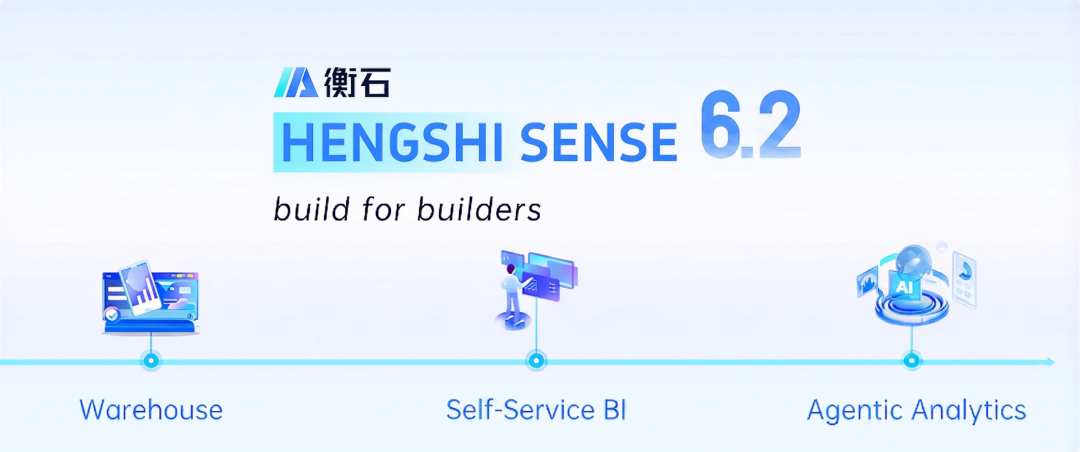
This release focuses on efficiency, intelligence, security, and flexibility. It connects the full data-analysis workflow, lowers the barrier to use, improves management efficiency, protects data security, and helps more business users analyze and decide efficiently.
1. AI Data Assistant
AI capability receives a milestone upgrade in version 6.2. The Data Agent evolves from a traditional question-answering assistant into a full-stack BI agent. In addition to powerful data-query and analysis capabilities, it now supports data modeling, visualization creation, system page operations, improved interaction experience, and broader scenario coverage, allowing AI to complete end-to-end data-analysis tasks autonomously.
Modeling Assistant
In the new version, the Data Agent breaks through the traditional barrier of data modeling and acts like a professional data engineer. It can drag datasets freely on the modeling canvas, configure LEFT, INNER, and RIGHT JOIN relationships, quickly create new datasets from data connections, and intelligently recommend optimal join types and dimension ownership based on business-analysis goals.
Authoring Assistant
As a visualization authoring expert, the Agent can assist throughout the process of building reports and dashboards. A single instruction can create a dashboard and generate matching charts. It can change chart types, colors, labels, axes, table fields, sort rules, formats, filter conditions, layouts, containers, and themes, automating the path from data exploration to visualization delivery.
Query Assistant
The classic intelligent query capability is comprehensively upgraded in version 6.2. The assistant can plan analysis workflows, understand requirements, explore data, execute queries, and deliver insights across multiple steps. It can learn from query errors, avoid repeating mistakes, remember users’ analysis habits and common dimensions, search related datasets intelligently, and understand table structures and field meanings more deeply.
Page Operation Assistant
The Data Agent now has system-level operation capability. It acts as a system navigator and configuration assistant, quickly navigating to data connections, dashboards, and other pages based on instructions, modifying chart titles and styles, and explaining while operating. It can demonstrate data-model creation and other feature workflows with full-context awareness.
Better Interaction, Efficiency, and Personalization
The release also improves interaction quality. The Agent calls page features directly to accelerate operations; streaming output presents results in real time; multilingual preferences are automatically adapted for global users; complex tasks are decomposed with progress tracking. The user center adds an “Agent Preferences” setting, allowing personalized Markdown instructions. The Agent can also learn user habits from conversations and become more aligned with each user over time.
Full-Module Context Awareness
HENGSHI SENSE 6.2 Data Agent now covers the full product context, including application authoring, data marketplace, dashboards, datasets, data connections, data pipelines, permission management, API management, and user management. It can be launched from any page, understand the current scenario, and provide targeted service as an all-purpose enterprise analytics partner.
2. Metric Management
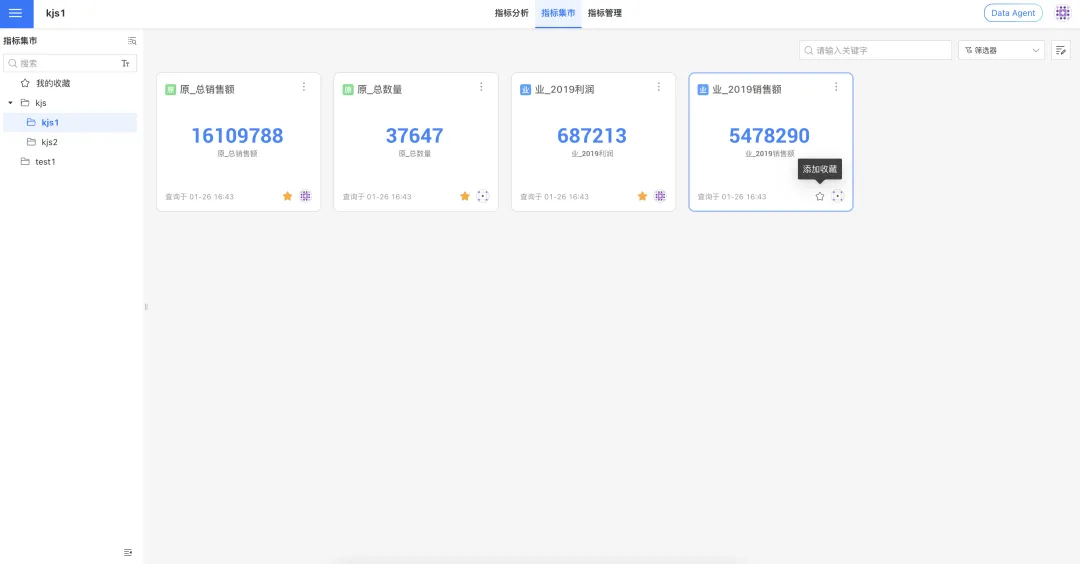
As enterprise metric assets keep growing, quickly finding and using core data becomes essential to analysis efficiency. HENGSHI SENSE 6.2 upgrades the metric marketplace with two key capabilities: metric favorites and global search. These features make metrics easier to retrieve, use, and reuse.
Metric Favorites
One-click favorites: frequently used metrics can be added to a personal “My Favorites” list, making them available within seconds when configuring metric dashboards.
Clear lineage: each favorite metric displays its theme path. Clicking the path takes the user directly to the relevant theme page for context.
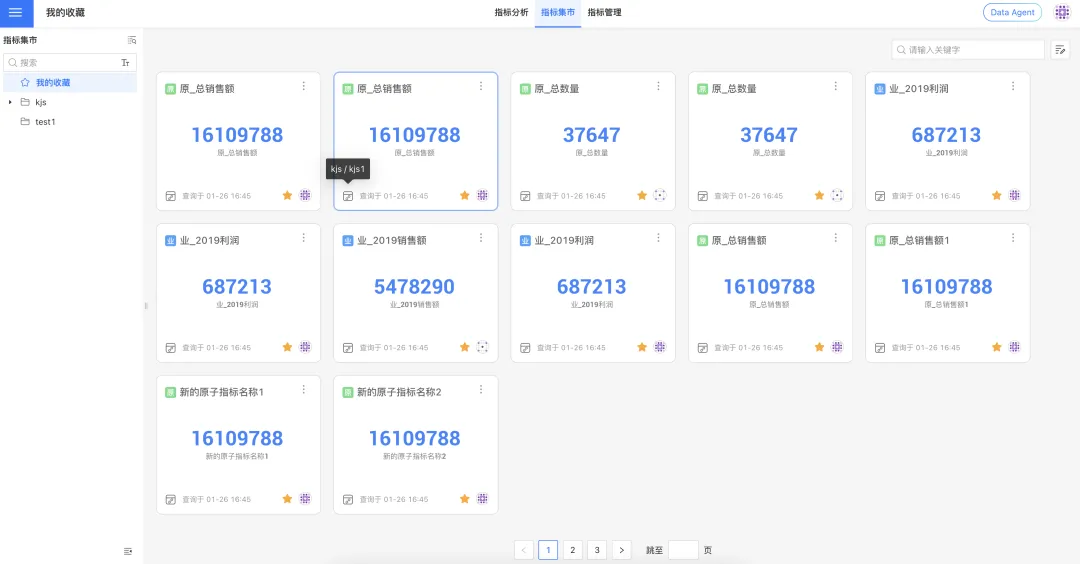
Capacity: each user can favorite up to 1,000 metrics, enough for daily high-frequency metric management and reuse.
Full-Scenario Metric Search
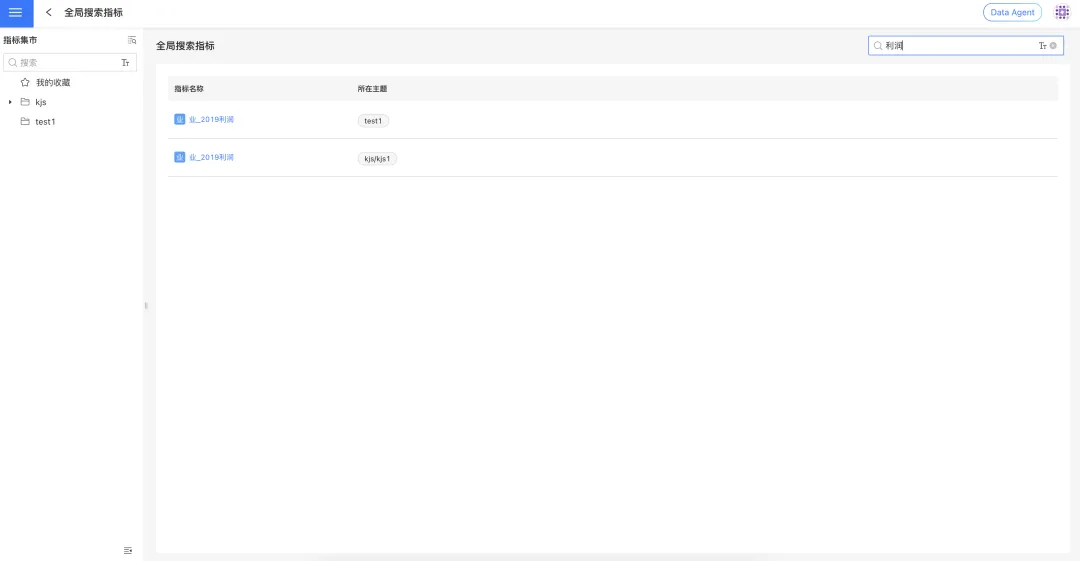
This upgrade introduces metric search across scenarios. Whether users are managing metrics, browsing the marketplace, or adding metrics to a dashboard, they get a consistent experience. Search results return up to 1,000 items, and precise keywords are recommended for higher efficiency and better matching.
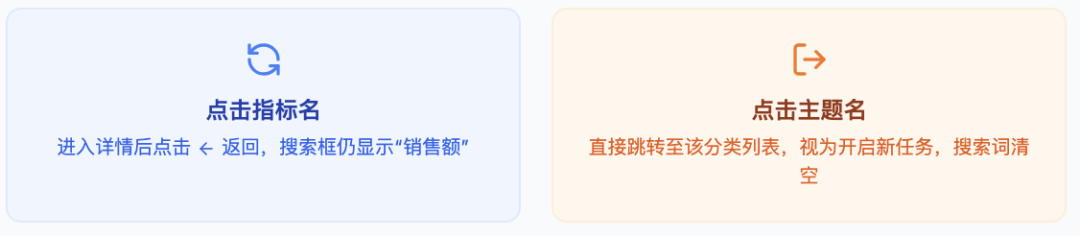
Result retention: when a user clicks a metric name in search results and enters its detail page, the system retains the current search keyword. After viewing the detail and clicking Back, the page returns directly to the search results.
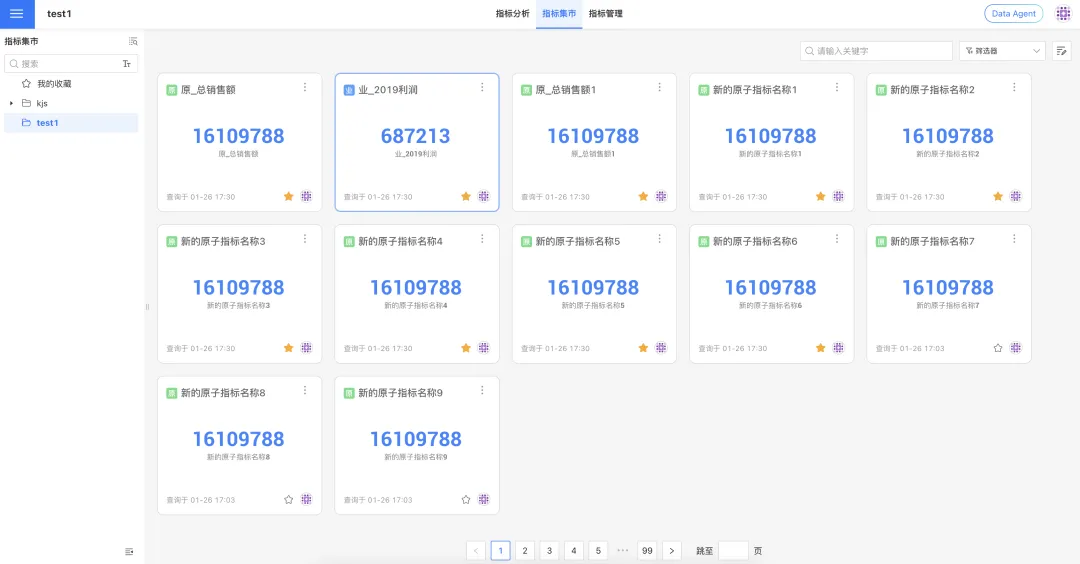
Scenario switching: when a user clicks the theme that a metric belongs to, the system treats the intent as switching from “find a specific metric” to “view all metrics under this category.” The page jumps to the theme list, and the original search keyword is not retained on return so that users can start a new exploration.
3. Application Management
HENGSHI SENSE 6.2 optimizes subscription and alert tasks in two areas: information reuse and data-export completeness. Report distribution and data delivery become more efficient and standardized.
Copy and Paste External Emails or User Accounts in Subscription and Alert Tasks
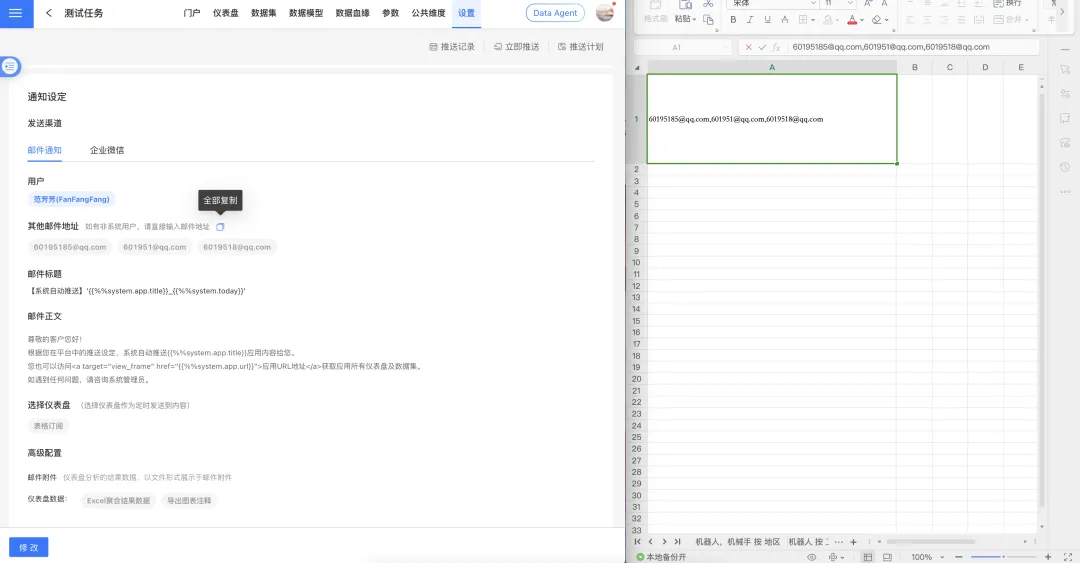
Business users often need to push reports or alerts to external recipients without system accounts. In the past, batch external emails or contact IDs had to be entered repeatedly when creating new tasks.
After this upgrade, users can copy existing account information from the View page of a subscription or alert task and paste it directly into a new task, reducing repeated entry and improving configuration efficiency.
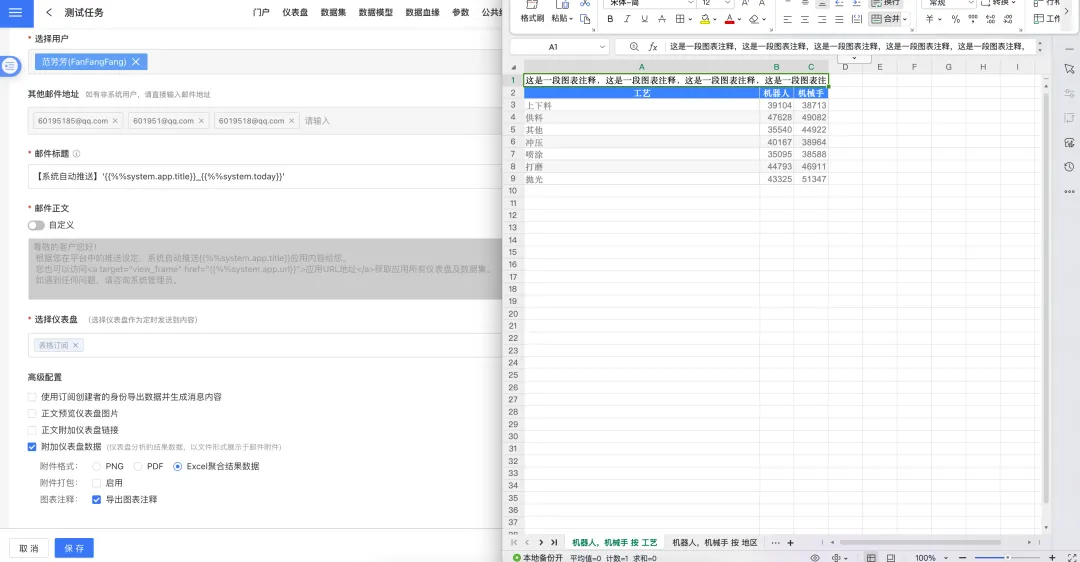
Export Chart Annotations When Exporting Dashboard Data
To keep data-delivery definitions complete and unambiguous, version 6.2 adds a chart-annotation export option to subscription and alert tasks. When users export Excel dashboard data, chart annotations can be exported at the same time, helping recipients understand metric definitions, business explanations, and notes while keeping the data traceable.
4. Dashboards
Version 6.2 optimizes the dashboard experience across chart styles, legends, parameters and filters, complex reports, portal interaction, container reuse, and export rules. Visualization becomes more flexible, configuration more efficient, and presentation more professional.
Charts: KPI Conditional Formatting Adds Rule-Based Configuration
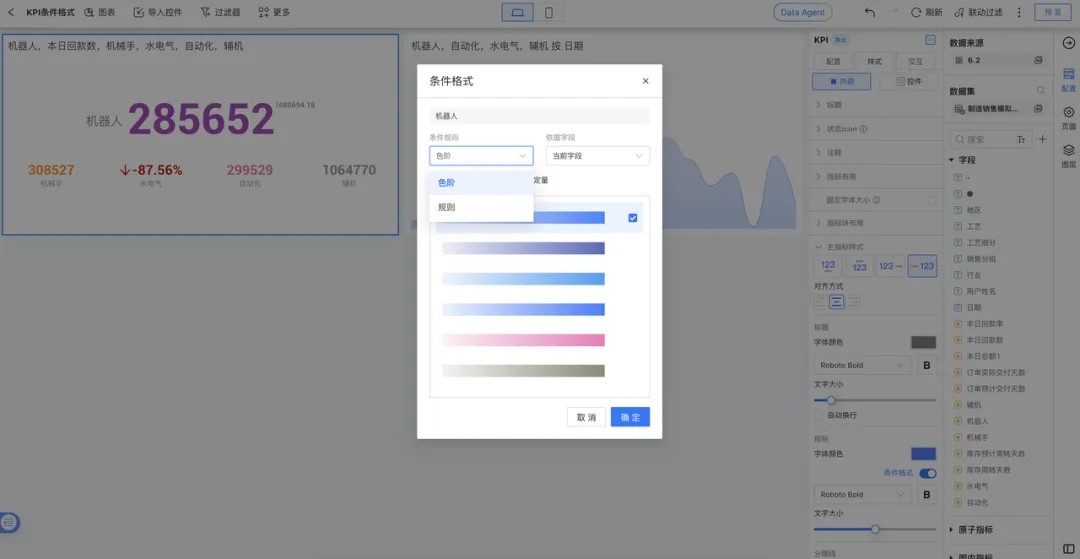
In previous versions, conditional formatting for KPI cards only supported color scales based on value gradients, and all secondary metrics had to share one formatting logic.
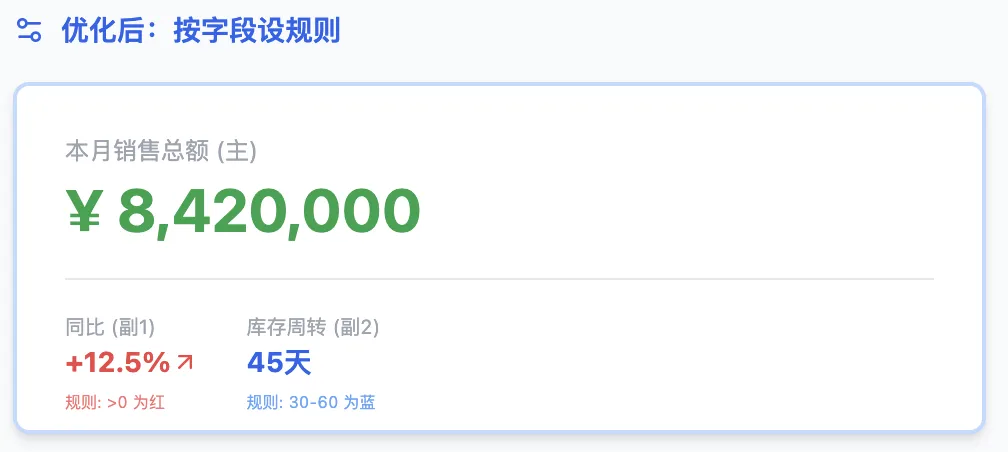
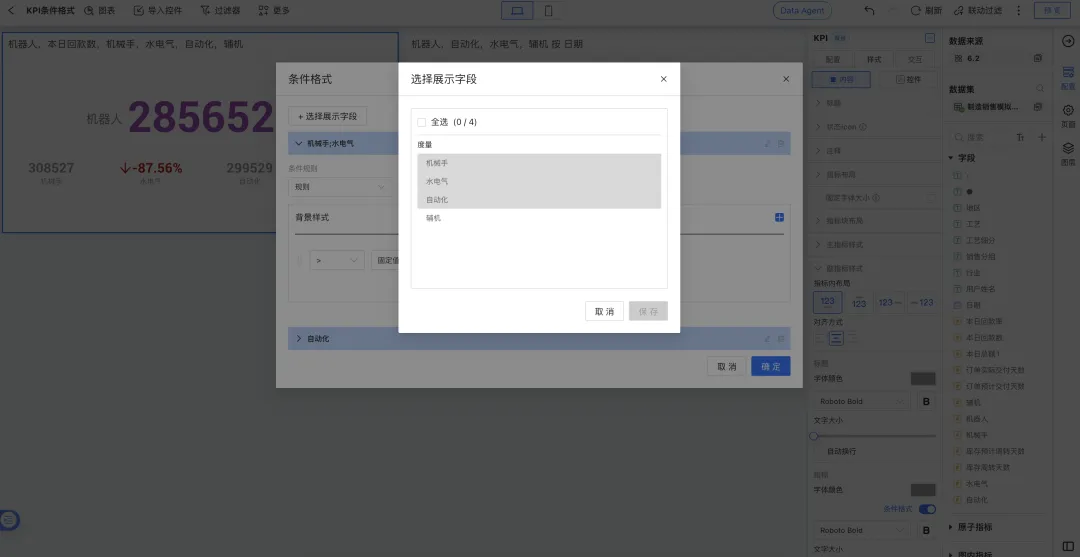
To make data warnings more intuitive and precise, we upgraded conditional formatting for KPI cards and KPI trend cards. This release introduces more flexible custom rules and independent configuration for secondary metrics and comparison measures. Previously configured conditional rules on historical charts are not affected after upgrade.
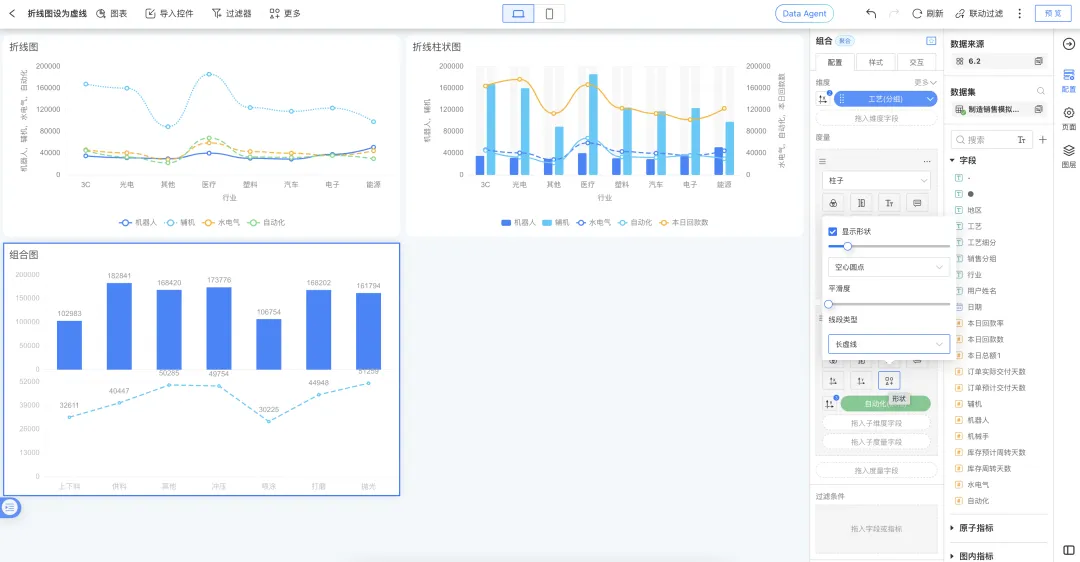
Charts: Line, Line-Column, and Combo Charts Support Dashed Lines
To improve visualization expression and help users distinguish different data attributes more intuitively, version 6.2 supports dashed-line styling for specified lines in line charts, line-column charts, and combo charts.
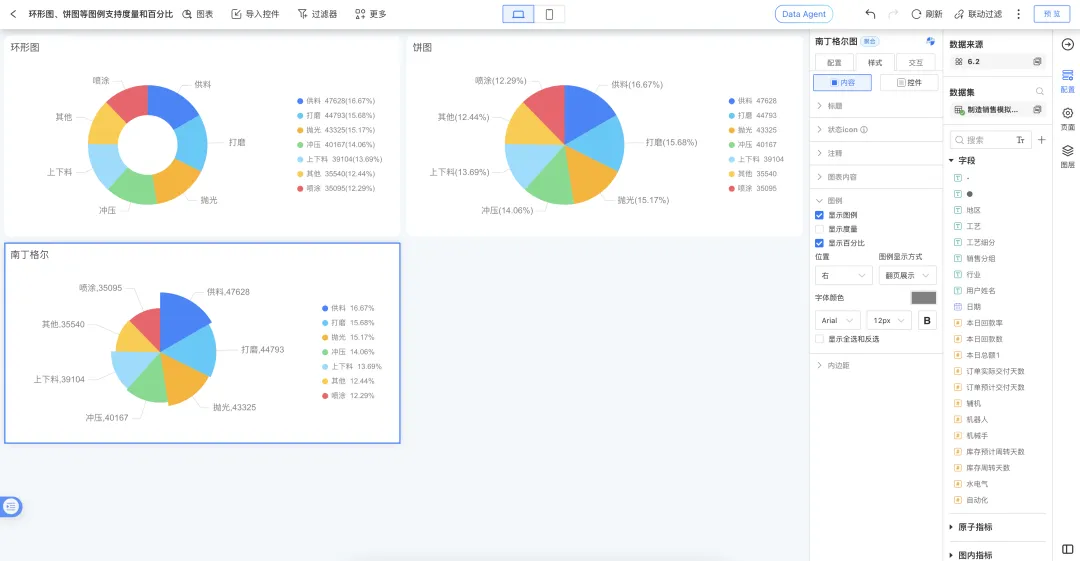
Charts: Pie and Donut Legends Can Show Measures and Percentages
Legends for pie charts, donut charts, and rose charts are enhanced. Previously, legends showed only category names. After the upgrade, users can combine name, measure value, and percentage display options, allowing them to view values and proportions directly in the legend area.
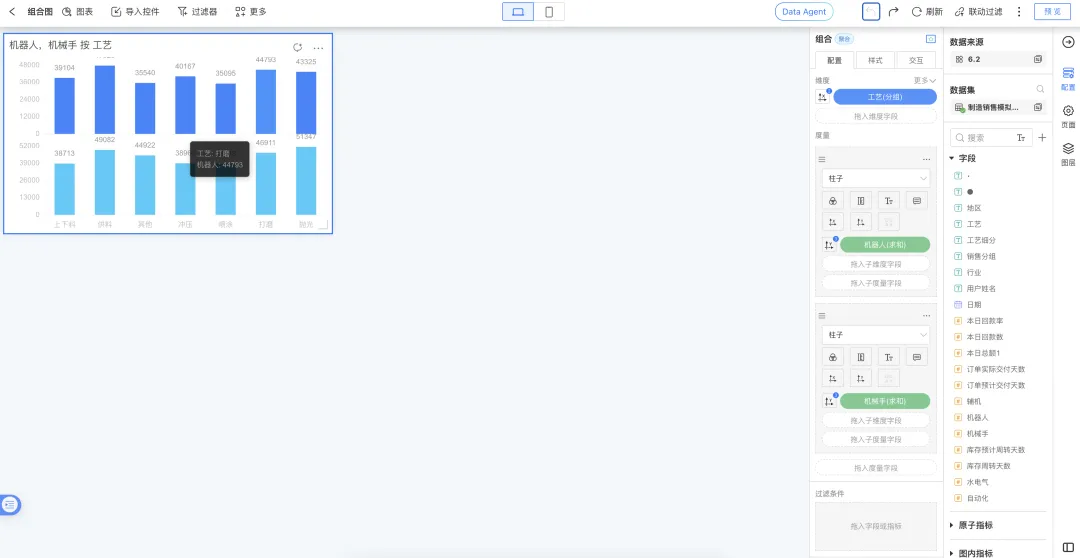
Charts: Combo Chart Tooltips Show Field Names by Default
To improve chart readability and reduce configuration effort, combo chart tooltips now show dimension field names by default. This creates a more transparent, what-you-see-is-what-you-get experience.
Automatic linkage: when a field’s display name is changed in dataset or component configuration, the tooltip name updates automatically.
Historical controls: existing charts keep their original display logic if not edited.
Partial updates: if new fields are added to an old chart, the new fields follow the new display logic while existing fields remain unchanged.
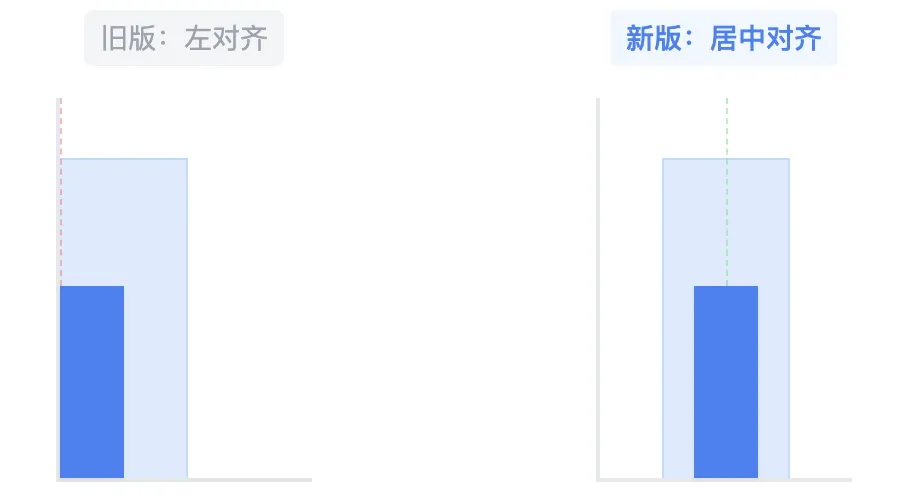
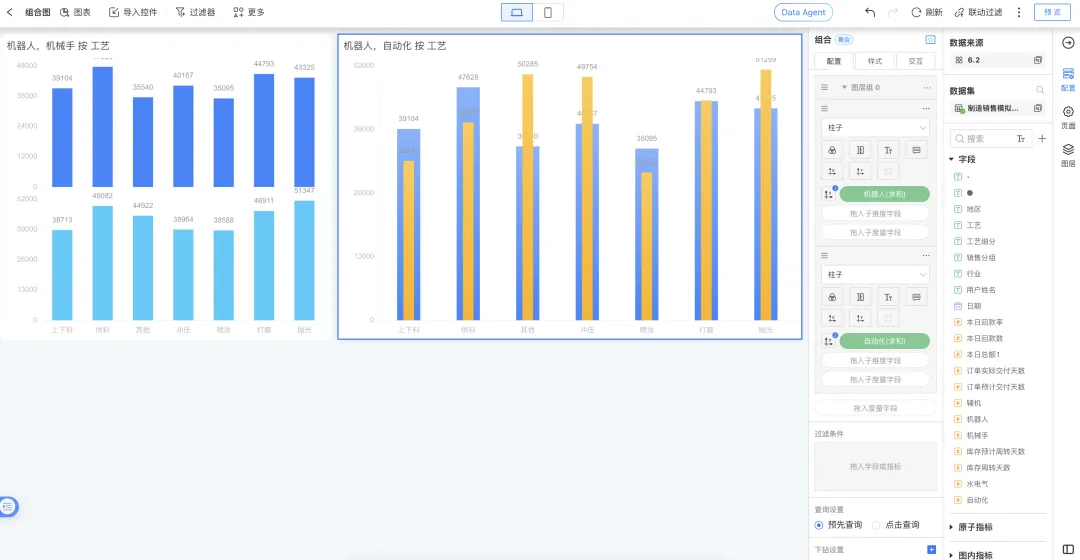
Charts: Centered Display for Overlapped Multi-Measure Combo Charts
When multiple measures are set as bars in a combo chart and merge mode is set to overlap, the system now visually aligns overlapping bars. This release changes the original left-aligned display to a more polished centered layout.
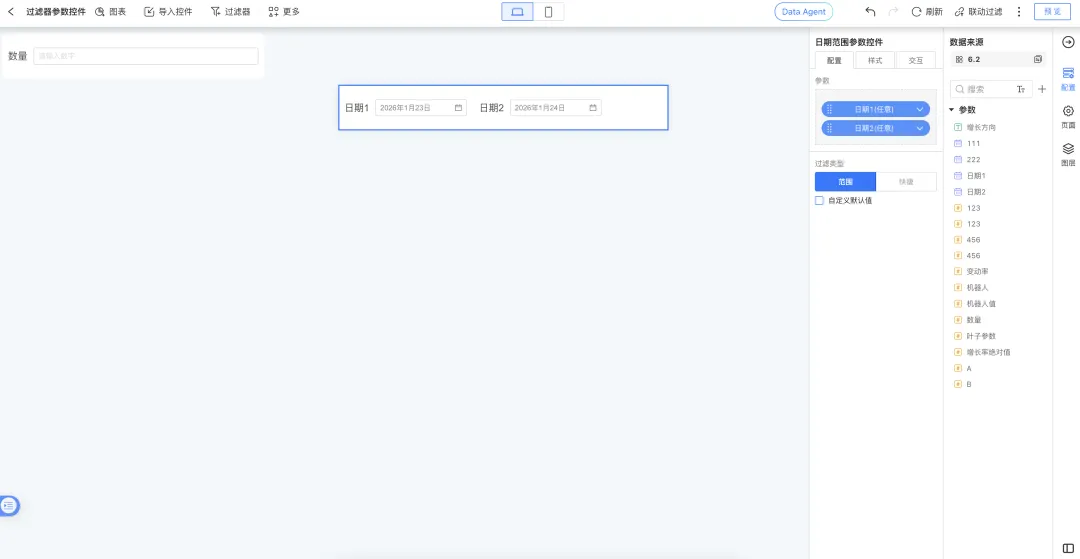
Parameters: Date Range Parameter Controls Support Custom Defaults
Date range parameter controls now support custom default values. Each control can have its own default value independent of the global parameter default, enabling more flexible filtering scenarios.
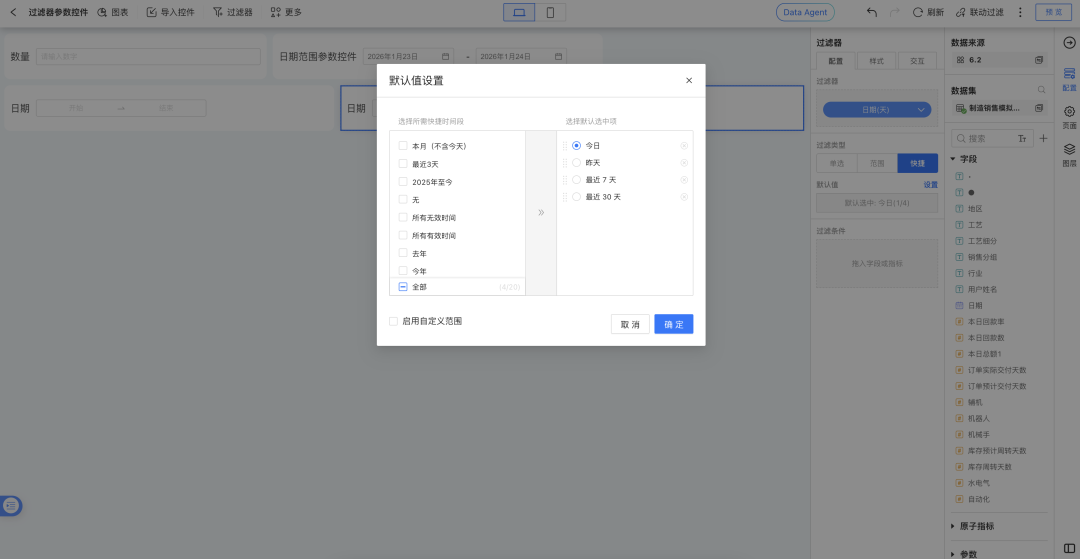
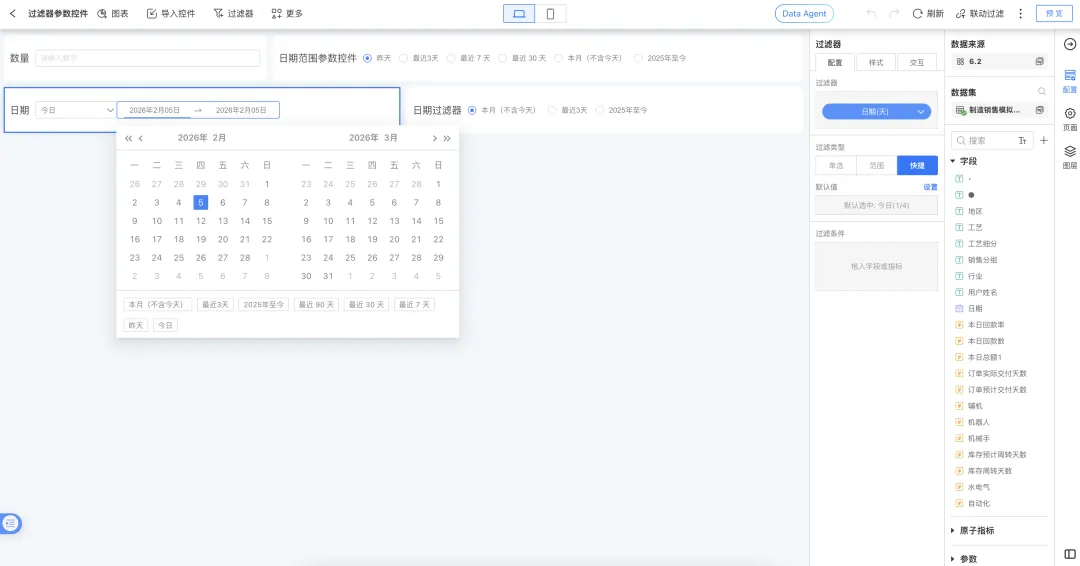
Filters: Quick Time Periods Can Be Customized
Version 6.2 adds application-level custom date shortcut options. These shortcuts can be applied to date range filters, quick date filters, and date range parameter controls, covering multiple filtering scenarios and supporting personalized business statistics.
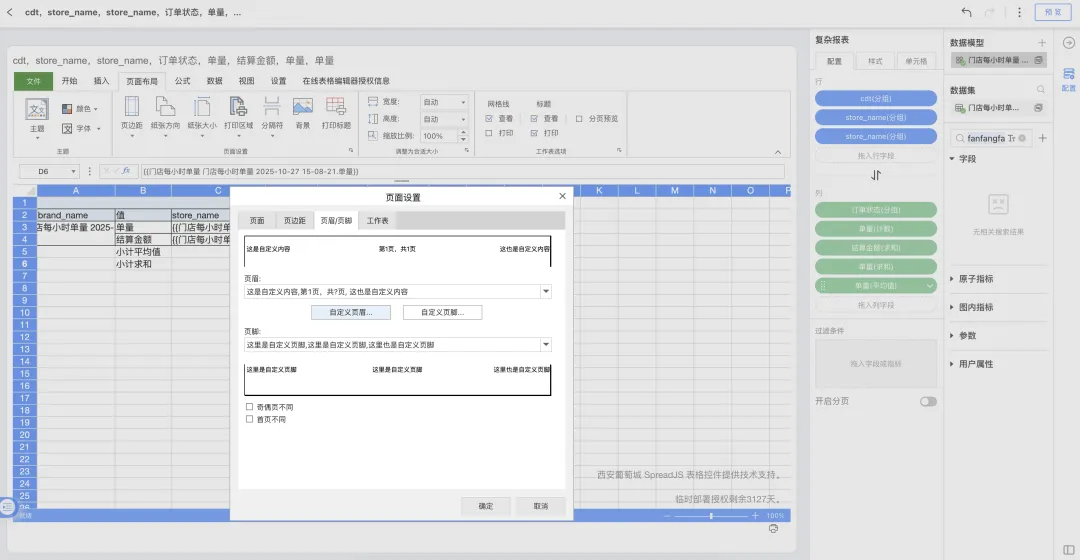
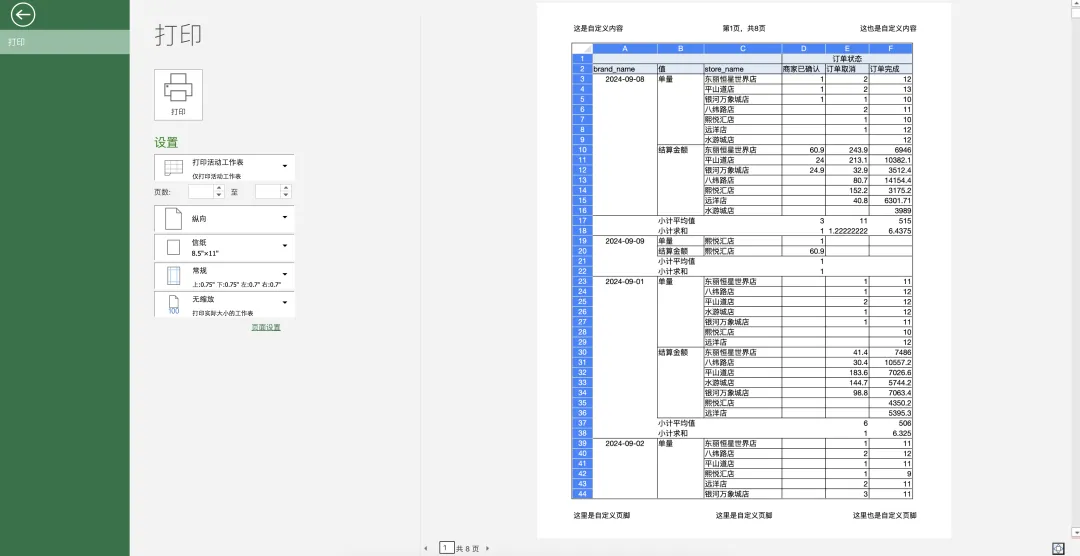
Complex Reports: Custom Headers and Footers
Complex reports now support custom headers and footers. Users can define top and bottom page information and automatically insert titles, page numbers, print time, and other content on each report page. The content is preserved when printing.
Portals: Location Path and Common Application Actions
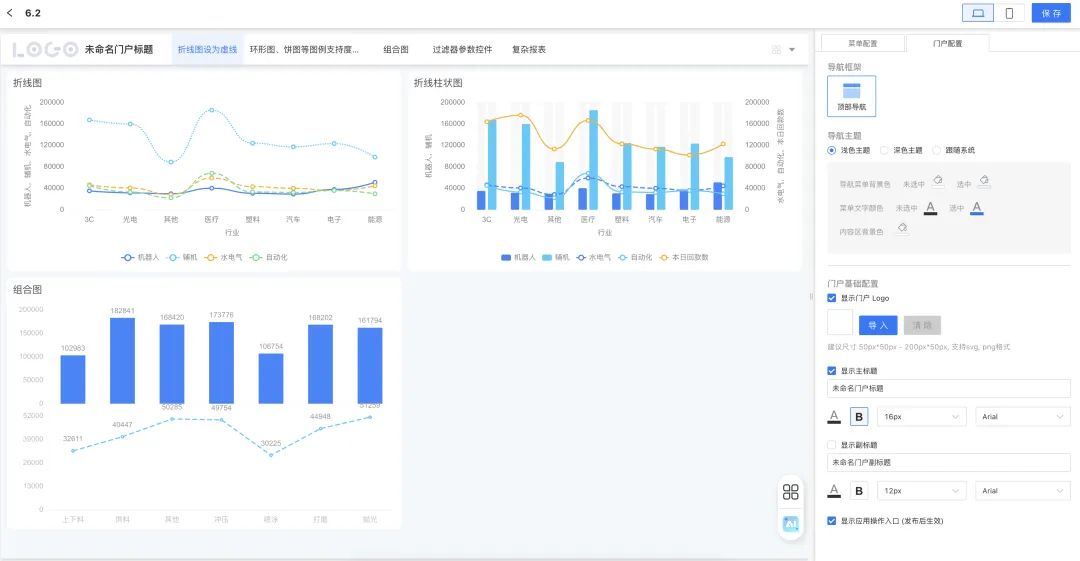
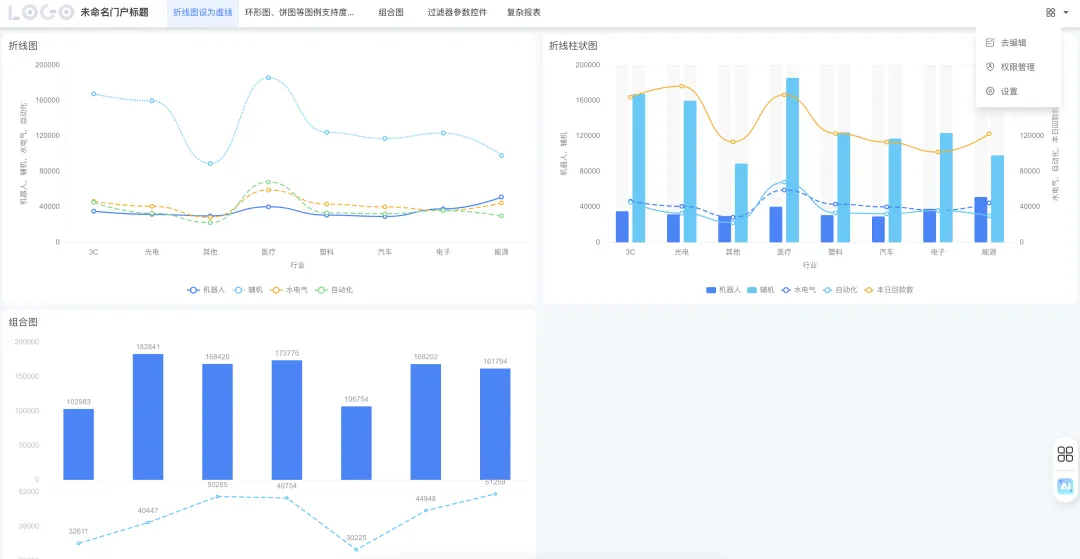
In previous versions, a published portal application opened in a new browser tab without a clear return mechanism, forcing users to close tabs or switch windows manually. Some common application-level actions were also hard to reach in portal mode.
With the version 6.2 optimization, the portal application’s top bar clearly shows the application’s location path, helping users understand where the application belongs and navigate back more easily. Common application actions are now available directly, shortening the operation path.
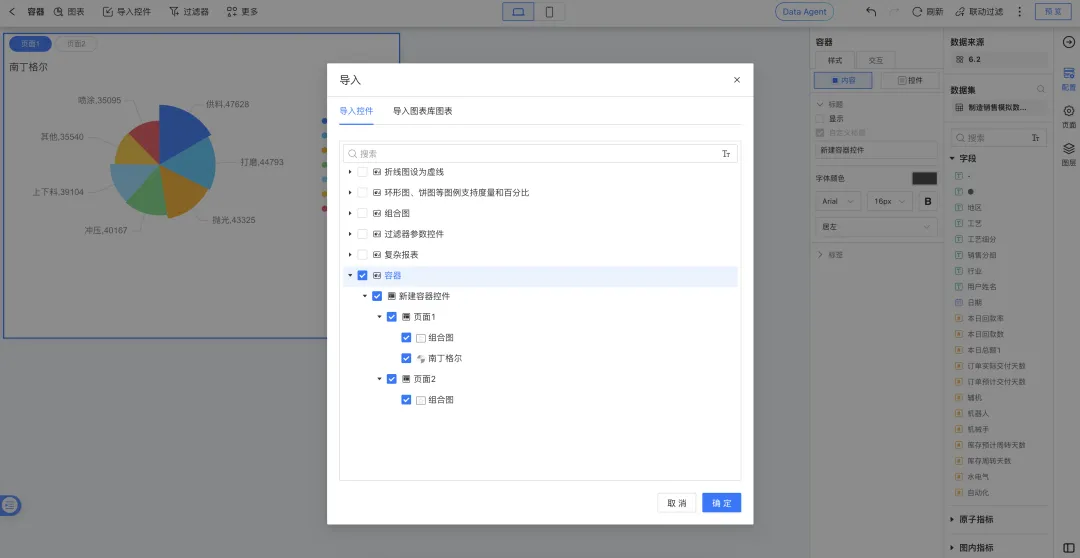
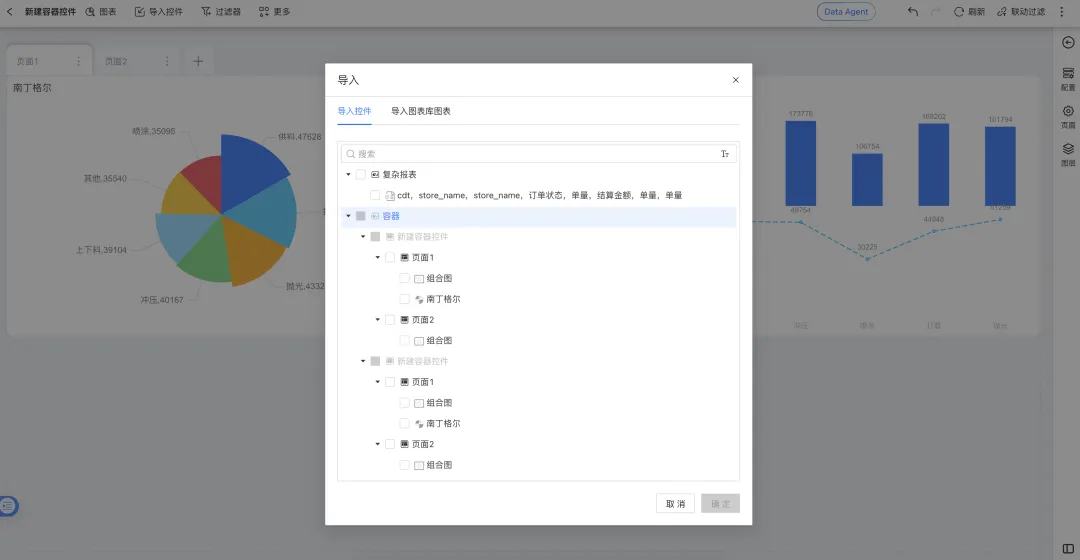
Dashboard Configuration: Import an Entire Container Into a Dashboard
To improve dashboard-building efficiency and reduce repeated layout work, users can now import an entire container into a dashboard with one click. This enables fast migration and reuse of business modules.
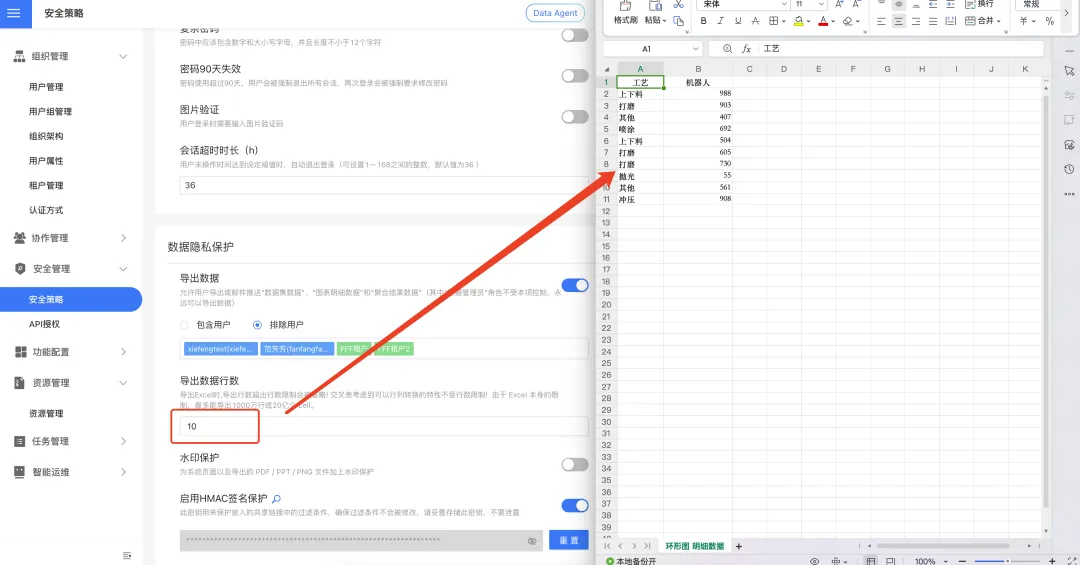
Export: Optimized Row-Limit Rules for Chart Detail Data
Detailed data export was previously fixed at a 100,000-row limit. The new version follows the export row-limit rule in the system security policy and supports up to 10 million rows, meeting larger-scale export needs.
5. Data Sources
HENGSHI SENSE 6.2 focuses on data marketplace management in the data source module. Three new practical features improve resource access efficiency, asset security, and data reuse, helping enterprises manage core data assets more effectively.
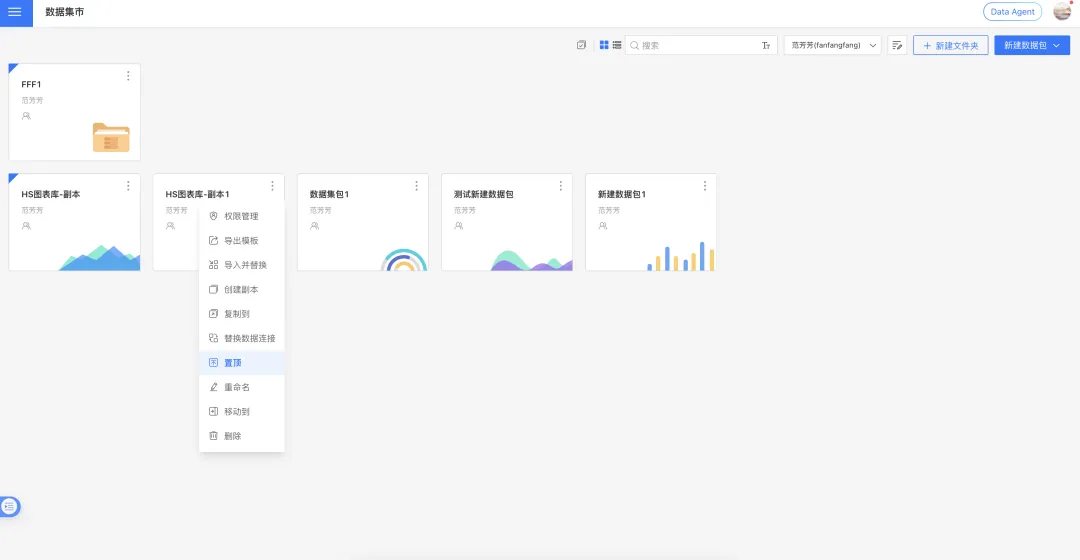
Pin Data Marketplace Folders and Data Packages
To help users access core data resources faster, version 6.2 adds a Pin feature to the data marketplace. Frequently used data packages or important folders can be fixed at the top of the list for better asset organization.
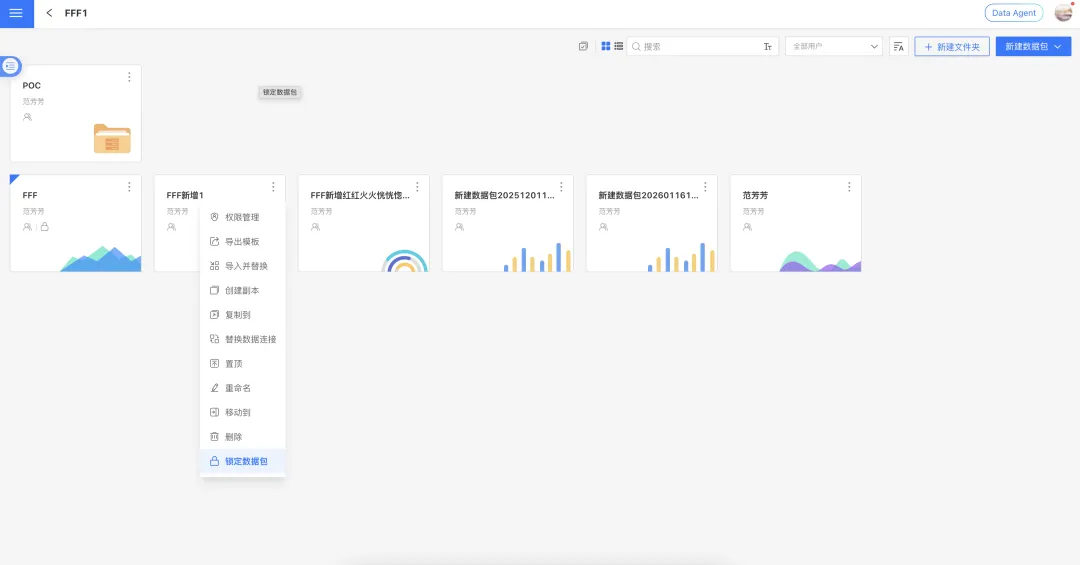
Lock Data Marketplace Packages
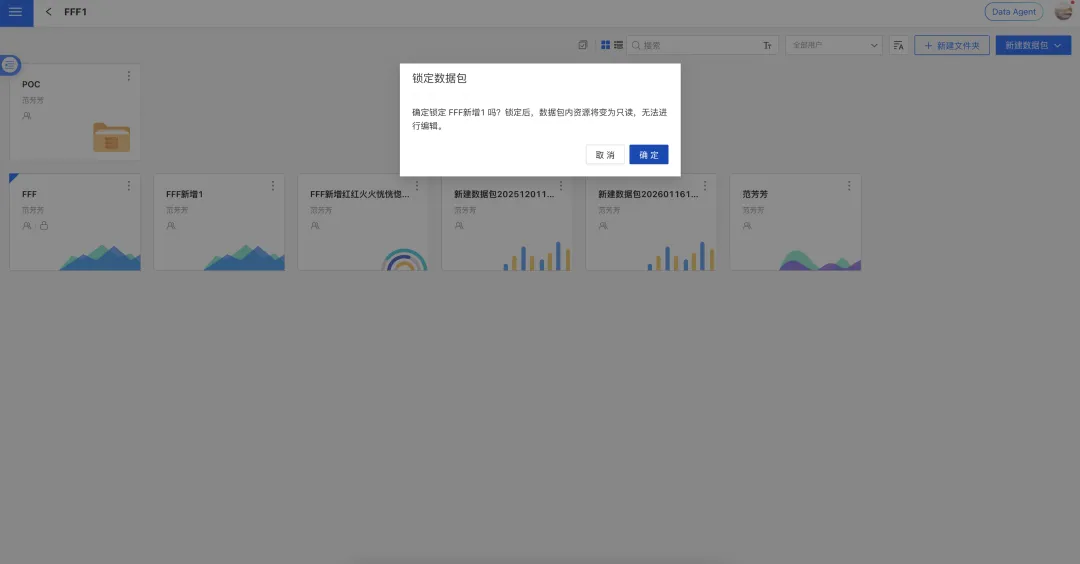
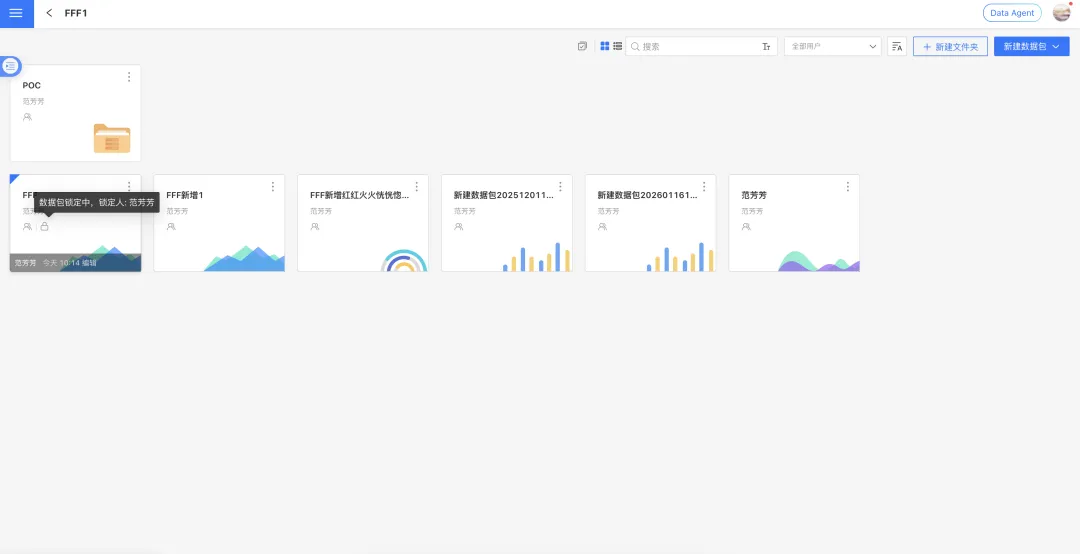
To protect core data assets and prevent accidental operations during key business periods, version 6.2 adds data-package locking. Data package managers can lock packages they manage. Once locked, the package enters a protected state, and all internal resources such as datasets and data models become read-only. No user, including other managers, can edit or delete them.
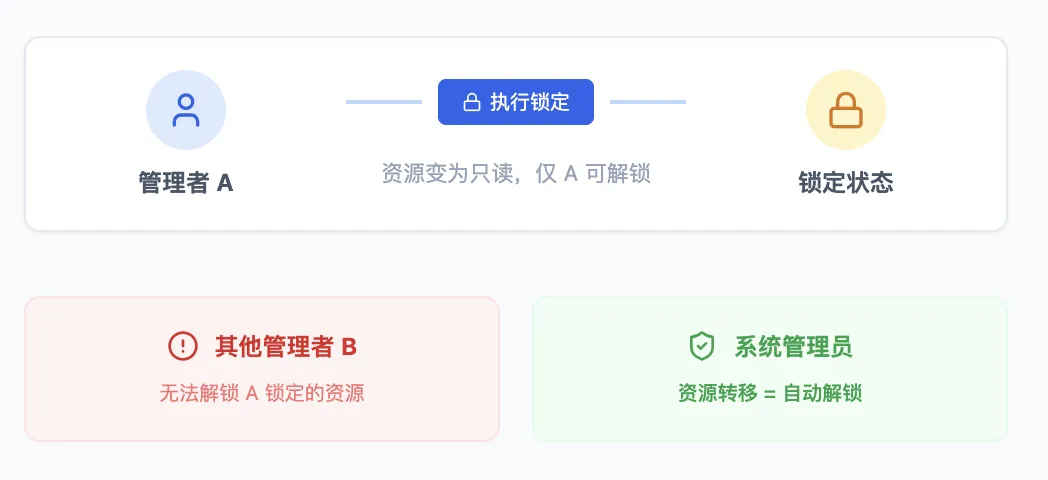
Data packages follow the principle that the person who locks the package is responsible for unlocking it:
- If the original locker is no longer a manager of the package, or the account is disabled or deleted, the package can only be unlocked by a system administrator through resource transfer. Once transferred, the original lock is removed automatically.
- After locking, the package manager can still configure data permissions for the package.
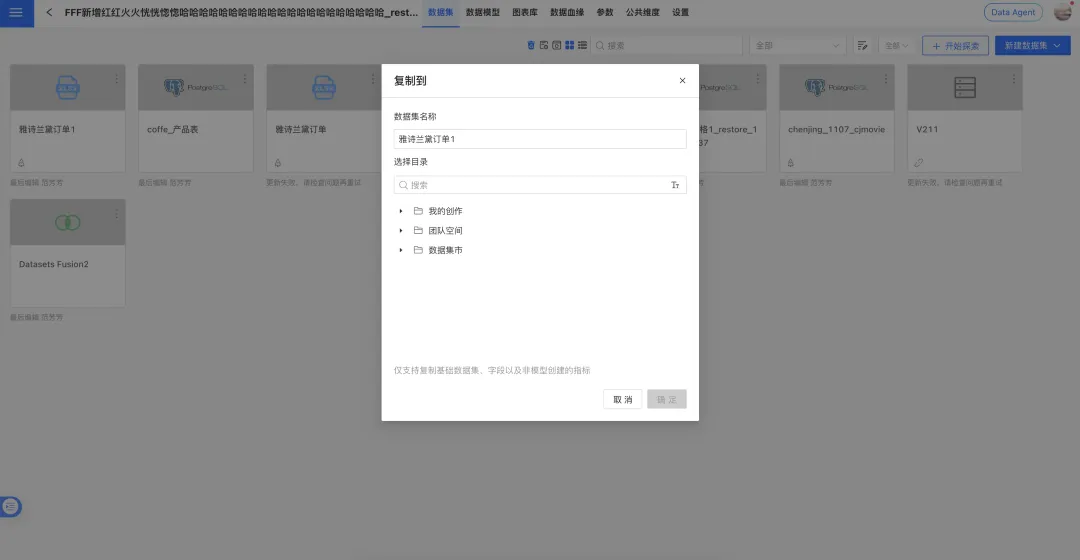
Copy Atomic Metrics When Copying Datasets Across Applications
In previous versions, copying a dataset from a data package to an application or another data package only synchronized table structures and field information. Metrics configured inside the dataset had to be recreated manually. After the upgrade, the system can identify and synchronize non-model-created atomic metrics while copying the dataset.
6. System Administration
HENGSHI SENSE 6.2 comprehensively optimizes system settings around personalization, resource-retrieval efficiency, and watermark security. The release balances enterprise personalization with system-governance standards while improving management efficiency and user experience.
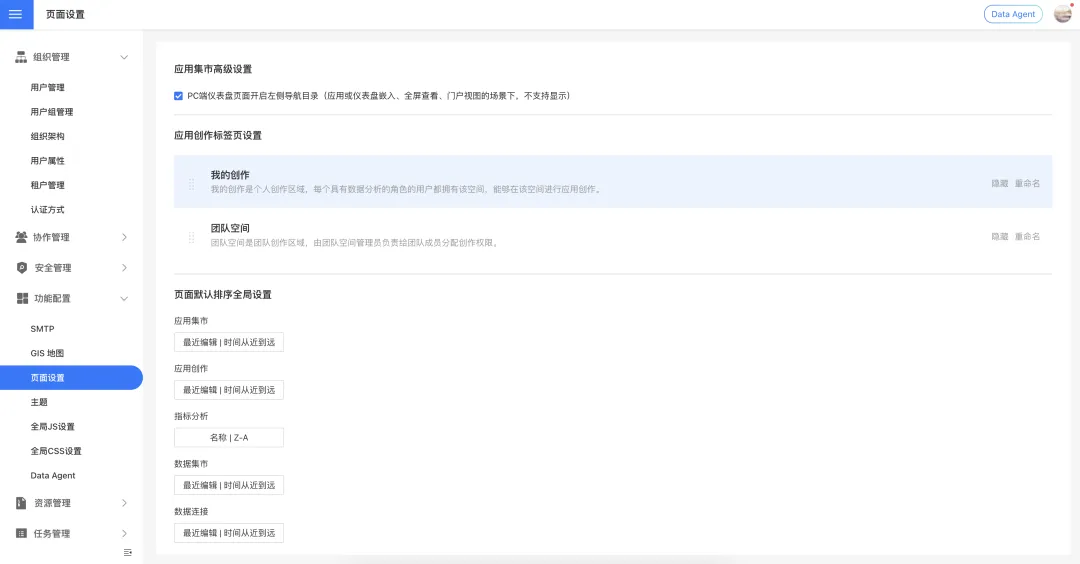
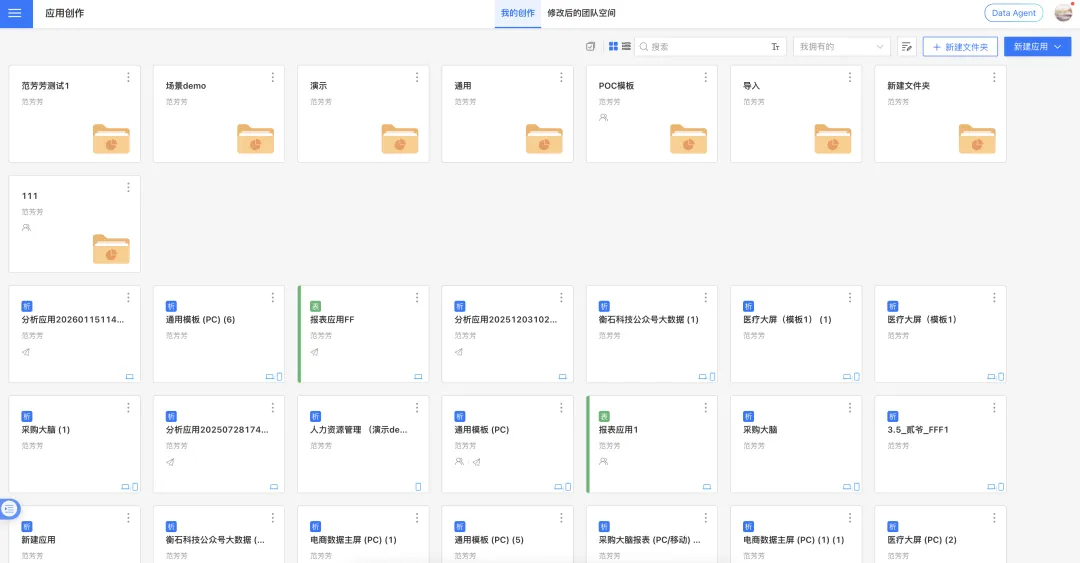
Application Authoring: Hide or Rename My Creations and Team Space
To meet different enterprise personalization needs, the Application Authoring module now supports custom configuration of the “My Creations” and “Team Space” tabs. System administrators can flexibly adjust page visibility and display names based on business scenarios.
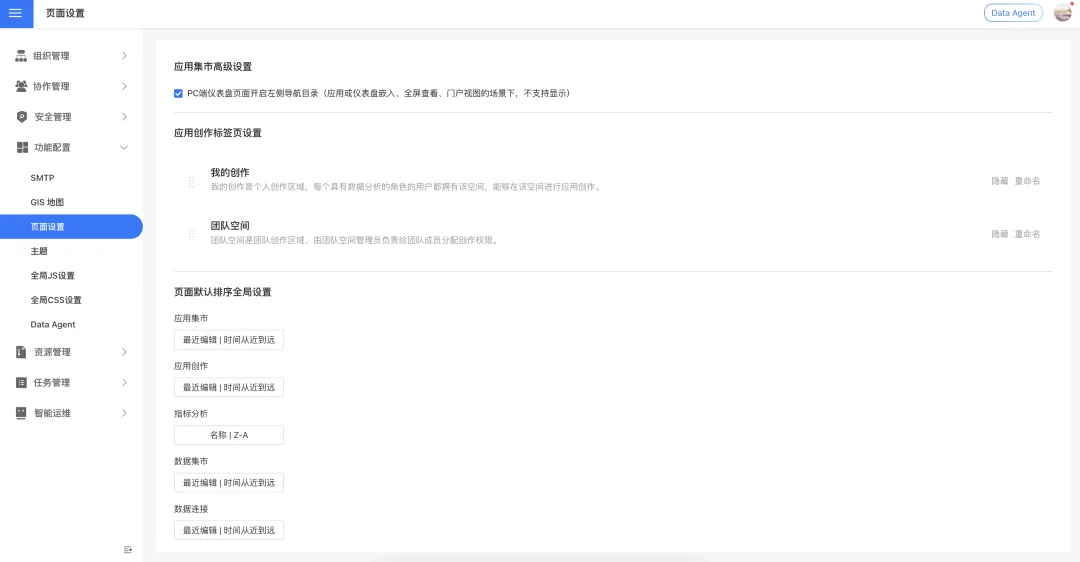
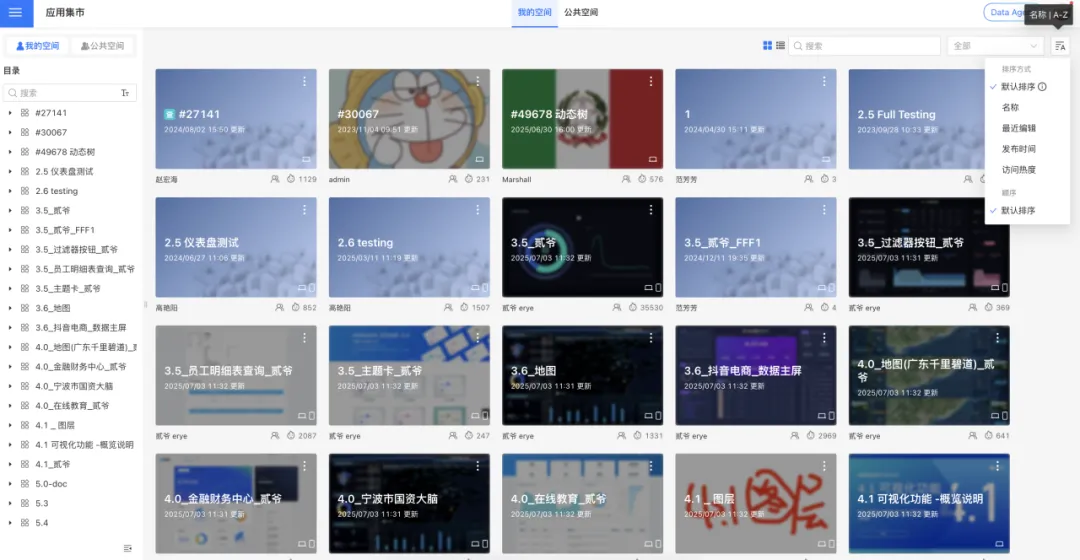
Global Default Sorting for Applications, Data Packages, Metrics, and More
To improve resource-retrieval efficiency across business scenarios and keep interaction consistent, the new version adds global default sorting settings. System administrators can use a unified entry point to define list display rules for multiple core modules.
Watermark Setting Optimization
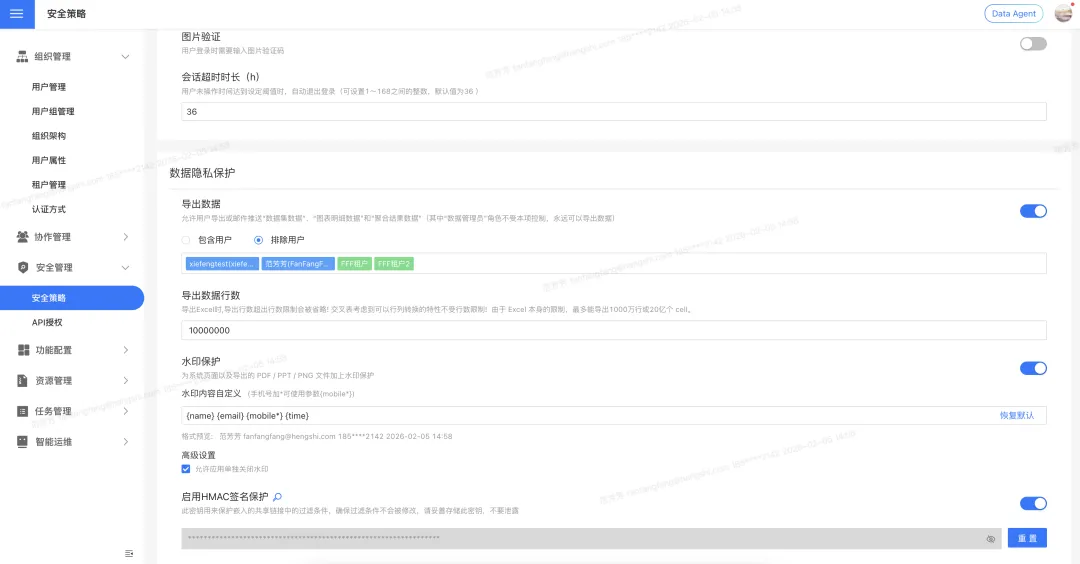
This release optimizes watermark settings in two ways, balancing global governance, personalized needs, and compliance adaptability.
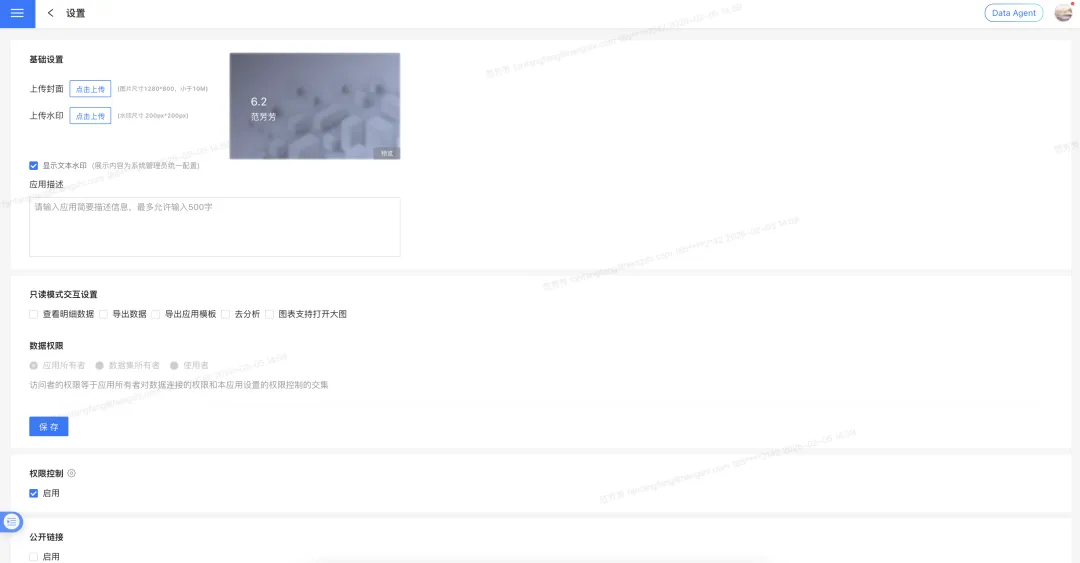
Optimization 1: global watermarks can be disabled for individual applications. The system follows a “global first, flexible delegation” principle. After watermark protection is enabled in system settings, watermarks apply to all applications and pages by default. Administrators can then enable “allow applications to turn off watermarks individually” in advanced settings. Once enabled, application administrators can decide whether to hide the watermark in a specific application based on business needs.
Optimization 2: watermark content can be customized. The system supports highly customizable watermark content for different compliance requirements. The default content is user name, email, mobile number, and current system time. System administrators can enter fixed text and combine it with those parameters, and can restore the default content with one click.
Conclusion
Intelligence advances through thousands of layers; data opens roads across great distances.
HENGSHI SENSE 6.2 arrives with a full-stack Data Agent that reconstructs the data-analysis workflow and deeply implements the Agentic BI architecture. It brings major capability improvements across AI modeling, visualization authoring, metric marketplace, dashboard experience, and system security, helping enterprises build a smarter, more efficient, and more reliable end-to-end data decision hub.
With our eyes on the next journey, we keep climbing with our ecosystem.
HENGSHI SENSE 7.0 will continue advancing along the Agentic BI direction, expanding platform openness, connecting with more vertical-domain AI Agent ecosystem partners, and making further breakthroughs in automated modeling, semantic engines, intelligent collaboration, and scenario applications.
Recommended Reading
- HENGSHI SENSE 6.1 Launches, From ChatBI to Agentic Analytics
- HENGSHI SENSE 6.0 Launches, Opening BI and Data Analytics Capabilities to All AI Agents
- HENGSHI SENSE 5.4 Launches, Further Improving ChatBI Maturity
- HENGSHI SENSE 5.3 Launches, a Next-Generation Enterprise BI PaaS With AI and Metrics
About Hengshi
Hengshi is defining a new generation of Agentic BI for the Data + AI era. HENGSHI SENSE, its enterprise data-intelligence engine, helps customer partners build vertical-domain AI analytics-agent applications with no code.
Founded in 2016, Hengshi focuses on empowering enterprise application SaaS partners with data analytics platforms. Hengshi serves major enterprise customers including WPP, BMW, GAC Honda, Publicis Groupe, BlueFocus, Sinopharm Group, AWS, Taitai Le, and Genki Forest. It also works deeply with more than 200 enterprise application SaaS partners, including Phoenix Contact, Synagie in Singapore, Travelsky, Sangfor, Kingdee Cloud, Inspur Cloud, Seeyon, Ti-Net, Baozun E-Commerce, Facishare, EC, Mingdao Cloud, and Beisen Cool College, helping partners bring built-in business intelligence online.