
Article body
Full article
A new generation of Agentic BI from HENGSHI Technology.
In the past, when AI helped with BI, it often stopped at telling you where to click.
It would say: go to the backend, select the application, find the dataset, configure the metrics, and save the dashboard. The steps were correct, but humans still had to do the work. Data analysts, delivery engineers, and operations teams spend large amounts of time on these small tasks every day: creating data connections, checking metrics, copying dashboards, tuning permissions, and synchronizing configurations across environments.
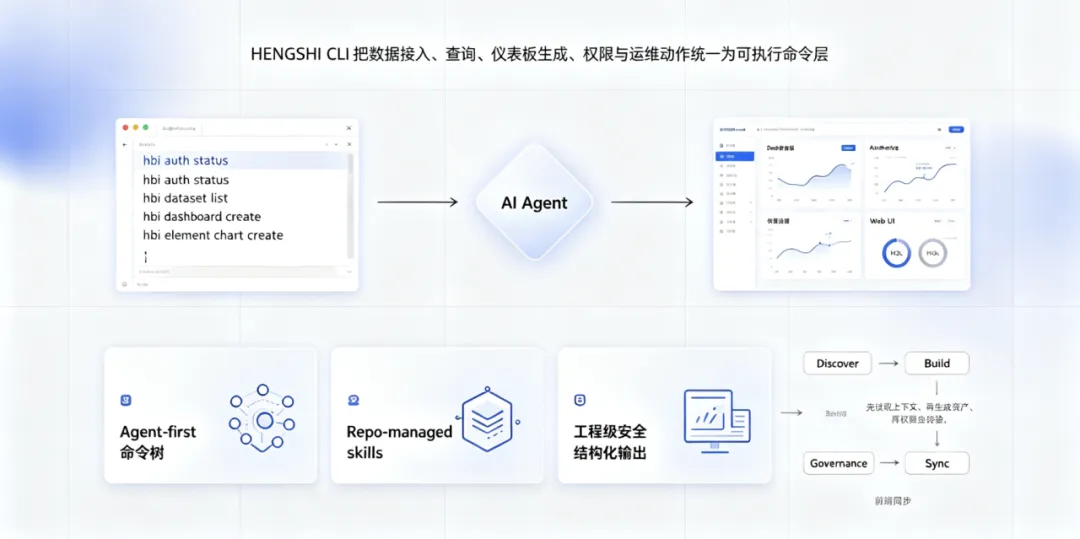
HENGSHI CLI is not trying to replace the interface with the command line. It gives AI Agents a stable execution layer.
In this execution layer, the Agent understands requirements, decomposes steps, and reads knowledge and context. HENGSHI CLI calls the real capabilities of the HENGSHI BI platform and executes operations on applications, datasets, dashboards, charts, permissions, schedules, pipelines, and more. Humans no longer have to stare at a console step by step. They review the Agent’s plan, confirm key changes, and check the execution result.
What Is HENGSHI CLI
The external command name of HENGSHI CLI is hbi. It is the command-line execution surface of the HENGSHI BI platform for both humans and AI Agents.
It does not cover only a few demo commands. It covers the main BI engineering chain: application management, data connections, datasets, data-model queries, metric calculation, dashboard creation, widget configuration, permission management, users and organizations, scheduled tasks, data integration, notebooks, and data alerts.
More importantly, the CLI itself does not guess what the user wants.
It keeps a clear boundary:
The Agent understands natural language, selects workflows, decides charts and layouts, and determines whether to query data first or build a model first.
The CLI executes explicit actions, calls backend APIs, validates parameters, and returns structured results.

This separation makes HENGSHI CLI better suited to production. Agents do not need to simulate humans clicking through web pages or infer state from page text. They can read official skills, call platform capabilities according to stable rules, and return JSON, YAML, or tabular results to humans or pipelines for further processing.
Scenario 1: Analysts Query Data Without Starting from Drag-and-Drop
A business user asks: “What was sales revenue in South China last month? Also show the trend.”
Previously, the analyst had to open the platform, find the application, confirm the dataset, configure metrics and filters, then drag out a chart. If field names, metric definitions, or application spaces were unfamiliar, they had to confirm back and forth.
With HENGSHI CLI, the Agent’s workflow becomes:
- First confirm which data assets exist under the current business application, identifying the sales dataset, time field, region field, and revenue metric.
- Then use data-model query capabilities to calculate South China sales for the specified month.
- If the user needs a trend, continue querying by time granularity and generate a chart or write the result into a dashboard draft.
- Finally, return the query definition, filter conditions, result, and chart suggestion for human confirmation.
Readers do not need to understand command parameters. The important point is: AI no longer only gives an operating tutorial. It can actually read platform context, run queries, and return reviewable results.
Scenario 2: New Customer Delivery Becomes a Reusable Plan
SaaS delivery teams often face a similar type of work: when a new customer goes live, they need to prepare standard applications, connect data sources, deploy dashboards, configure permissions, and validate results.
Doing this manually is error-prone. During migration between test, staging, and production environments, it is especially easy to miss data-source mappings, role grants, schedule configurations, or dashboard filters.
HENGSHI CLI is suitable for turning this work into a plan file.
An Agent can first read customer-environment information and standard templates, then generate a deployment plan. The plan describes which dashboards to create, which datasets to bind, which themes to apply, and which users or groups should receive permissions. Before execution, the CLI runs a dry-run and lists the resources that will be added, modified, or authorized. After delivery staff confirm, the Agent executes the plan.
The value is not only time savings. More importantly, every delivery has a plan, preview, and result record. If a problem appears, the team can review exactly what changed instead of relying on someone remembering which buttons were clicked.
Scenario 3: BI Operations Enter CI/CD
Some BI system problems are hard to notice, such as metric-definition drift.
After a version release, the date logic of a calculated field may change, a dataset may switch connections, or a dashboard filter may be overwritten. By the time business users see abnormal reports, the problem has already reached production.
After HENGSHI CLI enters CI/CD, release workflows can include BI checks:
- After release, the pipeline automatically validates whether core metric definitions match standards.
- It compares dashboard configuration differences between test and production.
- It checks whether key datasets, permissions, and scheduled tasks still exist.
- It outputs machine-readable reports and blocks releases or notifies owners when checks fail.
This means BI is no longer only configuration inside a product interface. It can enter engineering governance like code: checkable, comparable, rollbackable, and auditable.
Why Agents Need CLI Instead of Continuing to Operate Web Pages
Web pages are good for human exploration. CLI is good for Agent execution.
When Agents operate web pages, they face many unstable factors: button text changes, loading timing, hidden permission entries, pop-ups, and list pagination. They can do it, but the cost is high and the result is hard to audit.
CLI gives Agents another interface:
- Every action has a clear goal, such as querying a dataset, creating a chart, applying a dashboard plan, or granting permissions.
- Every call can return structured results, so the Agent does not need to infer state from screenshots.
- Write operations can be previewed so humans see the change plan before confirming.
- Automation scripts can specify the target instance and avoid human errors such as operating in the wrong currently opened environment.
- Official skills tell Agents what to read first in different business domains, how to execute, and which actions require confirmation.
A key principle of HENGSHI CLI is that CLI is the execution layer, not the decision layer. This boundary matters. It prevents CLI from becoming another black-box intelligent agent and prevents Agents from bypassing platform rules to modify underlying data directly.
Three Production Concerns
The first is security.
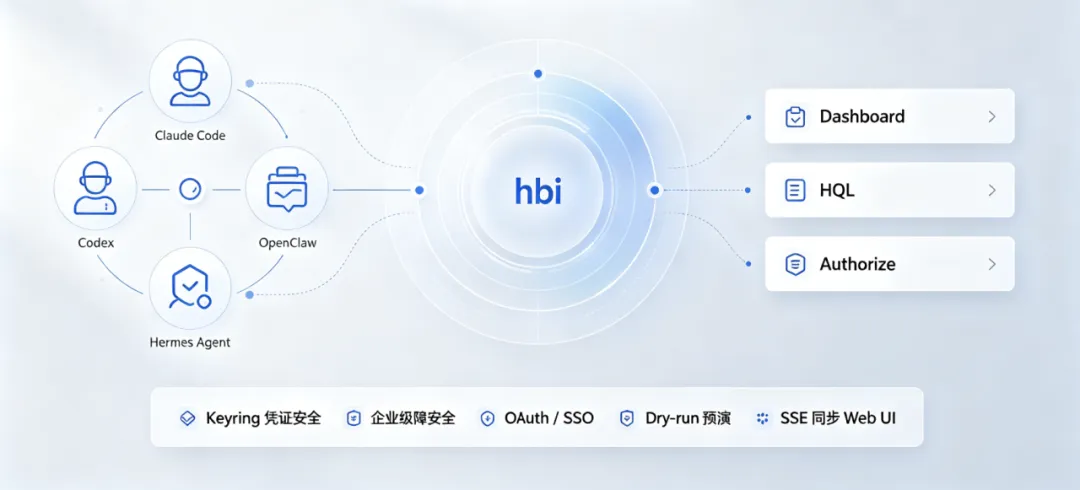
CLI supports device login, Client ID / Secret, OAuth / SSO, and environment-variable tokens, adapting to interactive use, local development, remote servers, and automation pipelines. External materials emphasize that credentials should not be written into deployment plans, script bodies, or dashboard configurations. Local credentials should also be isolated by configuration and saved with limited permissions. This lets Agents execute tasks without scattering secrets into chats or files.
The second is auditability.
Write operations support dry-run. Before changing permissions, authentication configuration, or dashboards, the Agent first generates what will change. Humans confirm before execution. Execution results can be saved as JSON or YAML, making them suitable for tickets, CI artifacts, or delivery records.
The third is synchronization.
CLI supports SSE real-time synchronization, so changes made in the terminal can push GUI refresh. For business users, this means the front-end page can show the latest state after the Agent completes background configuration. For operations teams, CLI and Web UI are no longer two disconnected entrances.
Official Skills Help Agents Guess Less
HENGSHI CLI ships with official skills. They are not an “autopilot engine” inside the CLI. They are domain knowledge and execution rules for Agents.
Typical responsibilities include:
- hbi-core handles authentication, instances, output formats, and execution conventions.
- hbi-data covers data connections, datasets, metrics, and measures.
- hbi-dashboard handles dashboard plans, layouts, and widget orchestration.
- hbi-permission manages permission lookup, granting, and revocation.
- hbi-workflow handles cross-domain task execution order.
- hql-expert helps Agents write HQL and HE expressions.
This design is more stable than giving an Agent a command encyclopedia. The Agent first reads the skill, understands the business domain, terminology, and security boundaries, and then calls CLI. CLI returns structured results, and the Agent decides the next step. The whole chain can be reviewed and tested.
The Value of HENGSHI CLI Is Not the Command Itself
The command line is only the shell. The real change is the way work is done.
For data analysts, it turns temporary data queries, definition confirmation, and chart drafts from manual operations into traceable execution.
For delivery teams, it turns new customer deployment, multi-environment synchronization, and standard template rollout into planned workflows.
For operations teams, it brings permissions, schedules, metric checks, and dashboard difference checks into automation.
For technical managers, it gives BI engineering measurable execution records instead of scattered chats, screenshots, and personal experience.
HENGSHI CLI is not intended to replace the Web UI. Business users still need the interface for exploration, review, and collaboration. CLI solves another class of problems: repeated, explicit, auditable BI operations that are suitable for automation.
When AI Agents enter enterprise systems, the biggest question is not whether they can answer, but whether they can finish work inside permission boundaries. HENGSHI CLI adds this execution layer to the HENGSHI BI platform: Agents understand tasks, skills constrain paths, CLI executes actions, and humans keep confirmation authority.
This is the foundation that lets Agentic BI move from concept to implementation.