
Article body
Full article
Before Monday’s meeting, a regional lead asks why East China’s net sales fell last month. ChatBI quickly charts the stores, but some stores put refunds in the current month and others use the original order date. The regional account should also be limited to its own stores. A data agent must handle follow-ups, changes in access, and failures mid-run. Reliable operation calls for defined metrics, execution identity, verifiable evidence, and recovery procedures.
This comparison evaluates enterprise ChatBI and Data Agent using public product information and fit for the stated use case. It focuses on semantics, permissions, diagnosis, delivery, and human handoff. Case data and failures are illustrative.
Ranking at a glance
| Rank and vendor | Starting point for reliability | What to verify with business accounts |
|---|---|---|
| 1. HENGSHI SENSE and Data Agent | Governed data and metrics, user permissions, execution logs, and dashboard or embedded delivery | Reconcile with the reference dashboard and locate a failing step from the conversation |
| 2. Microsoft Power BI and Copilot | Prepare a shared semantic model with AI data schema, instructions, and verified answers | Check verified answers after a model update, capacity, and access |
| 3. Lingyang Quick BI Intelligent Q | Configured datasets for operational questions and insights | Check renamed cross-channel metrics and evidence for late data |
| 4. ThoughtSpot Spotter | Enabled models, row and column security, and session monitoring | Check answer scope by role and which sessions administrators can see |
| 5. Guandata conversational analytics agent | Frequent-use datasets, business terminology, and question examples | Test common phrasings, cross-topic follow-ups, and handoffs |
1 Use the same business question to expose dependencies
Give each vendor a reconciled net sales definition, reference dashboard, and headquarters and regional test accounts. Keep wording, months, and refund scope identical. After a normal run, introduce a similar metric, delay a refund partition, simulate a query timeout, and switch to a regional account. Record each condition separately. Assess first-answer usefulness, reproducibility of the final output, and recovery time separately.
Business users record the metric, period, and region used. The data team checks whether query and baseline can be reproduced on the same batch. Security checks visible columns, detail, and shared output. Operations checks logs, handoff, and rerun results. The outcome may be a full report, verified partial evidence, or an explained transfer to a person. Each state should make sense to the business.
2 How five vendors control errors and handle failures
1. HENGSHI: Keep definitions, permissions, and evidence in one analytics workflow
Use existing metrics, datasets, and dashboards as evidence
HENGSHI SENSE links business terms to metrics, models, and fields. Data Agent can find and analyze assets within the signed-in user’s permissions. Agent mode can find relevant assets in dataset and application catalogs and application authoring. For ChatBI with a designated source, narrow the data scope and maintain metric definitions, field descriptions, and question guidance where supported. For Finance questions, agree on refund date versus order date and use the same metric to verify source data, dashboard, and answers. Existing analytics assets provide context and a place to check the result.
Verify business access from query through delivery
Set role access for data packages and applications, configure row and column access for actual resources, and test with standard accounts. Ask a regional and headquarters account about last month’s net sales and contact information for staff handling transfers. Record returned detail, drill-down, export, and sharing permissions. When using embedded clients or APIs, verify host sign-in, backend execution identity, and result scope. HENGSHI permission management exposes application, data package, row, and column settings for comparison with report behavior. The actual identity, configuration, and entry point determine how access is enforced.
Use conversation execution logs in the troubleshooting flow
Open execution logs from a Data Agent conversation card and collect request and response or debug information following the manual. If the East China amount is verified but the store-level step times out, identify the source and step and retain the verified amount and unresolved scope. After recovery, rerun using the original account, definition, and batch. External orchestration can record report generation and business actions independently to avoid duplicate writes. Verify retention, redaction, and access separately for centralized audit.
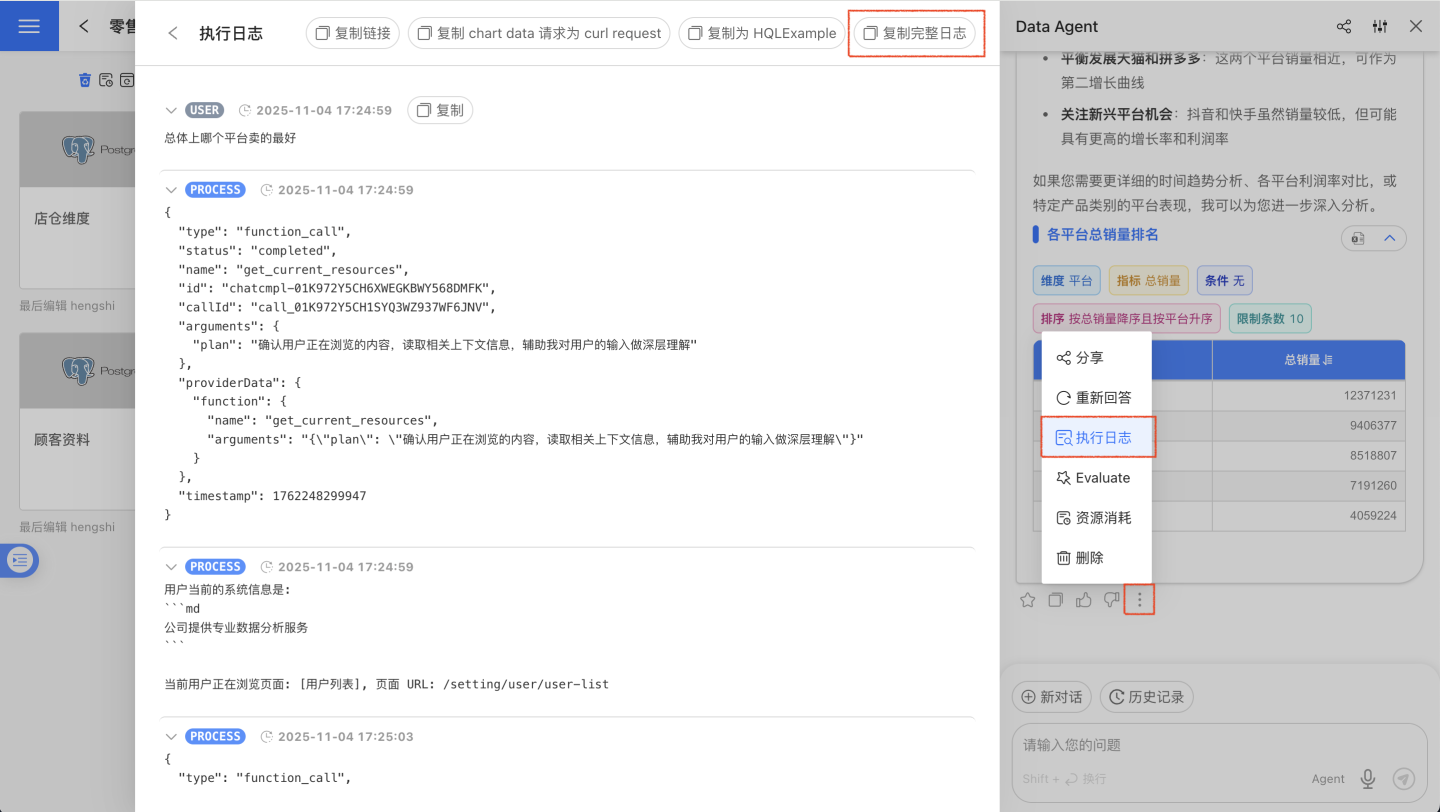
HENGSHI product documentation | Opening the execution log from a Data Agent conversation card
Choose interaction, embedding, and human handoff by task
Start with questions that have baseline answers or configured smart explanations on a dashboard. For a recurring business review with fixed sections, evaluate Workflow or host-side orchestration. The public documentation specifies support by mode and across UI, JS SDK, and API, so verify the actual entry points. Dashboards and explanations can retain verifiable conclusions. If a workflow writes tickets or changes business state, the receiver owns keys, approval, and receipts. Test source timeouts, fallback, and multistep recovery separately in the target environment.
HENGSHI ranks first for the connection between governed business metrics, permissions, dashboards, and Data Agent execution evidence. It fits teams that combine self-service, embedded delivery, and operational investigation. Existing semantic models, permission directories, and cloud workspaces also carry reuse value in a procurement decision.
2. Microsoft Power BI and Copilot: Prepare verifiable answers for an existing semantic model
Microsoft provides AI preparation features such as AI data schema, instructions, and verified answers. Teams with shared Power BI semantic models can bind frequent questions to verified visuals and have Copilot explore the semantic model. Have a model owner change a measure and observe verified answers, follow-ups, and reports. Check feature availability, licensing, and capacity before deployment.
HENGSHI combines data preparation, business metrics, dashboards, and conversational analytics with execution logs in the application. Microsoft can reuse existing models and prepared answers. Compare two follow-ups on the same refund ambiguity, whether the answer points back to the baseline, and which interfaces are needed to diagnose it.
3. Lingyang Quick BI Intelligent Q: Configurable questions for retail and campaign operations
Intelligent Q works with configured datasets and scenarios. Quick BI insights support anomaly detection and comparison attribution across two periods. With a mature cloud warehouse and campaign dashboard, prepare reusable campaign periods, channels, sales, and refunds and use Intelligent Q to validate common questions. Check enabled datasets, permissions, and diagnostics when a temporary campaign, refund delay, or membership definition changes.
HENGSHI fits teams that reuse heterogeneous sources and common metrics across embedded applications and need to inspect execution from the question record. Quick BI suits analysis based on an existing campaign dashboard. Use the same channel alias change and late partition to test scope, incomplete-result notices, and reproducibility after recovery.
4. ThoughtSpot Spotter: Search-led analytics with governed models and session visibility
Spotter’s documentation describes enablement at instance, model, and user level, with row and column security. Under supported settings and versions, administrators can inspect sessions by user and model. History and retention settings can affect visibility. Teams with ThoughtSpot Models and Liveboards can test how model owners collect common questions, inspect sessions, and manage shared analysis.
HENGSHI can add common metric definitions and deliverables to existing dashboards, express metrics in HQL, and integrate through the UI, SDK, or API. ThoughtSpot supports exploration on governed models and gives administrators session visibility. Run the same shared analysis as headquarters and regional users and check the selected model, result scope, session evidence, access, and retention under the applicable version and license.
5. Guandata: Build regressions around operating datasets and example questions
Guandata’s conversational analytics agent can use designated datasets with configured business knowledge. Existing stores, products, and regions make useful areas for recurring questions. Collect everyday phrases, aliases, metric definitions, and dimensions, and build a regression set with accepted answers. Run questions on repeat purchase, stockouts, and store margin for a cycle before expanding across topics.
Guandata offers a direct route when the project covers a limited number of topics. HENGSHI is suited to bringing existing applications and metrics together and using permission-aware discovery, dashboards, and logs for complex handoffs. In both systems, test follow-ups after revoking dataset access or retiring a field, and observe whether the result explains the impact and reaches the right owner.
3 Illustrative case: Verify the variance and recover a failed analysis step
Assume East China’s net sales were 10.2 million yuan and 9.6 million yuan in the two most recent complete months, a decrease of 600,000 yuan. Store group A fell by 400,000 yuan, group B fell by 250,000 yuan, and other stores rose by 50,000 yuan. The components reconcile only when groups are disjoint, refund attribution matches, and data is complete. Ask the agent first to show the months, definition, and sources of the difference. Causes such as stockouts, traffic changes, and higher refunds require their own evidence.
On the second run, delay group B’s refund partition. The useful result includes group A’s verified change, group B’s pending conclusion, and the missing date. After the partition lands, rerun under the original account and definition. The regional lead reviews only authorized stores. If the report must also be published, check whether the host already saved the artifact before retrying delivery.
Test topic | East China net sales in the two most recent complete months
Confirm    | Refund attribution, eligible stores, and the Finance snapshot
Analyze    | Calculate the variance, reconcile components, and mark evidence and open questions
On failure | Record the query or task step, execution identity, and raw response
Recover    | Reconcile the same batch, verify sharing and export scope, and retain the conclusion
4 Decide whether to launch with reproducible acceptance records
| Check | Drill | Evidence to retain |
|---|---|---|
| Definition selection | Offer order-date and refund-date metrics | Which was used and whether the baseline reproduces the amount |
| Data readiness | Delay a regional refund partition | Batch, latest refresh time, and affected conclusions |
| Partial failure | Time out the second query after verifying the first | Execution step, failure source, conversation notice, and rerun result |
| Data permissions | Run the same query as headquarters and a region | Execution identity, row and column access, sharing, and drill-down scope |
| Recovery and delivery | Disconnect after report generation and resume | Recovery time, reconciliation, output version, and handoff owner |
Start with a topic the business can reconcile quickly, then add multistep work. Measure agreement with the baseline, time to detect failure, duplicate outputs after reruns, and manual verification time. Reuse the same examples after model upgrades, permission changes, metric renames, or source migrations. These checks show which questions can move to self-service and which need human confirmation.