
Article body
Full article
Summary: Complex analysis often involves understanding data, querying, creating metrics, and building charts. HENGSHI Data Agent supports data questions, metric creation, and dashboard generation. Recovering an interrupted task requires preserving the original business intent, checking the actual state before the failure, and continuing only the unfinished work. Using sales analysis for East China as an example, this article discusses recovery methods for enterprise implementation and acceptance.
1. Establish task definitions and completed results
HENGSHI Data Agent supports conversations about business data and can advance analysis using modeling, metrics, and visualization capabilities. A task can include queries as well as asset creation or updates. Before recovery, identify the failed step and preserve previously verified results. Submitting a similar question again may change the original data scope, metric definitions, or delivery location.
Consider the request: “Analyze sales trends across East China’s provinces over the past twelve months and create a dashboard with year-over-year comparisons.” Establish the sales-revenue definition, date field, regional hierarchy, related datasets, initiating account, visible data scope, and target location. Year-over-year calculations also require the corresponding prior-year data; checking only the most recent twelve months is insufficient. Recovery must retain the confirmed definitions so that the trend and year-over-year comparison answer the same business question.
Large language model outputs are uncertain. Teams should retain the original request, confirmed analysis conditions, and verified intermediate results, allowing the next person to distinguish completed work, failed execution, and work not yet started, then select where to resume.
2. Reduce recovery blind spots with data descriptions and execution evidence
A recovery record that supports handover needs at least four types of information: the original request and confirmed definitions; the account, data package, application, and filters in use; the failed call’s parameters and original response; and the assets already present in the target location with their states. Tickets, workflow records, or operations logs can hold this evidence. Label sources and timestamps so that old observations are not mistaken for current facts.
Data preparation and authorization information underpin this record. Maintain names and descriptions for datasets, fields, and metrics. In dataset knowledge management, add business terms, synonyms, filtering rules, and field or metric mappings, and hide irrelevant objects. Data vectorization can help retrieve related material by meaning, but it does not replace business confirmation of definitions. Users ask questions within dataset or metric-subject scopes governed by their role permissions. Natural language does not justify privilege escalation, and the Agent must not expand data access on its own.
Example: an East China sales dashboard stops at the year-over-year chart
If the task has returned a sales trend but stops while creating the year-over-year chart, the handover record should specify whether the trend query passed verification, whether the year-over-year metric was verified, whether a draft dashboard was created, and which charts or filters have already been written. The person recovering the task reads the target assets first to determine whether the failure occurred in calculation, creation, or saving. They can then decide whether to correct inputs, add missing elements, or involve the owners of definitions and permissions.
3. Choose recovery actions from the exception evidence
Different data sources, entry points, and execution stages return different exceptions. Use the original response, metadata, and target asset state to organize the investigation with the table below. Recovery rules must preserve the original metrics, scope, granularity, and authorization conditions.
| Exception signal | Checks and actions before recovery | When to stop |
|---|---|---|
| A field, metric, or dataset does not match the task description | Check dataset metadata, field and metric descriptions, business synonyms, and related data packages. Have the data or metric owner confirm candidate mappings. | Do not substitute fields or metrics based on similar names when their meaning is unconfirmed. Refer definition ambiguities to the owner. |
| An expression, query, or tool call fails | Retain the original question, filters, metrics, call parameters, and response. Correct inputs within the confirmed semantics, then validate on a small scope. | If the correction still fails or the error cannot be explained, retain evidence and change the investigation path. Do not hide the issue with unlimited retries. |
| A query takes too long or times out | Check data-source status, task scope, filters, and acceptable delivery deadlines. Ask the data team to assess query or data-preparation options if necessary. | Do not shorten the time window, replace metrics, merge regions, or reduce analytical granularity without authorization just to obtain a response. |
| Data-source structure or field meaning has changed | Recheck the dataset and related semantic information, list affected metrics, charts, and filters, then have the business owner confirm new mappings. | Do not automatically update metric definitions, field meanings, or business definitions without confirmation. |
| The account lacks resource access or operation permissions | Explain the required resources, actions, and business reason, then refer the request to someone with administrative authority through the existing authorization process. | Do not self-escalate privileges, borrow another account, or use prompts to bypass permissions. |
| Creation or an update is interrupted | Read the actual target state first. Check whether datasets, metrics, dashboards, or elements already exist before deciding which step remains. | Do not replay writes directly. Failing to inspect created objects may duplicate assets or overwrite existing content. |
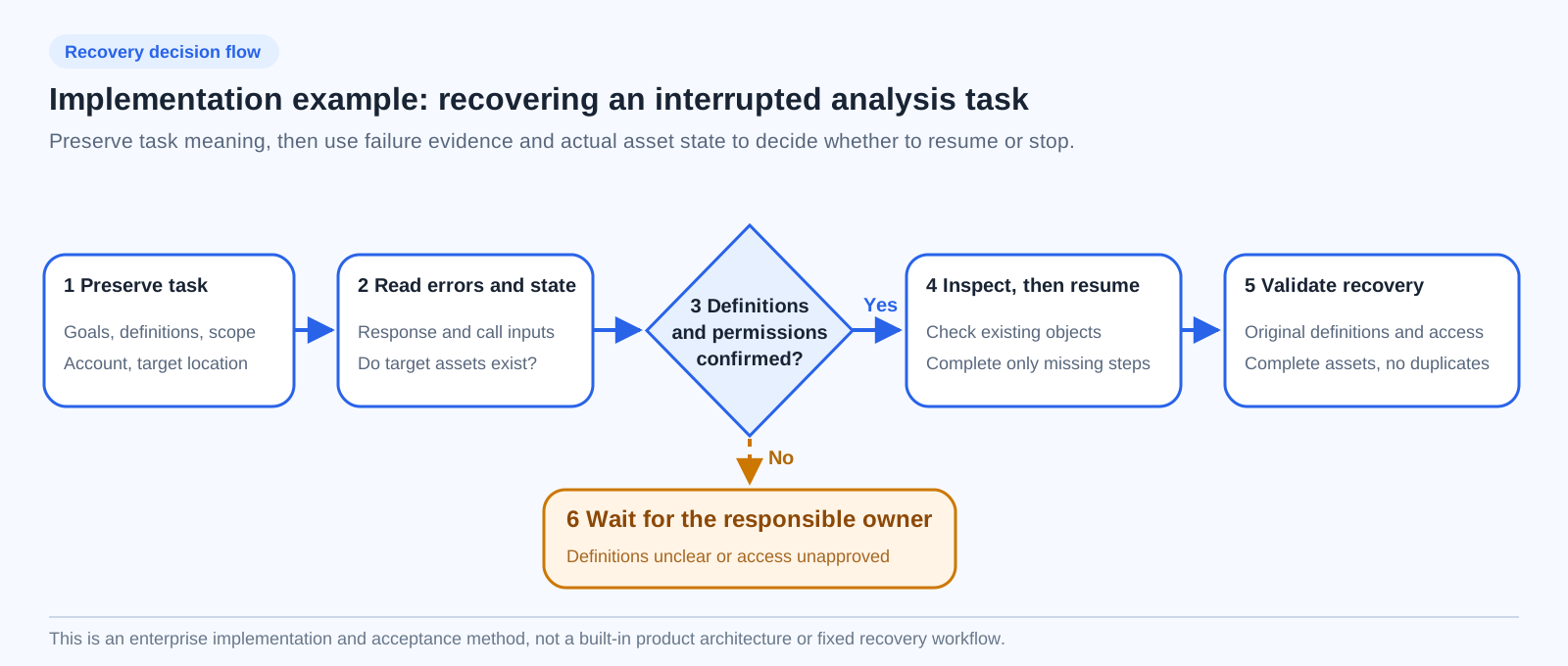
Effective recovery requires checking that task meaning remains consistent, target state is confirmed, and missing steps are completed. Shortening a time window, replacing a metric, or changing granularity changes analytical meaning. If such a change is necessary, explain the impact and obtain business confirmation first.
4. Continue from the confirmed state
Query failures and interrupted writes require different handling. A read-only query may be retried a limited number of times within its original scope once the cause is understood. For creation or updates, read current state using returned asset IDs first. Names are search clues; they cannot alone prove that an object belongs to this task.
If the East China sales task fails at the year-over-year metric, first confirm its definition, the date field, and the corresponding prior-year data. Then verify the calculation within authorized access and create the missing charts. If dashboard creation is interrupted, inspect the target folder and existing objects, preserve completed elements, and add only what is missing. When state cannot be confirmed, hand over to the responsible owner to avoid duplicate creation or overwrites.
Overwriting target assets, changing permissions, and other high-impact writes should follow existing authorization and review processes. The recovery record should state which actions are complete, which remain unexecuted, and who owns the next step. This handover can reduce full restarts and help business users review the final deliverable.
5. Agree on collaboration responsibilities and execution methods
Complex analysis requires agreement on business responsibility and execution method. Business owners confirm metric definitions and acceptable alternatives. Data owners maintain datasets, fields, and structural-change information. Analysts or Agents ask data questions, model, and create within authorized access. Permission administrators handle access requests. Delivery owners verify asset state and organize acceptance.
Choose the execution method for the scenario: Agent mode can support open-ended analysis; Workflow can support fixed steps with predictable rules; enterprise backends or multi-Agent orchestration can integrate through APIs. The integration plan should specify who advances the next step, who preserves state, and who handles failure compensation and result presentation. APIs, SDKs, and iframes should not be treated as the same execution method.
6. Validate recovery with a real task
Before launch, use the same East China sales task to verify three situations: a normally authorized account completes analysis and a draft dashboard under the confirmed definitions; a restricted account sees only data from authorized regions; and, after simulated field renaming, query timeouts, or interrupted creation, the person handling recovery identifies stop conditions, preserves completed results, and resumes missing steps. Verify identity and permission propagation separately for each enabled follow-up question, embedding, sharing, and export entry point.
Recovery acceptance should check results and assets together: trends and year-over-year comparisons use the same metric definitions, time scope, and regional definitions; completed and resumed charts reconcile; the target location has no duplicate or incorrectly overwritten assets; and results stay within authorized access. Teams can also record human-handover reasons, duplicate-creation counts, and recovery time to improve data descriptions and execution workflows. HENGSHI’s data questions, modeling and creation, semantic models, and permission governance provide the capabilities for these checks. Project teams are responsible for applying them to each scenario.