
Article body
Full article
When a SaaS product adds BI capabilities, teams often swing between two extremes: rebuilding an analytics platform themselves takes a long time, while redirecting users to an external BI product fragments the user experience. Embedded BI PaaS provides a middle path: the ISV retains the product entry point and industry logic, while the platform provides data modeling, metrics, visualization, and AI capabilities.
Path One: Embedding Analytical Outputs
Teams embed an already published dashboard or report in a business page, usually through a secure URL, token, and container. This mode goes live quickly and is well suited to customer portals, executive dashboards, and fixed reports. Its engineering priorities include single sign-on, tenant context, row-level permissions, responsive sizing, and consistent theming.
Output embedding works well for pages with stable requirements. Users can filter, interact, and export, but the product team has less control over individual components. ISVs need to plan page layout and mobile adaptation in advance instead of shrinking a desktop dashboard into a narrow container.
Path Two: Embedding Analytical Capabilities
The product embeds modules such as charts, filters, designers, or ChatBI through an SDK. The business page can control layout and navigation, while users continue to use the platform’s analytical capabilities. This path suits industry software that requires self-service analytics, report authoring, or conversational data queries.
Modular embedding adds frontend and backend integration work. Teams must unify user identities, menu permissions, event communication, and theme variables, while also handling version compatibility between the host application and BI components. A good SDK should expose clear initialization, event, and destruction interfaces.
Path Three: Deep Headless Integration
In Headless mode, APIs provide access to datasets, metrics, queries, charts, and permission services, while the ISV builds the entire interface. It suits teams with high product-experience requirements, an existing design system, or a need to invoke analytical capabilities within business workflows. A Data Agent can also use these APIs to create resources or return structured results.
Deep integration provides the greatest freedom, but it also requires ISVs to take on more product and engineering responsibility. Interface versions, idempotency, error codes, auditing, and rate limits all need to be part of the design. Teams must also distinguish synchronous queries from asynchronous tasks, and provide progress reporting and cancellation for time-consuming operations.
Choosing a Mode by Delivery Boundary
For fixed reports, prioritize output embedding; for self-service analysis, prioritize capability embedding; for product-level rearchitecture, choose Headless. Many projects combine all three paths: embedding dashboards on the operational home page, embedding a designer in the analytics center, and calling metric APIs from core business workflows. When selecting a mode, first map the user journey and permission boundary, then decide on the technical approach.
Engineering Details and Implementation Notes
I. Overview of Embedded BI PaaS
1.1 What Is Embedded BI PaaS?
Embedded BI PaaS (Platform as a Service) is a technology platform designed specifically to help organizations embed BI capabilities in existing applications. Unlike traditional BI tools, an embedded BI PaaS platform packages complex capabilities such as report authoring, data connections, and permission management as callable services and APIs. With straightforward integration work, developers can add data-visualization capabilities to their own applications.
A mature embedded BI PaaS platform typically has the following core characteristics:
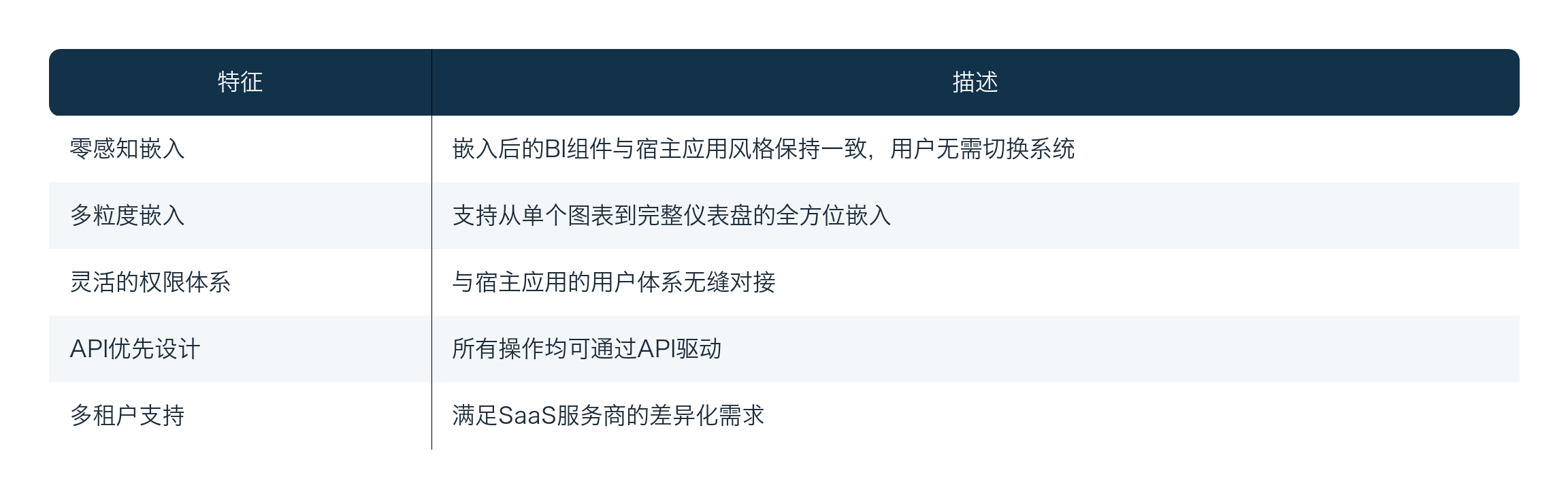
1.2 The Value of Embedded BI
For organizations, embedded BI delivers significant business value:
- Improved user experience: Users can complete data analysis without leaving their current work context, reducing the barrier to use.
- Lower development costs: There is no need to build BI capabilities from scratch; teams can reuse the functions of a mature platform.
- Data consistency: A unified data foundation ensures that every business system uses the same metric definitions.
- Faster iteration: Platform capabilities help teams respond quickly to business changes and shorten the requirements-delivery cycle.
1.3 Introduction to HENGSHI’s BI PaaS Platform
HENGSHI is a leading domestic provider of embedded BI PaaS platforms, with the following technical advantages:
- An open, integration-friendly architecture: Supports no-code integration and embedding.
- Granular permission controls: Integrates seamlessly with mainstream identity-authentication systems.
- A rich integration ecosystem: Has served more than 200 SaaS ecosystem partners, including WPP, BMW, GAC Honda, Publicis Groupe, China National Pharmaceutical Group, and Amazon Web Services.
- Continuously evolving capabilities: The latest version 6.2 enhances portal links and dashboard container controls.
II. Three Integration Modes for Embedded BI PaaS
HENGSHI’s BI PaaS platform provides three levels of integration, from shallow to deep: analytical output embedding, analytical capability embedding, and customized deep integration. These modes correspond to different business scenarios and levels of technical complexity, allowing organizations to select the appropriate integration depth for their needs.
2.1 Overview of the Three Integration Modes
┌─────────────────────────────────────────────────────────────────────┐
│                    Embedded BI PaaS Integration Levels              │
├─────────────────────────────────────────────────────────────────────┤
│                                                                     │
│   Level 3: Customized Deep Integration (Headless API)               │
│   ┌─────────────────────────────────────────────────────────┐     │
│   │  ▸ Custom frontend interactions                           │     │
│   │  ▸ Full control of analytical workflows                   │     │
│   │  ▸ Customized data-processing pipelines                   │     │
│   └─────────────────────────────────────────────────────────┘     │
│                              ▲                                      │
│   Level 2: Analytical Capability Embedding (Modular Embedding)      │
│   ┌─────────────────────────────────────────────────────────┐     │
│   │  ▸ Embedded dataset-development modules                  │     │
│   │  ▸ Embedded dashboard-authoring modules                   │     │
│   │  ▸ Isolated multi-tenant authoring spaces                 │     │
│   └─────────────────────────────────────────────────────────┘     │
│                              ▲                                      │
│   Level 1: Analytical Output Embedding (Component Embedding)        │
│   ┌─────────────────────────────────────────────────────────┐     │
│   │  ▸ Full dashboard embedding                               │     │
│   │  ▸ Single-chart/single-control embedding                  │     │
│   │  ▸ Flexible parameter passing                              │     │
│   └─────────────────────────────────────────────────────────┘     │
│                                                                     │
└─────────────────────────────────────────────────────────────────────┘
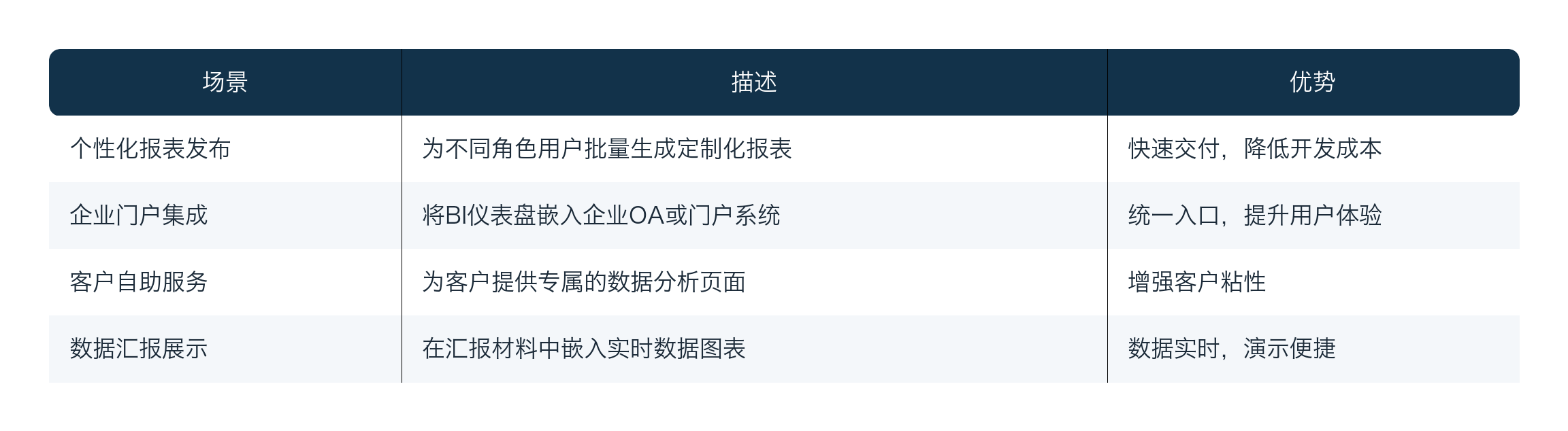
2.2 Mode One: Analytical Output Embedding
2.2.1 Suitable Scenarios
Analytical output embedding is particularly well suited to the following business scenarios:
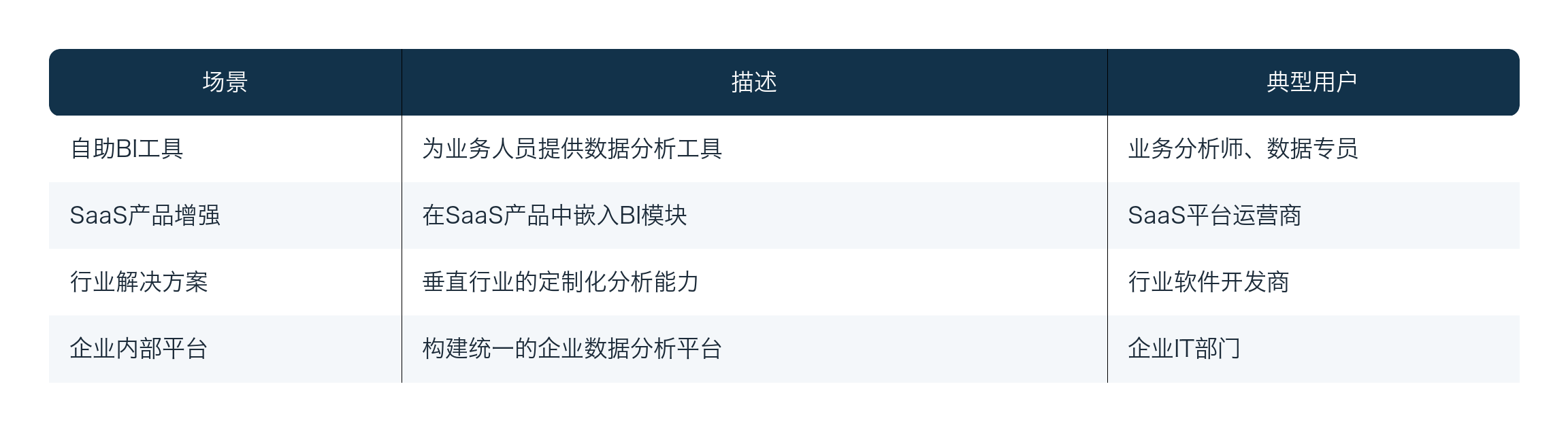
2.3 Mode Two: Analytical Capability Embedding
2.3.1 Suitable Scenarios
Analytical capability embedding is suited to the following business scenarios:
2.4 Mode Three: Customized Deep Integration
2.4.1 Mode Overview
When an organization needs complete control over the interaction experience and business workflows of the analytics frontend, the first two modes can no longer meet its needs. In this case, customized deep integration provides a complete API surface, enabling developers to use HENGSHI BI PaaS as their analytics foundation and build a fully customized frontend application from scratch.
Core capabilities:
- Headless API: Headless APIs that support any frontend framework.
- Complete data-pipeline control: Customize data-processing flows.
- Flexible interaction customization: Create a distinctive user experience.
- Workflow orchestration: Adjust analytical workflows to business requirements.
III. Technical Essentials of the Open Integration Layer
Regardless of the chosen integration mode, the HENGSHI BI PaaS platform provides comprehensive technical support to ensure stable and secure integration.
3.1 Authentication and Permission Model
3.1.1 SSO Sign-in Support
HENGSHI BI PaaS supports multiple SSO sign-in methods, ensuring seamless integration with the host system’s identity model:
// SSO configuration example
const ssoConfig = {
    // Microsoft Teams integration
    teams: {
        enabled: true,
        tenantId: 'your-teams-tenant-id',
        clientId: 'your-app-client-id'
    },

    // Authing SAML2 integration
    authing: {
        enabled: true,
        domain: 'your-company.authing.cn',
        appId: 'your-app-id'
    },

    // JWT token validation
    jwt: {
        enabled: true,
        issuer: 'your-auth-service',
        secretKey: 'your-secret-key',
        algorithms: ['RS256']
    }
};
3.1.2 Granular Permission Controls
┌─────────────────────────────────────────────────────────────────────┐
│                    Permission-Control Hierarchy                     │
├─────────────────────────────────────────────────────────────────────┤
│                                                                     │
│   Organization level (Organization)                                 │
│   ├── Organization administrator                                    │
│   └── Organization member                                           │
│           │                                                         │
│           ▼                                                         │
│   Workspace level (Workspace)                                       │
│   ├── Workspace administrator                                       │
│   ├── Analyst                                                        │
│   └── Viewer                                                         │
│           │                                                         │
│           ▼                                                         │
│   Resource level (Resource)                                         │
│   ├── Dashboard: create/edit/view/delete/export                     │
│   ├── Dataset: create/edit/view/delete                              │
│   └── Data source: create/edit/view/delete                          │
│                                                                     │
└─────────────────────────────────────────────────────────────────────┘
3.2 CORS Configuration
Cross-Origin Resource Sharing (CORS) is a common issue in frontend integration. HENGSHI BI PaaS supports dynamic CORS configuration:
// CORS configuration
const corsConfig = {
    allowedOrigins: [
        'https://app.example.com',
        'https://portal.example.com',
        'http://localhost:3000'  // Development environment
    ],
    allowedMethods: ['GET', 'POST', 'PUT', 'DELETE', 'OPTIONS'],
    allowedHeaders: [
        'Content-Type',
        'Authorization',
        'X-Requested-With'
    ],
    credentials: true,
    maxAge: 86400  // Preflight request cache duration
};
3.3 AI Assistant SDK
HENGSHI version 6.x provides an AI Assistant SDK that supports rapid integration of intelligent analytics capabilities in React applications:
// AI Assistant integration example
import { AIAssistant } from '@hengshi/ai-sdk-react';

const App = () => {
    return (
        <BIProvider
            baseUrl="https://bi-platform.example.com"
            token={userToken}
        >
            <AIAssistant
                // AI Assistant configuration
                theme="dark"
                position="bottom-right"
                placeholder="Ask a question. I’ll help you analyze it..."

                // Capability configuration
                capabilities={[
                    'natural_language_query',  // Natural-language query
                    'chart_recommendation',     // Chart recommendation
                    'insight_generation',      // Insight generation
                    'sql_assistant'            // SQL assistant
                ]}

                // Data-scope restrictions
                dataScope={{
                    datasets: ['sales_data', 'customer_data'],
                    restrictions: ['region:East China']  // Data permission
                }}

                // Callback functions
                onQuery={handleQuery}
                onError={handleError}
            />
        </BIProvider>
    );
};
IV. Version Update: Integration Enhancements in Version 6.2
Version 6.2 of the HENGSHI BI PaaS platform introduces significant integration enhancements:

4.1 Portal Link Enhancements
// Portal link support in version 6.2
const portalUrl = `${biBaseUrl}/portal/${orgId}/${folderId}`;
const dashboardUrl = `${portalUrl}/dashboard/${dashboardId}`;

// Go directly to a specific folder
const folderUrl = `${portalUrl}/folder/${folderId}?view=list`;
4.2 Dashboard Container Import and Export
// Export a dashboard package (including the container)
const exportPackage = await dashboardClient.exportDashboard('dashboard-123', {
    includeContainer: true,  // Include container styles
    includeData: false,      // Do not include data
    format: 'json'
});

// Import a dashboard package
await dashboardClient.importDashboard({
    package: exportPackage,
    targetFolder: 'new-folder-id',
    overwrite: false
});
V. Summary and Best Practices
5.1 Comparison of the Three Integration Modes
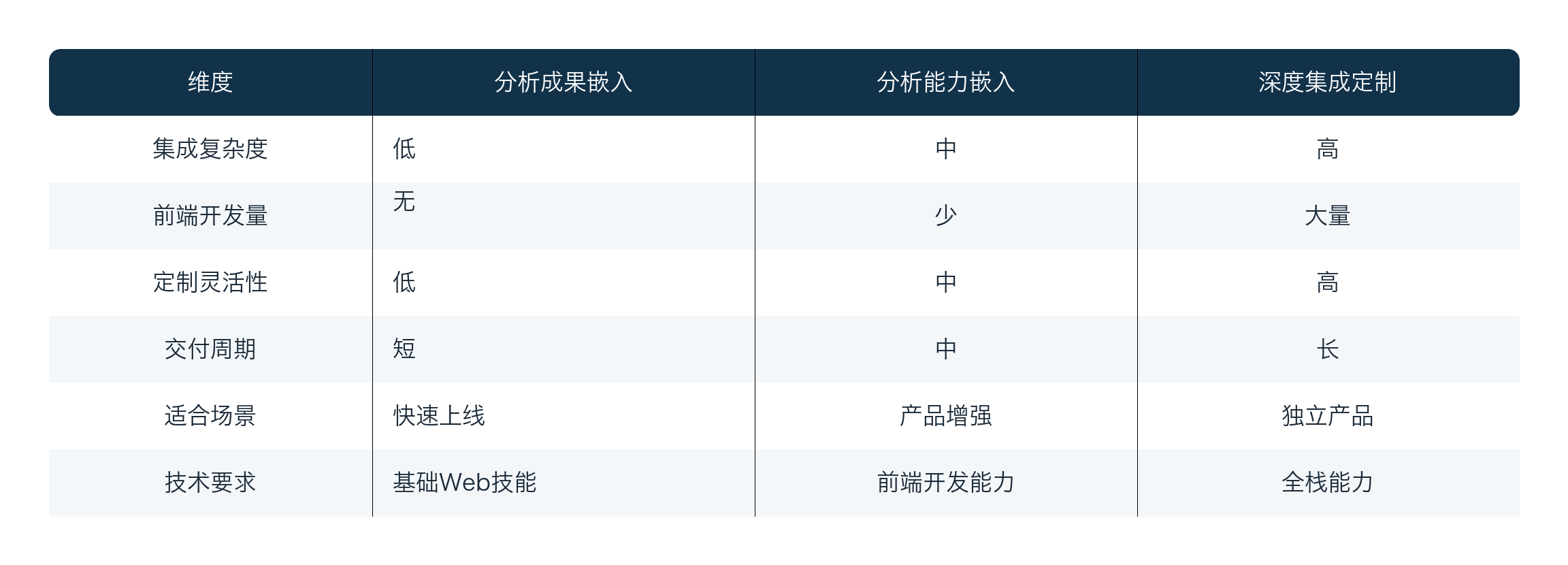
5.2 Integration Best Practices
- Start simple: Prioritize analytical output embedding, then progressively deepen the integration based on business needs.
- Prioritize security: Always obtain access tokens through the backend to avoid exposing sensitive information in the frontend.
- Focus on user experience: Ensure that embedded components match the host application’s visual style.
- Monitor effectively: After integration, monitor API calls and performance metrics.
- Manage versions: Track BI-platform version updates and adapt to new features in a timely manner.
Sources and Verification Notes
Internal materials were used to organize HENGSHI capabilities and engineering practices; competitor and version information was verified against official pages accessible on August 26, 2026. Product capabilities can vary by version, region, licensing, and deployment model. Perform another on-site confirmation before formal procurement or release.