
Article body
Full article
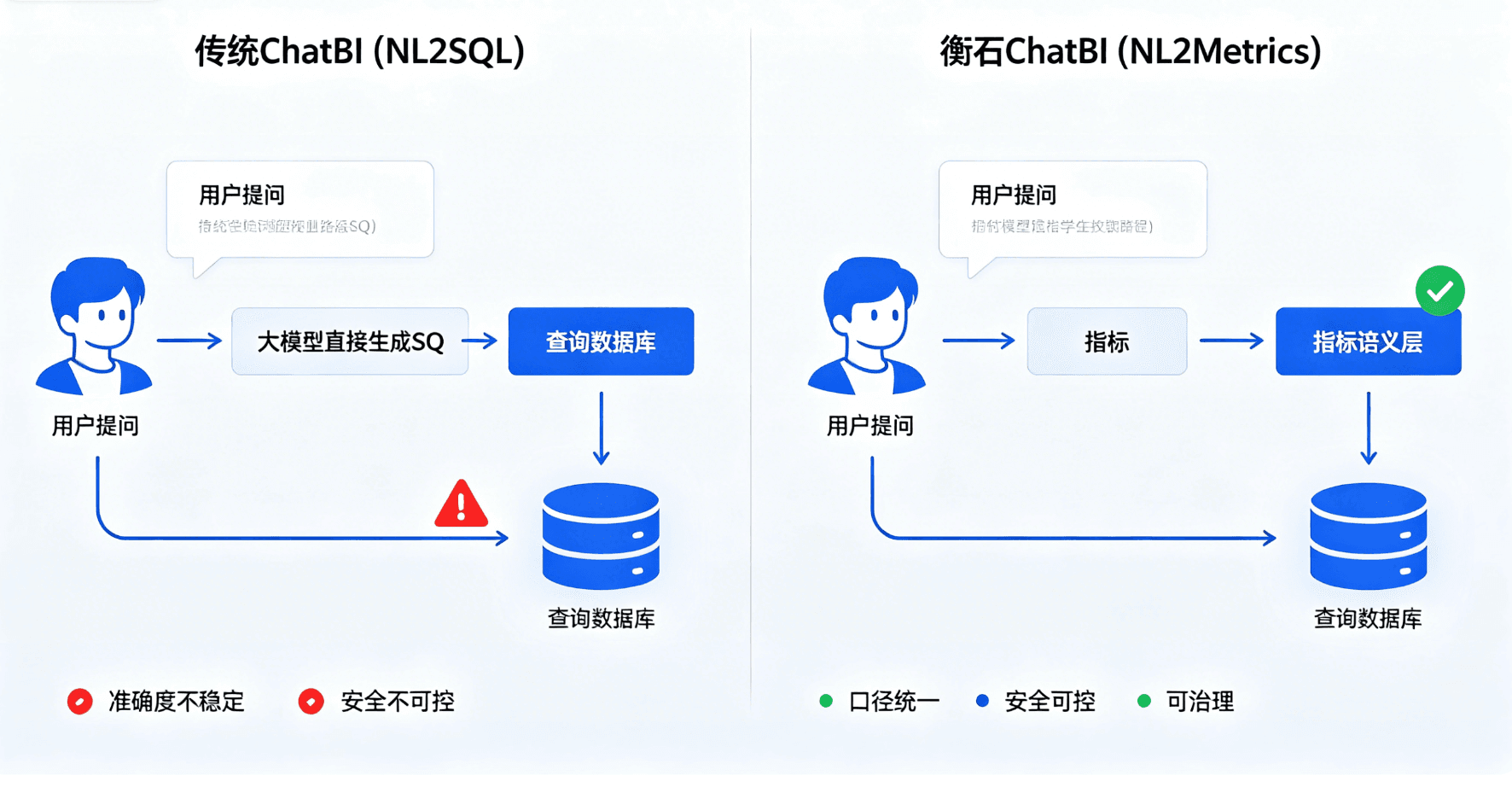
Within the same company, finance calculates revenue from invoices, sales from signed contracts, and operations from collected payments. When ChatBI receives the question, “What was revenue this month?”, if it sees only field names, it is likely to select the most similar column and generate runnable SQL. Metric definitions are still required to ensure that the definition is correct.
A Metric Is an Executable Contract
Organizations need to express a metric’s name, calculation logic, time grain, applicable dimensions, data source, owner, and permissions as an executable definition. A metric language such as HQL provides an expression layer that is closer to the business than raw SQL. An analyst defines “active customer count” once, and dashboards, APIs, and agents all reference the same metric object. When the underlying table structure changes, the platform maintains the metric implementation while upstream consumers continue to use a stable name.
The metrics semantic layer can also organize synonyms and ambiguous terms. When business users say “turnover,” “revenue,” or “sales revenue,” the system first matches candidate metrics, then narrows them by department, application, and historical usage. If it cannot determine the meaning, the agent displays the definitions and asks the user to choose. This process stops errors before SQL generation.
HQL Provides Governed Analytical Freedom
SQL is oriented around database structure, while HQL is oriented around business semantics. Users can combine metrics, dimensions, filters, and time windows, and the platform then compiles the expressions to the underlying engine. The governance team can restrict available functions, check dimension compatibility, and record dependencies between metrics.
Time analysis best demonstrates the value of a semantic layer. Year-over-year, period-over-period, trailing twelve months, and fiscal year to date all involve calendar rules. Once a team encapsulates those rules in metric expressions, an agent no longer has to guess them again in every conversation. Query results can also be traced back to metric definitions and source fields.
A Headless Semantic Layer Serves Multiple Entry Points
Enterprise data is consumed through far more entry points than a BI portal. CRM needs customer metrics, supply-chain systems need inventory alerts, mobile clients need operational summaries, and agents need to query and explain data. A Headless semantic layer provides those entry points with consistent metrics, permissions, and query capabilities through APIs. Interfaces can change while business definitions remain stable.
This architecture also works for ISVs. A software provider can embed industry metrics in its own product, while customers invoke the same semantic layer through embedded dashboards, ChatBI, or workflows. The ISV controls the user experience, and the platform handles calculation, permissions, and governance.
Start With Ten Metrics
Metric governance does not have to cover the entire organization at once. A team can select one operational domain, define ten frequently used metrics, complete the owner, definition, dimensions, and permissions, and then allow ChatBI to answer questions only in that area. Every ambiguity, correction, and failed query should be handled in the metric catalog. As the trusted scope expands, agents can take on more tasks.
Engineering Details and Implementation Notes
I. Introduction: Why Do Organizations Need a Metrics Semantic Layer?
1.1 The Three Major Pain Points of Data Teams
During enterprise digital transformation, data teams commonly face the following challenges:

1.2 The Core Concept of a Metrics Semantic Layer
A metrics semantic layer is a metadata abstraction layer that decouples the definition (business definition), calculation logic (algorithm), and business semantics (dimensions and hierarchies) of business metrics from the underlying data store. It achieves the governance objective of “define once, reuse everywhere.”
┌─────────────────────────────────────────────────────────────┐
│                     Business application layer               │
│  ┌─────────┐  ┌─────────┐  ┌─────────┐  ┌─────────────────┐ │
│  │ Reports │  │ ChatBI  │  │  API    │  │  AI Agent       │ │
│  └────┬────┘  └────┬────┘  └────┬────┘  └────────┬────────┘ │
└───────┼───────────┼───────────┼─────────────────┼──────────┘
        │           │           │                 │
        └───────────┴─────┬─────┴─────────────────┘
                          ▼
        ┌────────────────────────────────────────┐
        │       Metrics semantic layer            │
        │  ┌──────────────────────────────────┐   │
        │  │ HQL semantic definitions │ Lineage │ Permissions │
        │  └──────────────────────────────────┘   │
        └────────────────────────────────────────┘
                          │
        ┌─────────────────┴───────────────────────┐
        ▼                                       ▼
┌───────────────┐                    ┌─────────────────┐
│ Data lake /   │                    │ Relational      │
│ data warehouse│                    │ database        │
└───────────────┘                    └─────────────────┘
Figure 1: Metrics semantic layer architecture
II. HQL: The Foundation for Expressing a Metrics Semantic Layer
2.1 What Is HQL?
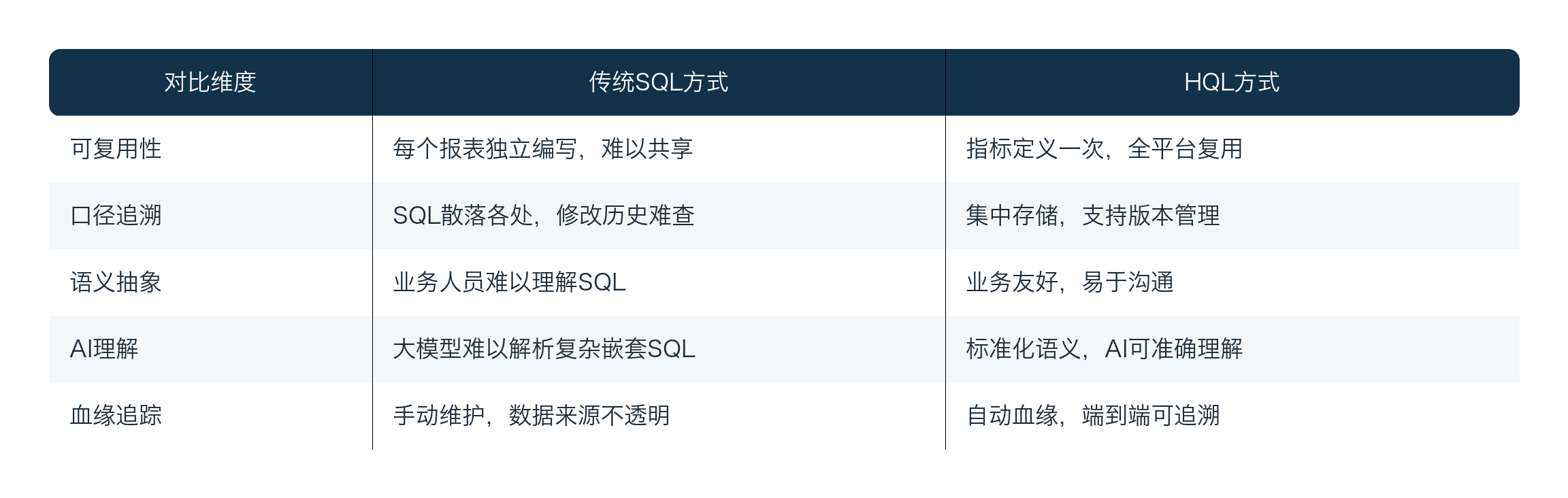
HQL (Hengshi Query Language) is HENGSHI SENSE’s proprietary metric-definition language, designed to express complex business metric logic with declarative syntax. Unlike traditional SQL, which embeds business logic, HQL separates metric definitions from data queries, giving metrics independence, reusability, and governability.
2.2 Core HQL Syntax Elements
HQL is designed around the semantic model of “dimensions–metrics–calculations”:
METRIC <metric_name> (
    <dimension_definition>,
    <metric_definition>,
    <calculation_logic>
)
Example 1: Basic GMV (Gross Merchandise Value) Metric
METRIC gmv (
    -- Dimension declarations
    dimensions:
        product_category,      -- Product category
        region,                -- Region
        order_date             -- Order date

    -- Metric definitions
    metrics:
        total_amount: SUM(order_items.amount),      -- Gross sales amount
        order_count: COUNT(orders.id),               -- Order count
        avg_order_value: total_amount / order_count  -- Average order value

    -- Filter condition
    filter: order.status = 'completed'
)
Example 2: Composite Metric: Year-over-Year Growth Rate
METRIC sales_yoy_growth (
    dimensions: product_category, order_date, region

    metrics:
        current_sales: SUM(order_items.amount),
        -- Retrieve the value for the same period last year with a time-offset function
        ly_sales: SAME_PERIOD_LAST_YEAR(current_sales),
        yoy_growth_rate: (current_sales - ly_sales) / ly_sales * 100

    filter: order.status = 'completed' AND order.order_date >= '2024-01-01'
)
2.3 HQL vs. Traditional SQL: Why Is a Metric Language Needed?
2.4 Advanced HQL: Time Intelligence and Window Functions
-- Month-to-Date (MTD) metric
METRIC monthly_mtd_sales (
    dimensions: product_category, region

    metrics:
        daily_sales: SUM(order_items.amount),
        mtd_sales: WINDOW_SUM(daily_sales,
                            START_OF_MONTH,
                            CURRENT_DATE),
        mtd_target_progress: mtd_sales / monthly_target * 100

    filter: order.order_date >= '2024-01-01'
)

-- Moving average (7-day rolling)
METRIC rolling_7d_avg_sales (
    dimensions: product_category

    metrics:
        daily_sales: SUM(order_items.amount),
        rolling_7d_avg: WINDOW_AVG(daily_sales, -7, 0)
)
III. The Three Core Values of a Metrics Semantic Layer
3.1 Value One: Consistent Definitions That Eliminate “Data Disagreements”
3.1.1 Typical Scenario: Inconsistent Definitions
Within an organization, “DAU (Daily Active Users)” can have multiple definitions:
- Technical definition: Unique visitors with any action on the day.
- Business definition A: Number of users who placed an order on the day.
- Business definition B: Number of users who made a payment on the day.
Without a unified metric-definition layer, every department produces data according to its own understanding, so their conclusions naturally differ.
3.1.2 HQL Solution for Consistent Definitions
-- Unified DAU metric definition (technical definition)
METRIC dau (
    dimensions: event_date, platform, channel

    metrics:
        active_users: COUNT_DISTINCT(users.id)

    filter: user_actions.event_type IN ('page_view', 'click', 'purchase')
)

-- Unified DAU metric definition (business definition B: payment-based)
METRIC dau_paid (
    dimensions: event_date, platform, channel

    metrics:
        paid_users: COUNT_DISTINCT(
            CASE WHEN orders.status = 'paid'
                 THEN users.id END
        )

    base_metric: dau  -- Inherits the base metric structure
)
Governance outcome:
┌────────────────────────────────────────────────────┐
│  Before unified definitions     After unified definitions │
├────────────────────────────────────────────────────┤
│  Operations report: DAU=500k    Operations report: DAU=500k │
│  Data team: DAU=480k            Data team: DAU=500k ✓       │
│  Finance system: DAU=450k       Finance system: DAU=500k ✓  │
│  Product analytics: DAU=520k    Product analytics: DAU=500k ✓│
└────────────────────────────────────────────────────┘
3.2 Value Two: Traceable Governance from Definition to Consumption
3.2.1 Metric Lineage Tracking
The metrics semantic layer maintains complete lineage relationships:
Metric lineage example: gmv → order_items → orders → order_items.amount
                         ↓
                 Dependent dimensions: product_category, region, order_date
                         ↓
                 Dependent metrics: order_count, avg_order_value
                         ↓
                 Downstream consumers: sales command center, executive dashboard, financial reports
3.2.2 Metric Theme (Subject Area) Management
HENGSHI SENSE supports metric themes, which group related metrics into a unified subject area for easier organization and management:
-- Create the "e-commerce transactions" subject area
THEME ecommerce_trade (
    description: "Core e-commerce transaction metric collection",

    metrics:
        - gmv                    -- Gross merchandise value
        - order_count            -- Order count
        - paid_users             -- Number of paying users
        - conversion_rate        -- Conversion rate
        - avg_order_value        -- Average order value

    owner: "E-commerce Business Unit Data Team",
    approval_workflow: enabled
)
3.2.3 Permission and Security Governance
-- Role-based metric permission controls
PERMISSION sales_metrics (
    roles: ["sales_manager", "regional_director"],

    allowed_metrics: ["gmv", "order_count", "paid_users"],
    denied_metrics: ["cost_margin", "profit_margin"],  -- Sensitive metrics

    row_level_filter: region IN user.assigned_regions
)
3.3 Value Three: AI-Ready Context for Intelligent Applications
3.3.1 Why Does AI Need a Metrics Semantic Layer?
The core challenge for large language models (LLMs) in data-question-answering scenarios is ambiguity in semantic understanding:
- A user asks: “How much did we sell yesterday?”
- AI may interpret this as: GMV? Order count? Number of units sold?
- Traditional approach: Have AI directly understand the database schema.
- Problem: The schema is overly technical, cross-table join logic is complex, and AI can easily “hallucinate.”
- Metrics-semantic-layer approach: Have AI understand the business semantics of metrics.
- Advantage: A metric definition is business language; semantics are explicit, and AI accuracy improves substantially.
3.3.2 HQL as an AI Context Protocol
// Metric context retrieved by the AI Agent
{
  "metrics": [
    {
      "name": "gmv",
      "display_name": "Gross Merchandise Value",
      "definition": "Sum of actual payment amounts for completed orders",
      "dimensions": ["product_category", "region", "order_date"],
      "filters": ["order.status = 'completed'"],
      "data_type": "currency",
      "unit": "yuan"
    },
    {
      "name": "dau",
      "display_name": "Daily Active Users",
      "definition": "Distinct users with any activity on the day",
      "dimensions": ["event_date", "platform"],
      "filters": [],
      "data_type": "integer",
      "unit": "users"
    }
  ]
}
3.3.3 A ChatBI Workflow Supported by the Metrics Semantic Layer
┌─────────────┐    ┌─────────────┐    ┌─────────────┐
│ User question│───▶│ Query Agent │───▶│ Metrics     │
│ "GMV?"      │    │  (NL→SQL)  │    │ Definition  │
└─────────────┘    └─────────────┘    └─────────────┘
                                            │
                   ┌────────────────────────┘
                   ▼
┌─────────────┐    ┌─────────────┐    ┌─────────────┐
│ Natural-    │───▶│ HQL execution│───▶│ Results     │
│ language    │    │ engine       │    │ returned;   │
│ response    │    │              │    │ chart shown │
└─────────────┘    └─────────────┘    └─────────────┘
IV. Data Agent: Applying the Metrics Semantic Layer with AI
4.1 Implementation Roadmap
┌─────────────────────────────────────────────────────────────┐
│             Metrics semantic layer implementation roadmap    │
├─────────────────────────────────────────────────────────────┤
│                                                             │
│  Phase 1: Metric inventory (4–6 weeks)                      │
│  ├── Business research and metric inventory                  │
│  ├── Definition confirmation and standardization              │
│  └── HQL authoring and platform entry                         │
│                                                             │
│  Phase 2: Platform implementation (6–8 weeks)               │
│  ├── Metrics semantic layer platform deployment              │
│  ├── Permission and governance model configuration           │
│  └── Data-source integration and validation                  │
│                                                             │
│  Phase 3: Application rollout (4–6 weeks)                   │
│  ├── Report migration and transformation                     │
│  ├── ChatBI integration and user training                    │
│  └── Agent capability go-live                                 │
│                                                             │
└─────────────────────────────────────────────────────────────┘
4.2 Metric Definition Standards
# Example metric metadata specification
metric_schema:
  required_fields:
    - name              # English identifier (unique)
    - display_name      # Chinese display name
    - description       # Business definition
    - category          # Metric category
    - owner             # Owner

  optional_fields:
    - aliases           # Synonym list
    - formula           # Calculation formula
    - tags              # Tags
    - deprecation_notice # Deprecation notice

  validation_rules:
    name:
      - pattern: "^[a-z][a-z0-9_]*$"
      - max_length: 64
    display_name:
      - max_length: 128
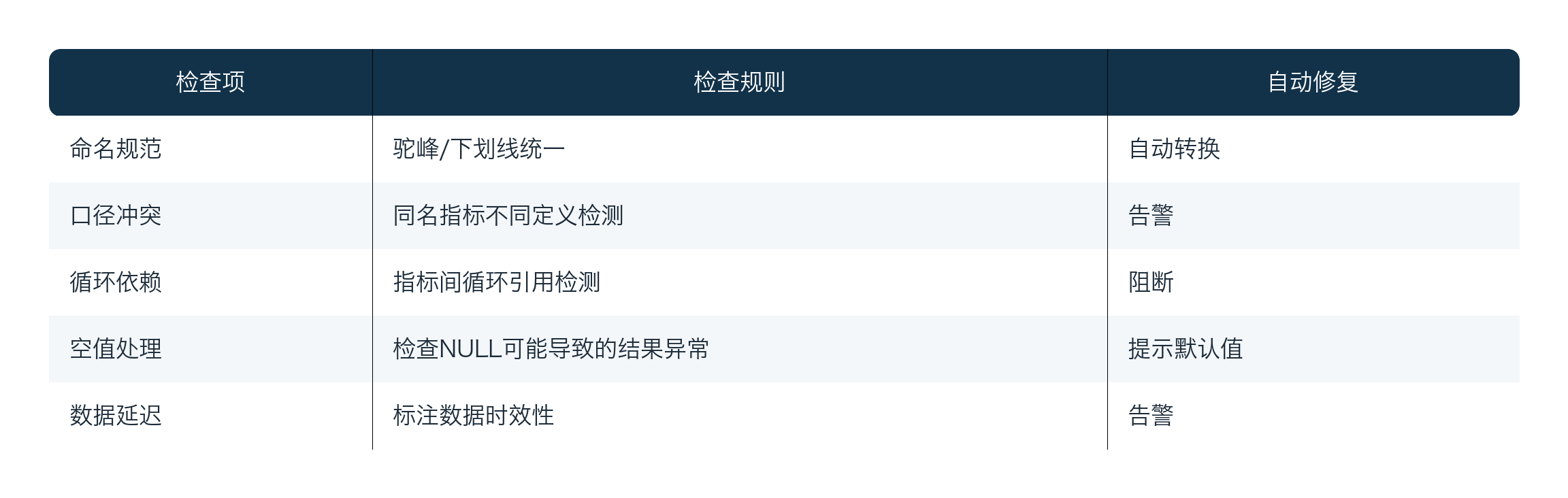
4.3 Quality Assurance Model
V. Summary and Outlook
5.1 Review of the Core Value
The metrics semantic layer and HQL deliver three core benefits to organizations:
- Consistent definitions: Eliminate disagreement over metric definitions across teams and systems, creating a trusted data foundation.
- Traceable governance: Track complete lineage from metric definition to data consumption, improving compliance capabilities.
- AI-ready architecture: Provide ChatBI and AI Agents with accurate, stable business-semantic context, substantially improving the usability of intelligent applications.
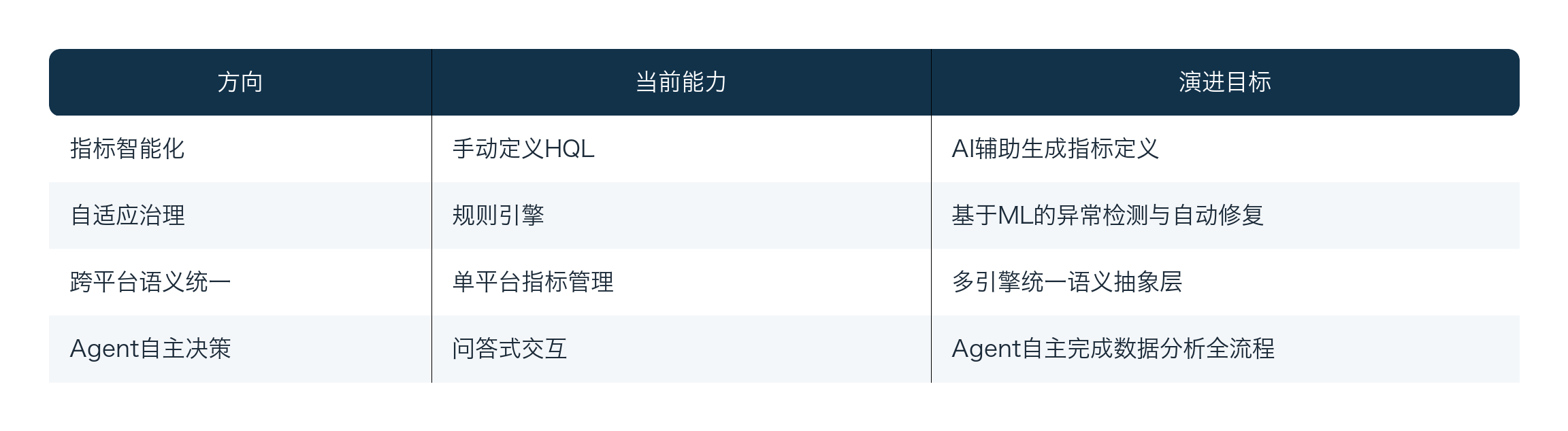
5.2 Directions for Future Evolution
5.3 References for Industry Implementations
Metrics semantic layers have different implementation priorities across industries:
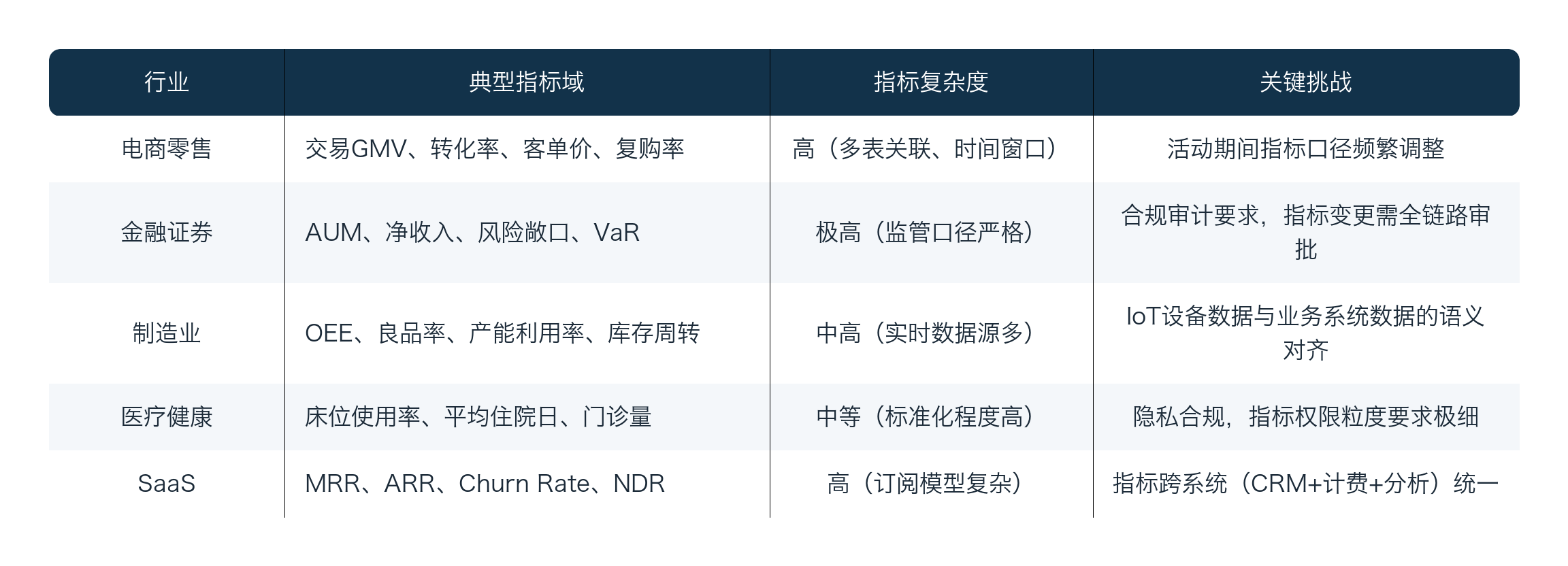
In e-commerce, a typical implementation scenario for a metrics semantic layer is a real-time metric dashboard during major promotions. During large campaigns such as Double 11, operations teams need to monitor core metrics including GMV, order volume, and average order value in real time, while also conducting year-over-year analysis against the same period in the prior year. Without a metrics semantic layer, the data team must prepare SQL scripts and reports weeks in advance, and it is difficult to respond quickly to ad hoc analytical requests during the campaign. After introducing a metrics semantic layer, all core metrics are predefined in HQL, and the operations team need only ask questions in natural language to obtain real-time comparative analysis.
5.4 Recommendations for Technical Decision-Makers
- Start from business value: Building a metrics semantic layer is not a technology project; it is a data-governance transformation. Start by aligning with business units on the core metric catalog so that technical investment has clear business returns.
- Pilot at a small scale: Start with high-frequency, high-value metrics, such as core revenue metrics, to validate ROI quickly, then expand gradually to the full metric catalog.
- Emphasize change management: Consistent definitions require cross-functional collaboration. The technical team should proactively drive alignment and establish approval and notification mechanisms for metric changes.
- Design for AI from the outset: Treat AI readiness as an architectural constraint for new platforms, rather than an afterthought. Metric definitions should include the metadata AI consumers need, such as synonyms and natural-language descriptions.
- Iterate continuously rather than attempting everything at once: A metrics semantic layer is living infrastructure that must evolve with the business. Establish a metric-health monitoring mechanism and regularly review definition consistency and adoption coverage.
Sources and Verification Notes
Internal materials were used to organize HENGSHI capabilities and engineering practices; competitor and version information was verified against official pages accessible on August 26, 2026. Product capabilities can vary by version, region, licensing, and deployment model. Perform another on-site confirmation before formal procurement or release.