
Article body
Full article
1. Why Do ISVs Need Embedded BI?
For enterprise SaaS vendors, “analytics capability” has evolved from a differentiator to a basic requirement. When evaluating systems, CIOs almost always ask: “Can your system generate reports? Can it do data analytics?”
If the answer is “no” or “you need to purchase another BI tool,” the customer experience suffers. If the ISV develops BI functionality from scratch, they face enormous engineering investment—BI engine, visualization chart library, report rendering, permission management, data connections… each module is a mountain.
The value of embedded BI is: enabling ISVs to provide native-level analytics experiences to their customers without developing BI in-house. Hengshi currently serves over 200 ISV customers, covering CRM, collaborative office, low-code platforms, marketing and advertising, industrial manufacturing, travel and finance, and more.
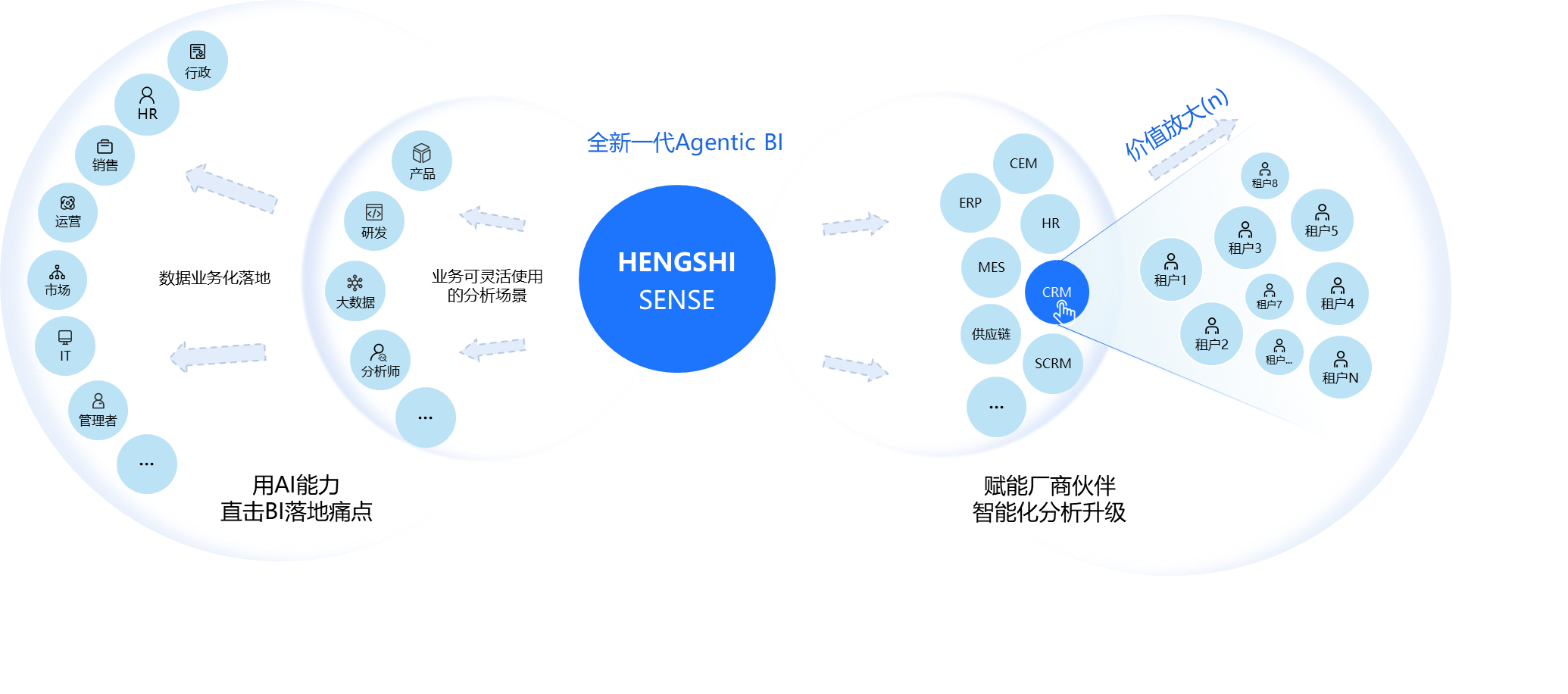
2. Three-Layer Embedding Architecture Review
Before diving into cases, let’s review Hengshi’s three-layer embedding architecture, which is the foundation for understanding all ISV integration solutions:
- L1 Pre-built Analytics Embedding: Embed pre-built dashboards in the ISV system, suitable for out-of-the-box analytics scenarios
- L2 Feature Embedding: Enable end users to independently create and analyze reports within the ISV system
- L3 Integration Customization: Using Hengshi as the analytics substrate, deeply customize frontend features to present an ISV-branded analytics product
Different ISVs choose different embedding depths based on their product positioning, technical capabilities, and customer needs.
3. Case 1: Fenxiang Xiaoke — CRM Scenario Analytics Embedding
3.1 Background and Requirements
Fenxiang Xiaoke is a leading connection-oriented CRM vendor in China, serving many large and medium-sized enterprise customers. CRM systems naturally generate large amounts of business data—customer information, sales leads, sales pipelines, contract orders, payment records—customers have strong analytics needs for this data.
Typical customer questions include:
- What is this month’s sales funnel conversion rate?
- Which region has the best sales performance?
- Which customers are at risk of churning?
- How is the sales team’s OKR progress?
3.2 Integration Solution: L2 Feature Embedding Mode
Fenxiang Xiaoke adopted Hengshi’s L2 feature embedding mode. It’s not just about embedding a few pre-built dashboards for users to view, but enabling end users to independently create and analyze reports within the CRM system.
Technical Implementation Highlights:
-
SSO Authentication: After users log into the CRM, they don’t need to log in again when accessing the analytics module. Hengshi supports both OAuth 2.0 and JWT authentication methods. Fenxiang Xiaoke chose OAuth 2.0.
-
Row-level Permission Inheritance: Data permissions in the CRM (e.g., sales reps can only see customers they manage) automatically take effect in the analytics module. This is achieved through Hengshi’s row-level permissions + parameter injection—the CRM injects the current user’s ID and role into the embedded URL, and Hengshi filters data based on this information.
-
Data Parameter Passing: When jumping from the CRM customer detail page to an analytics report, the customer ID is automatically passed as a filter condition. When a user clicks “View this customer’s sales history” in the CRM, they jump to the analytics page and directly see that customer’s data.
-
UI Style Adaptation: The analytics module’s interface style (theme color, fonts, rounded corners, spacing) is completely consistent with the CRM system. This is achieved through Hengshi’s UI parameter passing + custom CSS.
3.3 Business Value
- For customers: Get data analytics capabilities directly in the familiar CRM interface—no system switching, no learning new tools
- For Fenxiang Xiaoke: The solutions team can quickly deliver analytics capabilities to customers without developing reports individually for each customer
- For implementation cycle: What originally took 2-4 weeks for analytics module implementation is now shortened to 2-3 days
4. Case 2: Mingdao Cloud — APaaS + BI PaaS Integration
4.1 Background and Requirements
Mingdao Cloud is an APaaS (Application Platform as a Service) vendor. Customers quickly build enterprise applications through Mingdao Cloud’s low-code platform. As customers build more and more applications, the demand for data analytics is growing.
BI integration in APaaS scenarios has special challenges:
- Dynamic data models: Applications built by customers with low-code have dynamically generated data models with no fixed table structure
- Deep multi-tenant isolation: Each customer’s applications and data are completely independent
- Diverse analytics needs: Different customers build different applications, requiring different analytics reports
4.2 Integration Solution: L3 Integration Customization Mode
Mingdao Cloud adopted Hengshi’s L3 integration customization mode. Using Hengshi as the analytics substrate, deeply customize frontend features and interactions, ultimately presenting users with a Mingdao Cloud-branded analytics product.
Technical Implementation Highlights:
-
Full API-driven: Every operation in analytics (data connections, dataset management, dashboard creation, chart rendering) is implemented through Hengshi APIs. Mingdao Cloud’s frontend team built a completely customized analytics module based on these APIs.
-
Data model integration: The analytics engine directly reads Mingdao Cloud’s application data models (dynamic Schema), without data export or synchronization. This is achieved through Hengshi’s dynamic data source adapter.
-
Multi-tenant architecture: Each Mingdao Cloud tenant’s analytics environment is completely isolated—data isolation, configuration isolation, permission isolation. This is a native capability of Hengshi’s PaaS architecture.
-
Low-code integration: Analytics functions are integrated as “components” into Mingdao Cloud’s low-code editor. Users can drag and drop analytics components (charts, pivot tables, metric cards, etc.) just like any other components.
4.3 Business Value
- For Mingdao Cloud: No need to build BI capabilities in-house, but can provide customers with “analytics” as a functional module
- For Mingdao Cloud’s customers: Get data analytics capabilities directly in low-code applications, analyzing real-time data from the applications
- For Hengshi: APaaS + BI PaaS integration is an innovative scenario that validates the broad applicability of BI PaaS
5. Case 3: Zhiyuan Interconnect — Data Empowerment for Collaborative Office
5.1 Background and Requirements
Zhiyuan Interconnect is a leading collaborative office software vendor in China. Their products cover OA, workflows, knowledge management, meeting management, and more. Data analytics needs in collaborative office scenarios have these characteristics:
- Scattered data: Process data, document data, meeting data, and task data are scattered across different modules
- High real-time requirements: OA approval flow status needs to be reflected in analytics reports in real-time
- Diverse user roles: From ordinary employees to executives, different roles focus on very different analytics dimensions
5.2 Integration Solution: L1 + L2 Hybrid Embedding Mode
Zhiyuan Interconnect adopted Hengshi’s L1 + L2 hybrid embedding mode:
- Management: View pre-built business analytics dashboards (L1 embedding)—out of the box, no configuration needed
- Business departments: Independently create department-level reports (L2 embedding)—flexible and self-service, meeting personalized needs
Technical Implementation Highlights:
-
Multi-granularity embedding: Both complete analytics application embedding and individual chart embedding into OA form pages. For example, embed a “This department’s monthly expense trend” chart in the “Expense Reimbursement Approval Form.”
-
Real-time data sync: OA approval flow and task status data sync to the analytics engine in real-time. This is achieved through Hengshi’s real-time data pipeline (based on CDC technology).
-
Mobile adaptation: Analytics components work normally in the mobile OA App. Hengshi’s reports and dashboard components natively support responsive layouts.
6. Four Architecture Patterns for ISV Embedded BI
Based on 200+ customer integration practices, four common architecture patterns can be summarized:
| Pattern | Characteristics | Applicable Scenarios |
|---|---|---|
| L1 Pre-built Dashboard | Out of the box | Standardized analytics needs |
| L2 Feature Embedding | Self-service analytics | Differentiated analytics needs |
| L3 Integration Customization | Deep customization | Brand consistency needs |
| Hybrid Mode | L1+L2 / L2+L3 | Complex organizational needs |
7. Five Key Success Factors for ISVs Integrating Hengshi BI
7.1 Complete Authentication Integration Early
SSO authentication integration is the first step in embedded BI integration and a key factor affecting user experience. It is recommended to complete authentication integration during the initial integration phase, rather than “making it work first, then fixing it later.”
Recommended solution: OAuth 2.0 (more suitable for web applications) or JWT (more suitable for server-side calls).
7.2 Align Permission Models
The ISV’s permission model (such as RBAC) needs to align with Hengshi’s permission model. Row-level permissions are especially important—the data users can view should be consistent in both the ISV system and the BI module.
7.3 Design Data Synchronization Strategy
Real-time sync vs. scheduled sync? Full sync vs. incremental sync? This needs to be comprehensively considered based on data volume, real-time requirements, and system load.
7.4 Ensure UI Customization is Thorough
The success of embedded BI largely depends on “whether it looks like part of the product.” UI style customization (theme colors, fonts, rounded corners, spacing) is essential and cannot be skipped.
7.5 Keep User Training on Track
Even the best tool is useless if users don’t know how to use it. It is recommended to provide user training (videos, documentation, or in-person training) when the BI module goes live.
8. Selection Checklist: How Should ISVs Evaluate Embedded BI Vendors?
8.1 Embedding Capabilities
- What embedding methods are supported (iframe, SDK, API)?
- What granularities are supported (single chart, single dashboard, complete application)?
- Are parameter injections supported (data parameters, UI parameters)?
8.2 Multi-tenancy
- Is multi-tenant isolation natively supported?
- How are tenant data, configurations, and permissions isolated?
8.3 Authentication Integration
- What authentication methods are supported (OAuth, SSO, JWT)?
- Is row-level permission supported?
8.4 API Completeness
- Does every feature have a corresponding API?
- How is the API documentation quality?
9. Summary
Embedded BI is not a simple “buy a tool” decision, but a “choose a partner” process. Hengshi’s experience serving 200+ ISVs shows that a good embedded BI vendor should not only provide tools but also integration best practices, architecture consulting, and ongoing technical support.
Choosing the right partner allows ISVs to compress years of BI R&D investment into a few months of integration cycles.