
Article body
Full article
When a user asks for “a sales trend chart for the provinces of East China,” an analyst first needs to confirm the sales definition, geographic scope, and time granularity, then decide which tools to use. Can an existing metric be reused? Does the model need additional work? Is the result for this discussion alone, or should it become a recurring dashboard? These choices affect query, maintenance, and delivery costs.
HENGSHI Data Agent connects natural-language analysis with an enterprise’s existing datasets, metrics, and visualization assets. Business users can continue investigating a question, while developers can use HENGSHI CLI and its accompanying Skills to organize resource inspection, queries, creation, and authorization into a reviewable execution process.
At a glance: inspect resources before choosing a path
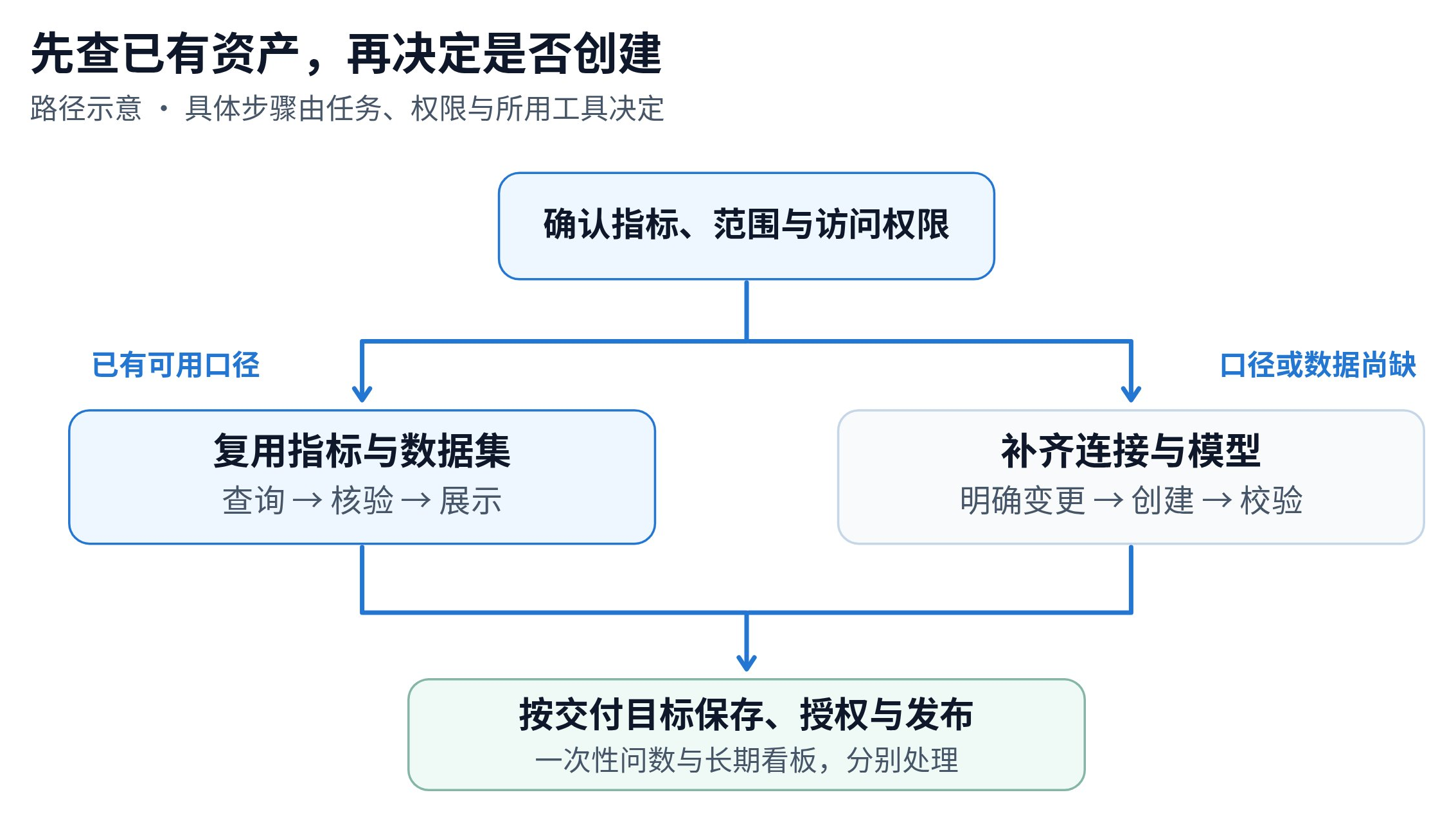
The diagram presents a method for planning tasks. The in-product Data Agent assistant and an external Agent invoking the CLI have different entry points. What can actually be executed depends on enabled capabilities, the current identity, and resource permissions.
Different delivery methods can serve the same analysis goal
| Path | When it fits | Costs to consider |
|---|---|---|
| Reuse existing metrics and datasets | Definitions, dimensions, and data scope already meet the need; suitable for ad hoc questions or further drill-down | Query execution, model calls, and result verification |
| Extend the model and create analysis assets | Relationships, dimensions, or business definitions are missing; multiple people need ongoing access | Model validation, data refresh, permissions, and subsequent maintenance |
| Export for specialized processing | Offline review, a particular file format, or processing in another system is required | Export permissions, file handling, manual processing, and version management |
These methods have no universal speed ranking. Data volume, connection mode, query engine, and filters all affect response time. Saving a dashboard enables reuse of charts, filters, and layouts; whether computation becomes faster still depends on the data processing method and actual queries.
How HENGSHI supports path selection
1. Establish reusable business definitions first. Enterprises can manage data models and metrics in HENGSHI and express business calculations with HQL. Analysts should check existing metric definitions, time fields, aggregation methods, and available dimensions before creating new objects. Using confirmed definitions for the same business question helps reduce repeated modeling and disagreements over metrics.
2. Connect questions to analysis creation. Data Agent can analyze the current page and resources accessible to the user, and perform queries or create charts and dashboards through supported entry points. Users can continue investigating an unusual region or organize frequently needed results into analysis assets. Metrics, filters, and results still need verification at each step.
3. Use CLI and Skills to organize inspectable execution steps. HENGSHI CLI provides structured platform commands. Its accompanying Skills can guide an Agent to inspect the current state, understand parameters, and proceed step by step. The Agent plans and selects tools, the CLI executes specific commands, and the platform server validates permissions and business constraints. Where a write operation supports a preview, inspect its dry-run result before making the change.
Reuse first, then fill gaps. Use existing resources when they meet the need. When new datasets, dashboards, or permissions are necessary, state the purpose, owner, and delivery scope. Teams can include this rule in their Skills.
Example: from an East China sales question to a weekly business meeting
Hypothetical solution example: A retail company wants to review sales trends across East China’s provinces for the last three complete months. The following steps illustrate the method; they do not describe an actual customer project or performance benchmark.
| Step | Handling in HENGSHI | Evidence to deliver |
|---|---|---|
| Clarify definitions | Check whether sales deduct refunds, and confirm the provinces included and the month field | Metric name, definition, and filter scope |
| Find existing assets | Inspect datasets, metrics, and dashboards accessible to the current user | Reusable resources and their limits |
| Complete the analysis | Query by month and province; check missing values, anomalies, and totals | Trend chart, data scope, and verification notes |
| Choose how to save | Retain the analysis for a temporary discussion; save a dashboard, configure access, and check publication when a weekly meeting needs it | Asset location, owner, and usage scope |
If the current model lacks a channel field, the team should add the necessary data and relationships before analyzing channels. If the question is simply “which province declined this month,” it can continue using existing resources. Tool choices should follow the task, avoiding a new set of assets for every follow-up question.
Review costs together with results
A task’s costs can be divided into model calls, query execution, asset maintenance, and human review. Teams can record call counts, execution time, new objects, and review time to compare paths. Query cost and scanned data volume also require execution information from the database or query engine.
- Clear analysis: Which metric, dataset, time range, and filters were used?
- Necessary creation: What new objects were created, and were reusable resources already available?
- Complete delivery: Can the intended users access the result, and do changes require republication?
- Maintainable handoff: Who maintains definitions, refreshes, and permissions, and which execution records should be retained?
Enterprises adopting Agentic BI can use HENGSHI to support consistent metrics, natural-language analysis, asset creation, and delivery. Executing, verifying, and reusing work around the same resources helps teams expand access to analysis while controlling the maintenance burden.