
Article body
Full article
A business review often involves a sequence of questions: examine sales, break them down by region, compare the same period last year, and then inspect a product. Users expect the assistant to understand “continue with the data we just used.” They also expect old conditions to stop affecting results after a change of period or organization.
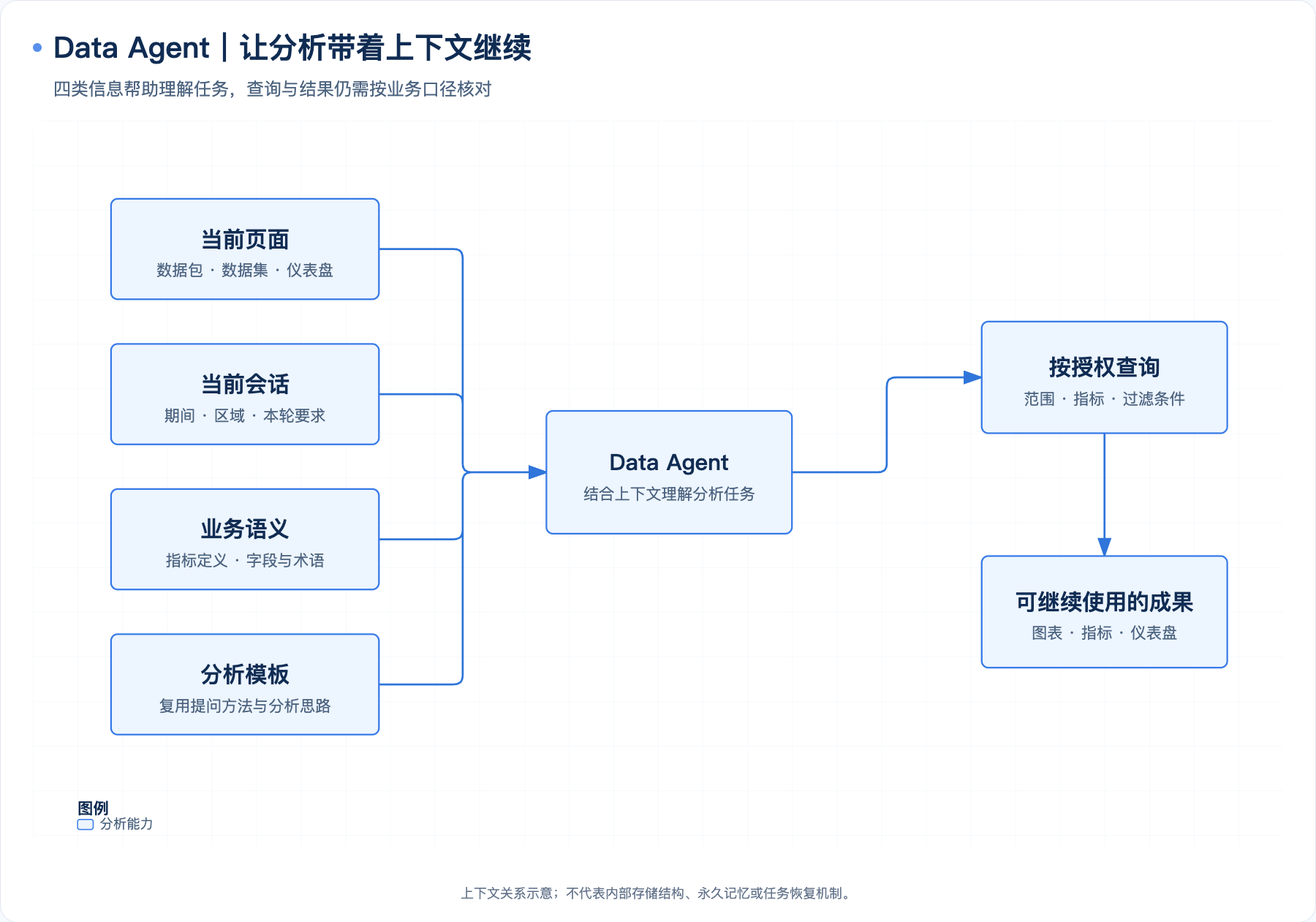
Context engineering in HENGSHI Data Agent connects the current page, business semantics, and conversational conditions to the analytical task. It reduces repeated resource selection and explanations of terminology, while giving data teams places to maintain metrics, knowledge, and analytical methods. The quality of a continuing analysis depends on conversational continuity, correct data scope, and results that can be reviewed.
1. The Current Page Provides a Starting Point
Data Agent can use information about the signed-in account and the page being viewed. Requests made within a particular data package, dataset, or dashboard help identify the analytical object. The Agent can also retrieve relevant resources within the user’s authorized data scope before querying them.
This capability fits everyday workflows. Users can open a sales dashboard and ask about category mix, or ask what a field means within a dataset, without redescribing the resource from across the entire system each time. Integration still requires confirmation of identity, page context, and resource scope. The presence of information on a page does not establish that the model has understood it correctly.
For questions such as “my department,” account attributes and permission configuration also help determine analytical scope. Prompts can help interpret the wording; resource authorization and data permissions must control actual access.
2. Separate Conversational Conditions from Business Definitions
| Information type | Appropriate content | What to verify |
|---|---|---|
| Conditions for this conversation | This month, East China, breakdown by category, or a request to switch to nationwide data | Whether follow-up questions retain or update the correct conditions |
| Organizational business definitions | Net sales, refund treatment, fiscal year, and reporting granularity | Whether metrics and dataset knowledge have business approval |
| Presentation requirements | Display units, chart types, and answer order | Presentation changes without changes to calculation rules or access scope |
| Identity and permissions | Accounts, roles, resources, and row and column permission settings | Which objects and data the user can actually access |
Reading note: Conversational conditions, organizational definitions, and automatic learning serve different purposes. The table is a reading aid, not a representation of internal product state.
3. Reduce Repeated Explanation with Metrics, Knowledge, and Analysis Templates
Metrics hold calculation rules. Turn recurring business logic into metrics with names, descriptions, reporting granularity, and applicable scope, giving later questions explicit objects to use. Clarify ambiguous definitions before executing a query.
Knowledge descriptions supply business meaning. Field descriptions, dataset knowledge, synonyms, and industry terminology can help the Agent find relevant resources. Vectorization supports semantic retrieval; it does not replace correcting bad data, configuring permissions, or validating metrics.
Analysis templates reuse questioning methods. Administrators can maintain analysis templates in Agent tuning. In Agent mode, users choose a template, add conditions such as period and organization, and send it. This suits recurring activities such as monthly business reviews and regional comparisons. Templates preserve reusable question content; they do not mean each run directly reuses old data or conclusions.
These practices build maintainable analytical assets. A correction involving a field, term, or metric should be applied to the corresponding object so that similar questions can benefit from it later.
4. Conversation Context and Automatic Learning Have Separate Controls
The public configuration manual provides HISTORY_LIMIT to control the number of historical conversation entries included in model interactions. Administrators should configure it for the model’s context window, question complexity, and response requirements, and verify behavior in the deployed version. Increasing the number of entries does not preserve every old instruction permanently or guarantee that a model will retain every condition in a long conversation.
Background automatic learning is controlled by SELF_EVOLUTION_ENABLED. The current public manual describes error learning, conversation insights, and preference extraction, with automatic learning disabled by default. It must be explicitly enabled to activate the corresponding learning behavior. Existing explicit settings are retained after upgrades, so inspect the actual environment value.
Disabling automatic learning does not disable normal data queries or conversation summaries. The ability to ask follow-up questions does not demonstrate long-term learning. A correction used in the current conversation does not establish that it has become permanent. Even with learning enabled, its results still need review and maintenance according to business requirements.
5. Test Continuity with a Sequence of Questions
The following is an acceptance example, not real customer data or an internal product state model. Teams can prepare four rounds of sales questions using a fixed data batch and test account:
- “Query this month’s net sales for East China.” Verify the source, net sales definition, and start and end dates.
- “Break it down by category.” Verify that the same period, region, and metric are retained.
- “Switch to nationwide data and compare the same period last year.” Verify that the region changes and that both date ranges and the comparison definition are clear.
- “Use this analysis for the monthly review.” Create or edit the relevant charts, dashboards, and notes through the chosen entry point, then have business users review them.
The Data Agent sidebar suits ongoing authoring and editing within an existing page. ChatBI suits standalone data queries and supports turning conversational charts into dashboards. Acceptance testing should cover each entry point actually used, without assuming that conversations, page state, and write paths are automatically shared.
Repeat testing with different business roles to verify that context supports understanding while the platform still enforces authorization boundaries. For ambiguity, denied access, or failed queries, record the original question and execution process, then correct the relevant stage.
6. Distinguish Saved Assets from Runtime State Across Sessions
Saved metrics, dashboards, analysis templates, and business knowledge provide stable starting points for later work. Teams can also retain verified analytical scope and explanatory notes for the next review.
These assets differ from the runtime state of unfinished Agent tasks. Being able to view conversation history does not prove that a background task continues running. Behavior after a page refresh or session switch must be verified in the chosen operating mode and deployment version. Cross-day, cross-device, or unattended continuation requires the integration plan to specify task persistence, failure handling, and recovery responsibilities.
Model changes also require retesting. Maintaining business semantics in data and metric assets reduces repeated explanation, but models may handle instructions, tools, and context differently. Identical output after switching models cannot be promised.
HENGSHI’s context capabilities help users continue questioning from the current business page and preserve useful analytical methods in metrics, knowledge, and templates. Maintaining these objects and validating conditions and results with consecutive questions makes multi-turn analysis useful in daily business operations.