
Article body
Full article
A working connection shows that the driver, authentication, and network can communicate. It leaves decimal precision, business dates, refund states, and key integrity to be checked. Production also brings late updates, write failures, cross-source joins, and dashboard query load. Using HENGSHI SENSE as an example, this article walks through connection and dialect checks, data preparation and synchronization, and business modeling and consumption.
1. Choose connections for the required reads and writes
Identify where data comes from, who may read it, whether the workflow needs to write data, and where aggregation will run. Treat database support, successful table previews, and use as an ETL destination as separate acceptance checks. For an output connection, verify deployment version support, the write options in HENGSHI, the database account, and target schema permissions. Test a read, a write, and a read back using small samples with binary fields, long text, high-precision decimals, or time zone-aware timestamps.
| Source | Initial connection checks | Preparation for analytics |
|---|---|---|
| Relational databases such as MySQL, Oracle, Dameng, and KingbaseES | Supported versions, drivers, authentication, schemas, identifiers, and amount precision | Fix primary keys, time boundaries, business enumerations, and types |
| Analytical databases such as ClickHouse, Redshift, and StarRocks | Query concurrency, aggregation location, and destination write support | Materialize or aggregate by common dimensions and test under real load |
| MongoDB documents | Choose a native connection or MongoDB BI Connector. Check samples, exposed fields, and types for each path | Standardize null values, nesting, and target grain, and verify counts after array expansion |
| InfluxDB time-series data | Connection, version, time ranges, tags, and units | Aggregate by hour, shift, or another grain in a suitable query or processing layer |
| Denodo virtual views | Source permissions, execution plans, networking, and latency | Maintain views in the existing virtualization layer and consume them through the HENGSHI connection |
| HTTP APIs and files | Authentication, pagination, rate limits, status, file fields, and encoding | Agree on ingestion checks, common business keys, and backfill scope |
HENGSHI connections and analytics expressions can support different sources. Handwritten SQL must follow the target dialect. Test date truncation, null handling, string concatenation, fixed-point decimals, and window functions separately. If the connection, fields, and business model contract stay stable through a database upgrade, downstream references can continue to work. If an output field retains its name but changes precision or meaning, rerun checks for both datasets and metrics.
Give each connection a field and dialect checklist
Prepare four minimal cases: a fractional amount, a timestamp that crosses a date boundary when converted, a longer-than-usual product description, and a null. Compare the source value, connector preview, and the value read back after writing before increasing the historical migration scope. If individual values look right but aggregates differ, inspect precision, encoding, and implicit type conversion and identify the responsible query or stage. Record the approved connector and database versions together because their capabilities can vary by version.
Relational adapters usually influence query generation, type inference, and read/write behavior. Agree who owns each expression. Platform-generated queries use the product connector, while their authors maintain retained source SQL or custom functions. On upgrade, test calendar boundaries in platform expressions, verify source-side custom expressions, and reconcile the results. When migrating a database, those boundaries help identify whether to replace a connection, change a field mapping, or revisit the meaning of a metric.
2. Prepare APIs, document stores, and time series according to their needs
API query datasets can configure HTTP JSON requests and pagination. For reusable integrations with external APIs, evaluate a built-in API source adapter or custom implementation. The integration owner maintains authorization, rate limits, cursors, and handling for field changes under the provider’s rules. When a vendor sends daily files, make each batch identifiable, recoverable, and reconcilable before passing it downstream. HENGSHI exposes results through API services. Project documentation should identify which APIs ingest external data and which deliver analysis to the host application.
A MongoDB collection may contain scalar fields, nested documents, and empty arrays. Use samples to verify field visibility and type consistency, then extract or expand to the business grain. A session with several products still calls for transaction facts at order-line grain and independent deduplication of behavior events by event identifier. Device telemetry can be aggregated into time windows in the source, warehouse, or a supported processing node. Save sums and counts for averages to avoid averaging hourly means directly. Data governance sets raw retention and traceability rules.
3. Configure ETL and bulk synchronization at the right grain
Data integration projects connect input, transformation, and output nodes to filter, convert, join, combine, and aggregate data. Before building a flow, record each input’s primary key and data date and each output’s table, owner, and update mode. Use node previews to inspect fields and exception samples. Reconcile production against actual outputs and use preview samples for debugging.
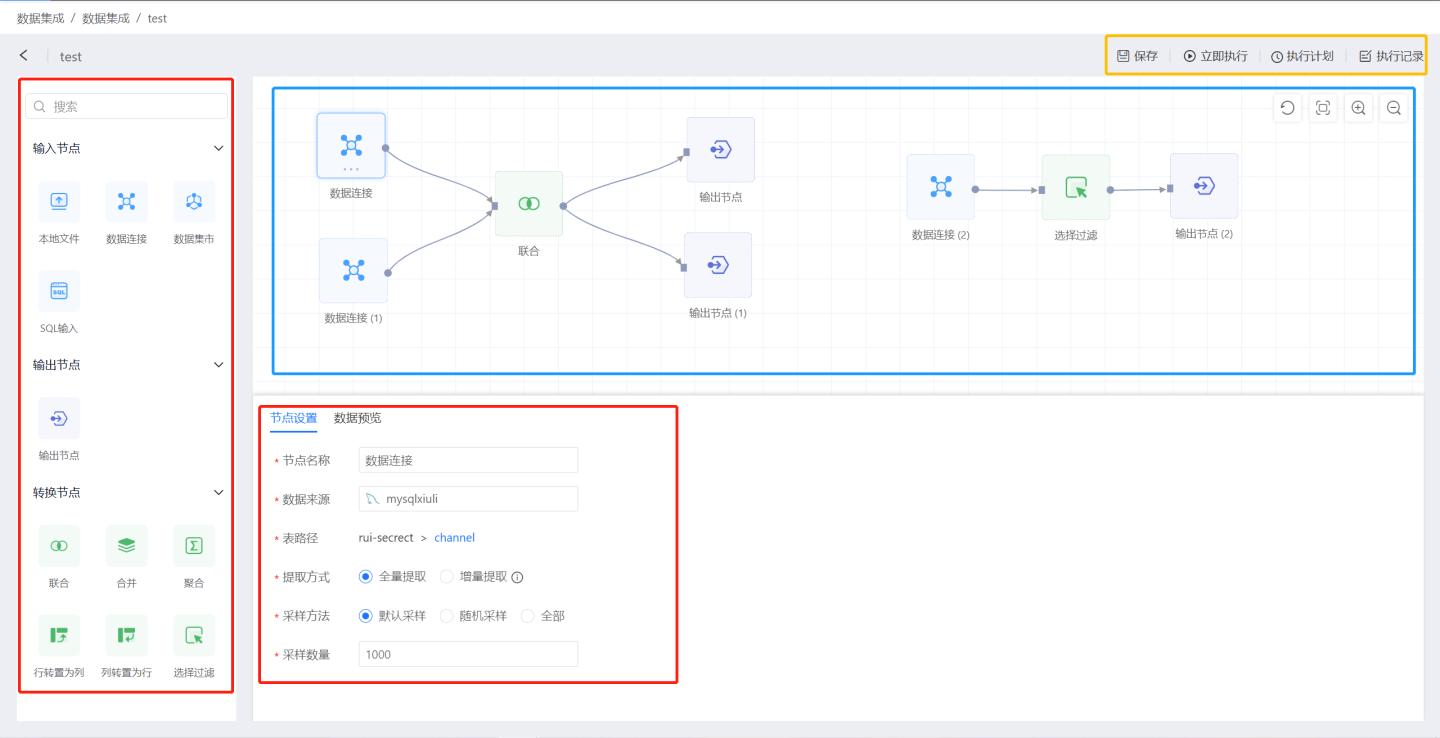
HENGSHI documentation screenshot. A data integration project connects input, transformation, and output nodes.
Bulk synchronization configures full and incremental extraction by table. ETL supports flows that clean, transform, and combine data. The two paths maintain separate incremental positions. The documentation describes bulk synchronization taking the highest incremental key from the destination table, while a data integration input node maintains its own position. The first incremental run generally still processes existing data. In both paths, verify that the source incremental field is monotonic and that the destination key identifies a business record. An increasing order number can miss an update to an older order. Include duplicate timestamps, late refunds, and physical deletes in acceptance checks, with a backfill or reconciliation process where needed.
| Refresh or write path | When to consider it | What to verify |
|---|---|---|
| Full recomputation | Small datasets that can be rebuilt within the window | If a rebuild affects permissions, views, or refreshes, evaluate how to switch over |
| Incremental append | Stable monotonic update keys and an event-level destination | Duplicate rows after replay and coverage of late arrivals |
| Incremental keyed update | Business records can be corrected repeatedly | Key uniqueness, destination update options, and historical backfill |
| Separate backfill and reconciliation | Interface gaps, late changes, or an unreliable source watermark | Backfill dates, approver, and batch-level reconciliation results |
This generic SQL checks for duplicates in a destination order fact with one row per tenant, channel, and order. An empty result confirms that duplicate check. Compare source counts, amounts, data dates, and sampled original orders as well.
SELECT tenant_id, channel_id, order_id, COUNT(*) AS copies
FROM bi_orders
GROUP BY tenant_id, channel_id, order_id
HAVING COUNT(*) > 1;
Test incremental behavior with a historical correction and a replay
Suppose an order from last week is updated today after receiving a partial refund. With order number as the only incremental key, the run can succeed and miss the change. Verify that a source timestamp or sequence captures updates and test multiple records with the same timestamp, out-of-order arrivals, and historical corrections. If no reliable ordering field exists, use a reconcilable business-date range for backfills or periodic reconciliation. Record when the update happened, who initiated the backfill, and which batch the dashboard begins using.
On the destination, replay the same batch and check that keyed writes leave a single business row. Simulate a destination lock wait during a run, inspect already-written results, and decide whether to replay. When a source adds a field or changes a type incompatibly, check whether your settings fail, update the field, or rebuild. Validate permissions, dependent views, and historical samples on a test table for any rebuild path before allocating a production window.
4. Turn compatible fields into reusable business models
In HENGSHI, datasets can standardize units, time zones, missing values, and business dates. Logical models record relationships and cardinalities, and business metrics reuse calculations. Data marts can organize packages, models, and access. When replacing a source, preserve stable fields and business meanings for downstream consumers and retest affected metrics and dashboards. Verify individual contracts whenever source behavior or field semantics change.
Consider where multi-table joins will run. The HENGSHI documentation describes direct joins between datasets from the same source and use of the acceleration engine for cross-source datasets, or preparing same-source datasets in an existing warehouse. One-to-many relationships can inflate amounts. Aggregate refund or behavior details to the required grain first. For shared relationships in a model, follow documented cardinality and structural constraints. Verify metric definitions and totals when analyzing several fact tables by a shared dimension. Use aggregate datasets and suitable acceleration for common summaries and test complex joins and cross-source execution with real data and query plans.
To support reuse, allow multiple applications to refer to maintained assets through data marts. If an asset must be copied to another workspace, verify field mappings, expressions, refresh rules, and grants and assign ownership of the source definition. If metric values diverge across applications, check the actual definitions and batches before tracing the source jobs. Record where copies came from and when a version took effect to help owners identify affected reports.
Use a handoff table to route each change
| Change | Impact to assess | Who handles it |
|---|---|---|
| First connection to a domestic relational database | Driver and protocol, precision, read/write paths, and dialect samples | Data platform and DBAs |
| New API enumeration or pagination behavior | Collection coverage, historical replay, and business status mappings | API owners and data engineering |
| Duplicate key in a dimension | Row counts before and after joins, totals, and query access scope | Model and metric owners |
| Report shows the previous batch | Source readiness, synchronization state, and metric consumption | On-call staff and dashboard owners |
With a model shared by several applications, a recovered interface outage can affect the corresponding warehouse batch, and a metric definition change can affect historical comparisons. Show the data date in reports, retain versions and execution records, and allow report owners to locate both old and new definitions if results need recalculation. Direct connections and materialization can coexist by business topic. Evaluate source constraints, concurrency, freshness, and operating effort for each one.
5. Accept delivery when data can be replayed and recalculated
Start with one transaction source and one supporting source. After a successful initial batch, simulate an old order correction, an incremental replay, a new field, and a temporary destination write failure. Check reported job success against expected source partitions, destination results, and downstream data dates. Use execution logs, source-to-destination reconciliation, and dashboard refresh records to see each stage. For high-frequency transaction sources, measure latency, success, and load. Prioritize row counts and business amounts for archives and pagination completeness and change handling for APIs.
Deliver metrics and models with named owners. A dashboard amount should lead to its batch and source orders. A failed incremental job should lead to the responsible task and a backfill procedure. Once both work, add databases, raise concurrency, or introduce new self-service analytics entry points in stages.
About HENGSHI
Founded in 2016, HENGSHI develops Agentic BI for the Data+AI era. Its enterprise analytics platform HENGSHI SENSE works with the HENGSHI Digital Employee, the HENGSHI CLI execution engine, and the privately deployed HENGSHI BOX to offer an integrated platform. With a decade of BI experience and its Powered by Hengshi partner strategy, HENGSHI works with software providers across industries to deliver private AI analytics for enterprise operations and decision-making in manufacturing, finance, retail, and government.