
Article body
Full article
A business review can begin with “Which regions lost revenue?”, continue with “Put the findings on a dashboard,” and end with “Schedule refreshes and notify the owners.” Those requests have different execution responsibilities, from querying data to creating platform resources and changing another system.
HENGSHI SENSE 7.0 gives natural-language analysis and platform authoring distinct execution modes. Metrics, data permissions, standard interfaces and execution receipts support both. CRM writes or outbound messages also require authorization and integration on the target system.
1. Separate execution boundaries
A single product or multiple cooperating agents can handle the work. The runtime must know which actions are available, the server must enforce permissions, and analysis assumptions need authorization before becoming resource changes.
HENGSHI’s query mode reads, follows up and explains data. Operation mode can create, modify and configure supported platform resources within the current account’s permissions. Switching modes starts a new conversation. A casual request to make a change does not grant write access to an existing analytical session.
| Dimension | Query mode | Operation mode |
|---|---|---|
| Goal | Understand figures, definitions and potential causes | Turn an explicit request into a resource change |
| Example | How have regional sales changed this year? | Create a monthly sales dashboard in the Sales application |
| Output | Text, charts and data sources used | Affected resources and execution results |
| Access | Data the current user can query | Resources the user may edit and the mode exposes |
| State | Queries leave business resources untouched | Datasets, metrics, charts and other resources may be created or edited |
| Confirmation | Clarify scope or definition if needed | Follow the rules for the operation. Schedule creation requires a proposal and confirmation |
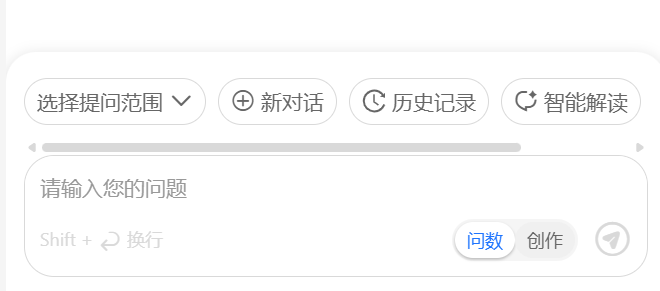
The figure comes from HENGSHI product documentation. Creation opens platform resource operations. Switching execution mode starts a new conversation.
2. What analysis delivers
2.1 Scope the question with metrics and data
An investigation into falling revenue starts with the revenue definition, comparison periods, organization and currency. HENGSHI metrics can capture the base calculation, qualifiers, dimensions and timeline. Data Agent queries and follows up inside the authorized scope.
Compare quarterly net sales, break the change down by region, channel and product, then inspect order count, average order value and refunds for the largest contributors. Identifying the largest drop narrows the investigation. A causal claim needs more evidence.
2.2 Keep execution evidence
The 7.0 processing view shows tool parameters, outputs and errors. Responses can include charts and source information. Business users can check which data was used, and data teams can investigate definitions, joins and results.
Separate facts, interpretations and hypotheses. A query can establish that East China revenue fell. Attributing it to a promotion requires evidence about policy dates, customer behavior or orders. State the gaps and how to verify them.
2.3 Reusing results introduces a separate save permission
HENGSHI ChatBI lets users explicitly add a response chart to an existing dashboard or create one from a conversation. The target application and dashboard require the relevant permissions. Read-only sharing and application portal scenarios have their own limits.
Queries stay read-only. Saving is an explicit resource write by the user. Together, these operations can turn an ad hoc analysis into a reusable team asset.
3. What operation mode can deliver
HENGSHI operation mode uses standard platform interfaces. It reads the target state first and uses identifiers from successful steps to continue a multi-step task.
| Area | Supported authoring examples | Verify after delivery |
|---|---|---|
| Data preparation | Create or edit datasets, fields, relationships and metrics | Field types, formulas, joins and previews |
| Application organization | Configure applications, folders, shared dimensions, parameters and portal content | Ownership, names and business scope |
| Analytics authoring | Create or edit charts, dashboards, page elements and layouts | Metrics, filters, units and presentation |
| Metric Center | Create or modify subject areas, analysis dashboards and featured metrics | Definitions, categorization and use scope |
| Data integration | Create or modify pipelines and nodes and preview nodes | Inputs, outputs, transformations and sample results |
| Scripts | Write scripts and script paragraphs | Code intent, inputs, outputs and requirements before execution |
| Automation resources | Discover and validate schedules and alerts, and propose schedule creation | Cadence, time zone, target and confirmation status |
An agent can read order data and existing metrics, add a business metric and build a dashboard by month and region. The resulting assets should be available for users to open and maintain.
Authoring, execution and external effect are separate actions. Track script content separately from its execution, dashboard creation separately from publication and a schedule proposal separately from a created schedule.
4. Who authorizes a write?
4.1 The user defines the goal and the platform enforces access
“Create a monthly net sales dashboard in the Sales application, based on payment date, with amounts in ten thousand yuan” is a specific request. Operation mode executes it within the user’s permissions.
Server-side checks enforce permissions. Prompts, skills and page context cannot extend them. An administrator account still does not expose all system interfaces through operation mode. Resource authorization and product support are separate checks.
4.2 Routine authorized authoring can proceed in sequence
After an explicit request authorizes supported work, the agent can read, create, edit and report across several steps. Teams can define ownership, scope and acceptance without repeating authorization for every low-risk operation.
Clarify real ambiguity, such as identical application names, two possible metric definitions or a request to “optimize” without a target.
4.3 Schedule creation uses a proposal followed by confirmation
In HENGSHI 7.0 the Agent proposes a schedule and the user confirms it. The system rechecks permissions, resource, content and validity when confirmed. A successful receipt establishes creation.
Review the target, action, cadence, timing and data impact. Resource or permission changes can invalidate old assumptions. Operation mode currently excludes schedule updates, deletion, enablement and disablement.
4.4 Use the owning entry point for other actions
Publication, sharing, grants, exports, user and permission administration, credential changes, permanent resource deletion, script execution and sending alert notifications fall outside the general scope of operation mode. Data Agent does not change system settings.
Use the corresponding product entry point or independently authorized integration. Confirmation does not expose an unavailable interface. This allows routine analysis authoring while preserving responsibility for release and administration.
5. Responsibilities of the CLI, runtime skills and other systems
5.1 The CLI supplies standard execution interfaces
HENGSHI CLI provides structured outputs for resource discovery, queries, datasets, charts and dashboards. An external Agent or workflow can invoke documented steps, read the payload and decide how to proceed.
Replace the application, dataset and field with authorized objects. This example checks fields before querying.
hbi dataset fields --app 4812 --dataset 3 --output json
hbi data-model query --app 4812 --dataset 3 "SUM({amount})" --output json
Where supported, dry-run previews an intended request or change before approval or execution. Check the command help and release. A preview neither changes the resource nor guarantees that an external system can roll it back.
A standalone CLI can expose more commands than the built-in Data Agent. Each entry point follows its own execution identity, permissions and capability limits.
5.2 Runtime skills maintain methods and rules
HENGSHI 7.0 administrators can upload, enable and roll back skills that capture business knowledge, analytical steps and tool use. A sales review skill can establish comparable stores, check income and refunds and then drill into regions and products.
Skills guide how to work. Platform interfaces enforce what is allowed. CRM, messaging and approval access need their own grants. Test revised business methods on representative work before sharing more broadly.
5.3 Cross-system actions need a contract with the target
A CRM write needs a target tenant, account, field mapping, deduplication and allowed statuses. A notification needs confirmed recipients, content and channel. HENGSHI results can feed the action under the target system’s authorization.
HENGSHI JARVIS offers consulting for Agent knowledge indexing, workflows and delivery governance. Design and verify connectors, automated actions and approval paths for each project.
6. From revenue analysis to a maintainable dashboard
Suppose operations asks to analyze quarterly changes, build a monthly review dashboard and prepare a data refresh schedule. This is an illustrative acceptance scenario.
| Stage | Work | Evidence and responsibility |
|---|---|---|
| Define the question | Confirm revenue, payment date, refunds and scope | Business owner confirms the definition and records the scope |
| Analyze | Compare the total and drill into region and product | Review sources, charts and processing details, and list facts and hypotheses |
| Check metrics | Inspect current metrics and define additions if needed | Data owner verifies formula, dimensions and timeline |
| Create resources | Build charts and dashboard in an editable application | Open the resources and inspect metrics, filters, layout and units |
| Propose a schedule | Prepare the needed data refresh | User checks target, cadence, time zone and impact |
| Confirm execution | System revalidates and creates upon confirmation | Successful receipt and actual schedule state establish completion |
| Follow up | Review refresh runs and dashboard freshness | Operations and business verify continued usability |
Company-wide publishing or messaging a sales group is a separate action for the relevant product or integration. The analysis uses existing data and metrics, authoring creates maintainable platform assets, and the schedule enforces a confirmation boundary.
7. Make timeout and partial failure traceable
Use the server result and actual resource state to determine a write’s outcome. A timeout can mean that the server did nothing or that it succeeded without returning a response. Checking before repeating steps avoids duplicates.
HENGSHI execution rules read current state, continue from successful object identifiers and report completion on success with the affected resources. Permission or validation rejection means the action did not run. Closing a page does not establish cancellation. Check the saved session and run state.
For bulk or cross-system tasks, keep a record that lets operators retry the affected part.
| Record | Purpose |
|---|---|
| Target and requested change | Establish which resources should change |
| Successful steps and identifiers | Avoid recreating successful work |
| Failed steps and error details | Separate permission, parameter, validation and network issues |
| Pending confirmation or unknown result | Distinguish proposals and timeouts from success |
| Available recovery method and owner | Identify correction, reversal or manual recovery according to the target |
This is a workflow design guide. Verify each external system’s rollback and idempotency mechanisms during integration and verify the contents and target before an irreversible action.
8. Test success and where execution should stop
Include normal authoring, duplicate names, ambiguous definitions, missing permission, unsupported operations, changes before confirmation and partial failures in acceptance testing.
Open the result and check its application, preserved constraints and maintainability. Verify that denials stop execution, that partial outcomes are accurately reported and that successors can operate the assets.
HENGSHI connects data queries, metrics and authoring. Clear task authorization, platform permissions, confirmation rules and verifiable receipts make responsibility for writes explicit in real business work.
About HENGSHI
Founded in 2016, HENGSHI Technology develops Agentic BI for the Data+AI era. Its enterprise analytics platform, HENGSHI SENSE, works with the HENGSHI JARVIS Digital Employee, HENGSHI CLI execution engine and HENGSHI BOX for private deployment. Drawing on a decade of BI experience and the Powered by Hengshi ecosystem, HENGSHI helps software vendors and enterprise groups in manufacturing, finance, retail and government deploy trusted AI analytics in their own environments and use them for business decisions.