
Article body
Full article
A regional manager posts a dashboard screenshot to a group chat and asks why East China’s conversion rate fell. The analyst recalculates with a revised definition and gets a different number. A week later, the old image is still being forwarded. Discussion loses the data scope, screenshots travel outside application permissions, and authoring changes can be mistaken for a formal release. HENGSHI SENSE connects metrics, dashboard collaboration, subscriptions and release snapshots. The organization assigns responsibility for discussion, assessment and approval.
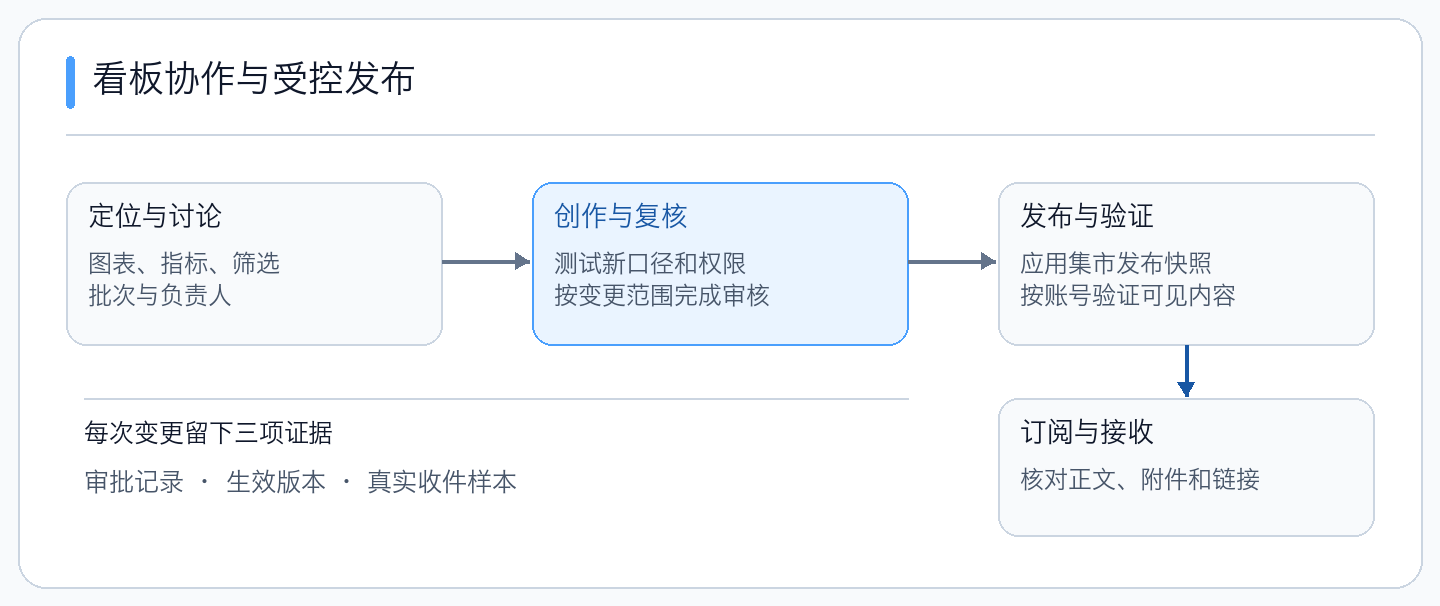
Figure 1. A dashboard workflow for discussion, review, release and subscription delivery.
1. Tie the discussion to a business object
A reviewable comment identifies the chart, scope and specific number. A regional manager could report a change in East China direct-store conversion in the first week of November and include the published link, metric, filters, data batch and screenshot time. An analyst can open the link, reproduce those conditions and tell whether the denominator changed or the underlying performance declined. A screenshot illustrates the symptom. The original dashboard with its filters enables recalculation.
HENGSHI metric analysis dashboards can be shared with editors or viewers. Inside an application, teams can collaborate, create a copy or export a template. Use collaboration to maintain one dashboard together. Compare current and candidate definitions in a copy and update the formal application after review. HENGSHI charts support rich-text notes and can show field and metric descriptions. Maintain interpretations relevant to all viewers alongside the dashboard. When teams need comment threads, mentions or follow-up reminders, capture them in their configured collaboration platform with the dashboard link and filters. Verify native support in the deployed version.
In the illustrative scenario, the sales report uses a new lead deduplication rule for the first time. Include old and new denominators, recalculations for the same week and effective dates in the tracking item. The metric owner can confirm that the definition explains the change or request further investigation. If an upstream batch is missing, hand it to the data team and keep the follow-up record and reviewer. The next owner should be able to trace the conclusion to the dashboard and data.
2. Use subscriptions for reports and alerts for exceptions
HENGSHI application subscriptions can deliver dashboards immediately or on a schedule through email, WeCom, Feishu, webhook and DingTalk, depending on configuration and account binding. Application metric alerts check chart thresholds with their own frequency, trigger and notification settings. The v6.3 guide notes that metric alerts are unavailable in the published application state. Check where the alert lives and how recipients access its context. Both routine reports and exception alerts need an owner, trigger and review path.
| Scenario | Entry point | Configuration and acceptance |
|---|---|---|
| Review yesterday’s performance at a morning meeting | Application subscription | Schedule after close and link to an authorized dashboard |
| A store drops below its fulfillment threshold | Application metric alert | Check the rule, interval, first alert and repeated alert behavior |
| Metric consumers need to hear about a definition change | Change record and notification workflow | Use lineage and the external dependency inventory to identify recipients, then record effective time and acknowledgment |
| An analyst follows up on a trend | Dashboard recalculation and collaboration record | Capture application, chart, metric, filters, batch and owner |
Design the payload first. A routine subscription can include a short summary, reporting date and a link. An alert needs the metric, threshold, check time and person responsible. Distinguish confirmed findings from open questions. Treat screenshots and spreadsheets as data delivered at send time, and check recipients, detail and forwarding exposure separately. Files recipients already saved are handled through the enterprise data process even if access changes later.
3. Test page permissions and delivered data separately
The HENGSHI subscription guide distinguishes internal and external email recipients. Internal recipients receive data according to the application’s data-permission configuration. External email recipients have the application author’s data access for generating the message. Validate channels, recipients and advanced export settings individually. Determine whether a link requires login, uses public sharing or is embedded in a host and verify the resulting data scope.
Sign in as East China and North China store managers and verify that each sees authorized stores only. Send the same subscription to both accounts and compare body, images, attachments and linked page. Then send authorized test data to a simulated external address and verify what it received. When personnel change roles or an account is unbound, sample recipient lists, delivery logs and links again. Record delivery success separately from access eligibility.
4. Use the boundary between authoring and published states
HENGSHI SENSE creates an application snapshot on publication and makes it available in the App Marketplace. Detail access and export can be configured during publication. Dashboard layout and configuration edits in the authoring area reach the published area through republication. Underlying source data can keep refreshing. Record the configuration version and data batch separately. For embeds and links, the guide favors the app hash because an app ID can change on republication.
Use this boundary to implement approvals. The page owner can approve a layout correction. For denominator changes, sensitive fields and expanded external visibility, have the metric and permissions owners review their respective scope and an authorized role publish. Where licensed and enabled, application version management can preview and restore versions. Versions include dashboards, datasets, models and parameters. Check permissions and connections separately. Approval steps and organizational roles depend on the project.
The following illustrative YAML is suitable for an internal change request or workflow system.
change_id: BI-2026-017
application: Weekly Store Operations Report
dashboard: Regional Operations
metric: In-store Conversion Rate
data_cutoff: "2026-11-08T23:59:59+08:00"
change: Use eligible leads as the denominator
validation:
  - Reconcile old and new denominators
  - Check viewing and exports as East and North China store managers
  - Test subscription contents for both account types
approval:
  metric_owner: Definition and effective date confirmed
  access_owner: Page and delivery scopes verified
  release_owner: Published state and links pending verification
status: Pending publication
5. Find all consumers before a metric change goes live
HENGSHI business metrics can record definitions, expressions, dimensions, timelines and qualifiers. The Metric Marketplace can show in-platform lineage. Headquarters maintains group performance standards, and subsidiaries register distinct operational metrics with their purpose and differences. Run a candidate definition on a test dashboard with prior-period and corner cases. Combine platform lineage with the organization’s inventory of consumers, including exports, third-party subscriptions and embedded portals. State the effective time, whether history is recalculated, the affected dashboards and their approvers.
Suppose East China had 60 sales and 1,200 raw leads in the first week of November, yielding 5%. Removing 200 invalid or duplicate leads gives a denominator of 1,000 and a 6% rate with the same sales. The one-percentage-point difference comes from the definition. Compare periods under the same rule before drawing a trend conclusion. Keep a reconciliation sample before publishing. Afterward check the subscription body, link, recipients and published snapshot.
6. Rehearse the entire workflow
| Stage | Situation to simulate | Passing evidence |
|---|---|---|
| Discussion | Two regions or data batches are confused | Chart, filters and batch reproduce the original figure |
| Subscription | A store manager changes roles and an external recipient lacks an account | Samples, logs and authorized scope reconcile for both recipient types |
| Release | Changes are held after authoring | The formal page still uses the approved configuration and the effective time is clear |
| Recovery | A release with the wrong filter has already triggered a message | The restored dashboard reads correctly and the message is corrected separately |
| Definition change | A subsidiary still has an old exported report | The consumer inventory records the historical snapshot, owner and follow-up |
The workflow shows whether an issue can be reproduced, who received a message and when a change reached users. HENGSHI metrics, analytics applications and subscriptions provide points to connect this evidence. Assign owners for the decision, consumer inventory and case closure so a published dashboard can guide the next investigation.
About HENGSHI Technology
Founded in 2016, HENGSHI Technology develops Agentic BI for the Data+AI era. Its enterprise analytics platform, HENGSHI SENSE, works with the HENGSHI Digital Employee, HENGSHI CLI execution engine and HENGSHI BOX for private deployment. Drawing on a decade of BI experience and the Powered by Hengshi ecosystem, HENGSHI helps software vendors and enterprise groups in manufacturing, finance, retail and government deploy trusted AI analytics in their own environments and use them for business decisions.