
Article body
Full article
When users say a number is wrong, they have usually noticed a difference from experience, a report or a ledger. Start with a reproducible question. Capture what they asked, which data was used, how the metric was calculated and which result served as the reference.
An accurate answer requires an end-to-end chain that finds authorized data and knowledge, interprets the business metric, runs the query and explains the result. HENGSHI brings dataset knowledge, metrics, resource permissions and Data Agent execution together so teams can trace the discrepancy and maintain the repaired assets.
1. Find the first discrepancy across three layers
Retrieval, semantics and execution are diagnostic perspectives. Retrieval can use catalogs, keywords, model metadata or vector search. Execution can go through HQL or platform query interfaces. These layers can exist in a single service, and natural-language analytics can involve more than a model generating SQL.
| Layer | First question | Evidence to compare | Where to make a correction |
|---|---|---|---|
| Retrieval and resource discovery | Did the query find the right data and guidance? | Application, dataset, field descriptions, knowledge recency and access scope | Resource scope, metadata or dataset knowledge |
| Business semantics | Do the metric, time, dimensions and qualifiers match? | Definition, formula, unit, timeline and clarifications | Atomic metrics, business metrics or knowledge |
| Query and execution | Did the query implement the agreed definition? | Query parameters, tool output, errors, details and data recency | Query expression, relationships, filters or data preparation |
Check authorization and freshness throughout. An absent field could come from stale guidance, the wrong dataset or an invalid expression. A plausible figure might use the wrong date range. Use the symptom to narrow the search and the evidence to identify the first divergence.
Hold identity, application scope, query time and data snapshot constant when reproducing an issue. If finance reconciles an account in the morning and operations queries it after new orders arrive in the afternoon, two correct calculations can still differ.
2. Retrieval finds the right resources
2.1 Start within the authorized scope
HENGSHI SENSE 7.0 Data Agent supports queries scoped to an application or data package, a metric subject area or a saved dashboard. Where preselection is optional, it looks within the current user’s accessible resources. Multiple plausible matches call for clarification, and the response identifies the actual application or dataset used.
A group might have separate Operating Sales and Financial Revenue data packages. The question “How much revenue have we made this year?” could refer to order value or recognized accounting revenue. Clarifying purpose and scope is more effective than retrieving more candidates. The chosen scope stays fixed in a conversation. Start a new conversation to switch applications or subject areas.
Data scope is governed jointly by HENGSHI resource boundaries and permissions. Prompts alone cannot enforce confidentiality. An application can use multiple datasets with supported relationships. Cross-application joins are unavailable in 7.0 natural-language queries.
2.2 Explain how knowledge is used
Dataset knowledge in HENGSHI can record definitions, synonyms, default filters and time grain. Add precise descriptions for fields and metrics. Before building synonyms for GMV, transaction value and sales, confirm that they really mean the same calculation.
For example, “Net sales use payment date, deduct completed refunds and are expressed in yuan. Exclude test orders. Average order value uses distinct orders as its denominator.” This gives the user and Agent more direction than “Amount field for sales analysis.”
If a field or metric changes, check the dataset, knowledge, existing charts and representative questions together. A documentation change can leave a stale formula behind. A formula-only change can leave users interpreting the result under the old name.
3. Semantics turns definitions into reusable metrics
3.1 Give each name a precise calculation
In HENGSHI, atomic metrics capture reusable base calculations. Business metrics add qualifiers, dimensions and time axes. Multiple metrics can reuse the dimensions and conditions of a shared grain. This lets recurring questions use established business metrics.
Group revenue, regional revenue and channel revenue can share a base calculation while making organizational scope and qualifiers explicit. Whether revenue includes tax, and which period absorbs a refund, belong in the business definition.
3.2 Grain errors can be harder to spot than syntax errors
Switching from day to month changes how several metrics must be aggregated.
| Metric type | Common mistake | Correct calculation to define |
|---|---|---|
| Additive metric such as sales | Summing an order multiple times after joining it to several rows | Define fact grain and relationships before aggregation |
| Ratio such as average order value | Averaging daily averages to get a monthly average | Reaggregate numerator and denominator for the month and divide |
| Point-in-time value such as month-end inventory | Adding daily inventory snapshots | Specify beginning, ending or average inventory |
| Distinct customer count | Adding the distinct counts for individual channels | Deduplicate across the entire scope, including cross-channel customers |
A successful query can still break these business rules. HENGSHI’s metrics and models provide a place to maintain them, and Data Agent uses those resources and explanations when it answers.
3.3 Clarify missing material conditions
“Last month’s revenue” can depend on the calendar or fiscal month, payment or recognition date, currency and comparable organization scope. For finance and performance reporting, define which defaults are acceptable and which conditions need user confirmation. HENGSHI Data Agent can clarify fields, definitions and scope where necessary. Business owners maintain the rules that make those clarifications meaningful.
4. Check what actually ran
After checking the resources and metrics, review execution for missing filters, joins that multiply rows, inconsistent date boundaries, stale imports and confusion between null and zero.
For example, the relationship between orders and order items is one to many. Summing the order total after joining exaggerates revenue if it is repeated on each item. Using item count as order count pushes average order value down. Inspect the model and aggregation expression. Repeating the question alone may reproduce the same error.
HENGSHI supports row and column permissions and previews of rules. When comparing a region manager’s figures with headquarters figures, verify whether the differences follow legitimate authorization differences and check the application’s data permission mode. Verify the permissions and inheritance behavior of derived datasets separately.
No matching data, lack of access and query failure are distinct outcomes. Preserve that distinction in investigation notes and responses. Empty data need not mean a metric is zero. Lack of access calls for honoring the restriction.
5. Trace the average order value error to its formula
Assume the following order item details fall in the same time range, with yuan amounts and consistent treatment of refunds and order status. The values are illustrative.
| Order | Item | Net sales |
|---|---|---|
| A001 | Item 1 | 100 |
| A001 | Item 2 | 50 |
| A002 | Item 3 | 150 |
Net sales total 300 yuan across two orders, so average order value is 150 yuan. Counting all three item rows as orders gives 100 yuan. Both results render successfully, but their denominators represent different business objects.
Confirm the answer used the correct order dataset. Check the average order value definition. Verify that the actual query counted distinct orders. Compare the result with a reference query using the same identity and period. If the definition is wrong, revise the metric. If it is correct and was used incorrectly, revise the query or instructions.
Saving the correct formula as a reusable metric with a preview lets the same rule serve future charts and queries.
6. Retain the evidence needed for investigation
HENGSHI 7.0 responses can include text, charts and source scope. The processing view exposes tool call parameters, outputs, errors and failed steps. Record the question, time, conversation and turn IDs and use Copy full log to give an administrator the details for investigation.
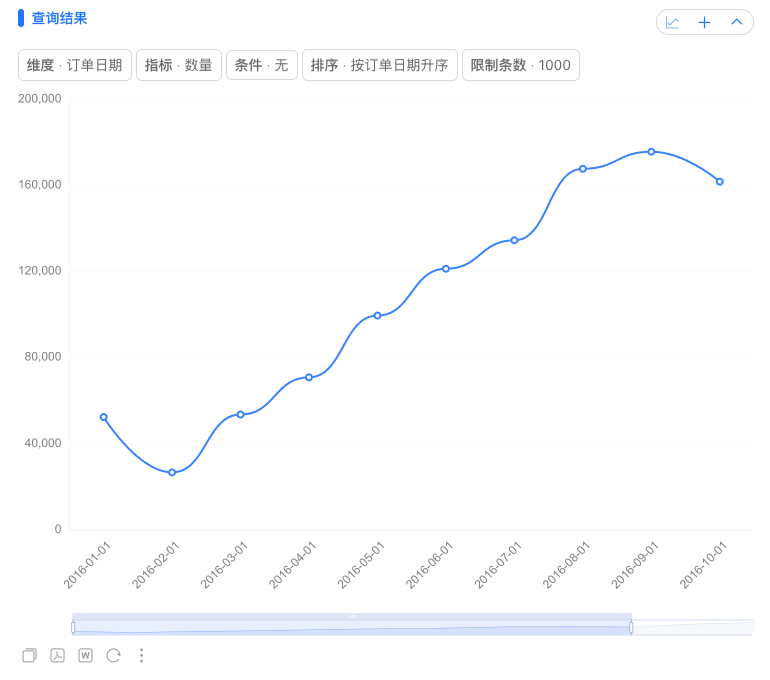
The figure uses coffee sales test data from the HENGSHI product documentation. The dimensions, metrics, conditions and sorting above the chart show how the system actually answered. It demonstrates an inspection interface using test data.
The following six kinds of evidence may be distributed across conversations, resource details and runtime logs.
| Evidence | What to verify | Where to look in HENGSHI |
|---|---|---|
| Question and expected value | Exact question, context, expected figure and reference | Conversation history and user feedback |
| Source | Application, dataset, subject area and update time | Source details and resource information |
| Business definition | Formula, unit, timeline and qualifiers | Metric management and knowledge |
| Actual execution | Query parameters, returned result and failed step | Processing view and full logs |
| Running identity | Requester, actual visibility and permission mode | Account and resource permissions |
| Final output | Agreement between text and chart, and disclosed limitations | Answer and result charts |
A sample internal investigation template follows. These are suggested ticket fields.
question: "What was average order value last month?"
business_scope: "Sales application / paid orders"
time_definition: "Payment date / confirmed calendar month"
metric_definition: "Total net sales divided by distinct order count"
reference: "Verified query with the same identity and scope"
actual_result: "Record the answer and unit"
related_records: "Record time, conversation ID and turn ID"
confirmed_difference: "Record the first divergence before inferring the root cause"
Check for customer information, sensitive details and credentials before forwarding the record. Keep the evidence needed for diagnosis and share it within the organization’s authorized scope.
7. Make the repair available to the next query
Make the change in the asset that owns the problem. Complete unclear field descriptions, revise an incorrect metric and turn a validated analytical sequence into a runtime skill. HENGSHI 7.0 lets administrators upload, enable and roll back skill versions so teams can maintain domain knowledge and methods. Skills guide existing tools under existing resource permissions.
After the fix, also query the metric with different dates, regions, wording and users with least privilege. This shows that the rule works across representative cases.
Reliable natural-language analytics requires ongoing maintenance of data, metrics, permissions, execution and feedback. HENGSHI connects these through managed assets. Business users can ask, data teams can verify definitions, administrators can trace execution and teams can reuse verified methods.
About HENGSHI
Founded in 2016, HENGSHI Technology develops Agentic BI for the Data+AI era. Its enterprise analytics platform, HENGSHI SENSE, works with the HENGSHI JARVIS Digital Employee, HENGSHI CLI execution engine and HENGSHI BOX for private deployment. Drawing on a decade of BI experience and the Powered by Hengshi ecosystem, HENGSHI helps software vendors and enterprise groups in manufacturing, finance, retail and government deploy trusted AI analytics in their own environments and use them for business decisions.