
Article body
Full article
Abstract: When enterprises connect analytics to products, operations, and agents, they need more than isolated charts. They need a governable chain: usable data, explainable metrics, deliverable analysis, enforceable permissions, and reusable engineering interfaces. HENGSHI SENSE BI PaaS combines data modeling, metric management, visualization and reporting, embedded integration, ChatBI, and engineering execution for agents in one platform. Enterprises can combine these capabilities according to their data architecture and delivery pace.
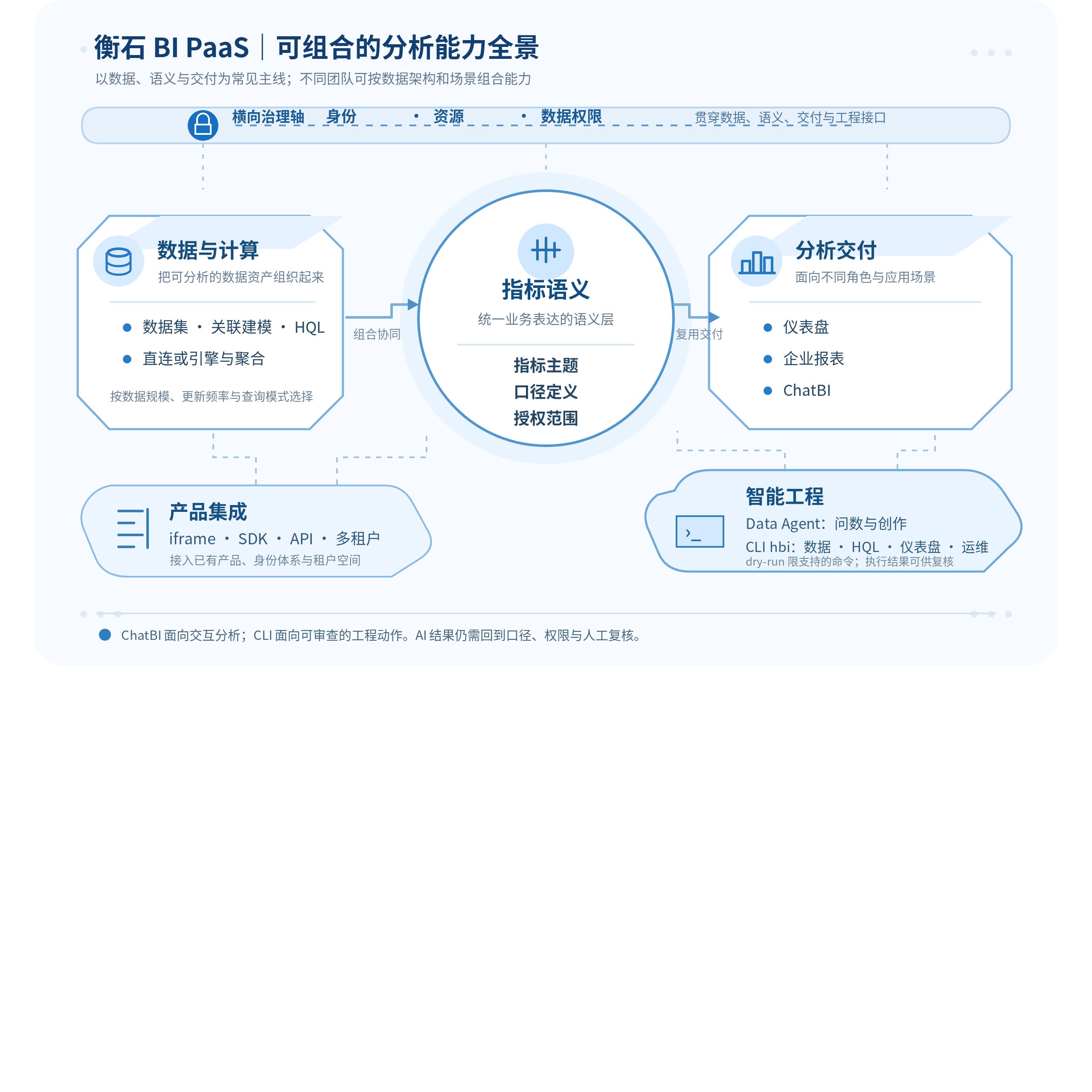
Figure: Data, metric semantics, and analytics delivery form the main chain. Integration and intelligent engineering capabilities are combined by business scenario, with identity and permissions throughout.
1 From Data to Analytics Assets
BI PaaS helps more than business users see charts: it turns data, definitions, pages, and permissions into analytics assets that can be delivered repeatedly. HENGSHI brings relational modeling, visualization, embedded integration, and multitenancy into one product system. Group IT teams typically prioritize centralized construction and delegated authorization; software vendors and industry partners prioritize connecting analytics pages, metrics, or data questions to existing products. Both can reuse the same data and semantic assets, delivering them to different users, applications, and tenants. The HENGSHI BI PaaS Product Page describes this combination for software integration.
Data Integration, Modeling, and Computation Choices
The platform builds analytics models around datasets and represents computation through HQL expressions. For frequently queried datasets suited to import, teams can enable an acceleration engine, import data into engine tables, and schedule synchronization. When large tables need to be reduced to a fixed analytical grain, aggregate datasets provide maintainable pre-aggregation definitions through dimensions, measures, and filters. For big-data sources such as Hive, Spark, Impala, Presto, and MaxCompute, the official manual recommends direct connections first to avoid memory consumption from large imports. Performance choices should follow data volume, update frequency, query patterns, and source capabilities rather than importing every dataset by default. Acceleration Engines explains activation, deactivation, synchronization, and engine types.
Data teams can divide responsibilities by scenario: detail stays in the existing data platform, suitable datasets enter an acceleration engine, frequent summary queries use aggregate datasets, and complex relationships and calculations remain in modeling and metrics. A sales scenario can organize orders, budgets, and organizational dimensions into analytical datasets, then reuse regional revenue, target attainment, and average order value through metric management and application pages. Business users receive consistent entry points while data teams can adjust the underlying implementation to source constraints, refresh schedules, and governance needs.
Make Metrics Business Assets with Explicit Authorization
If every dashboard, report, and conversational entry point calculates “revenue” independently, AI data questions amplify inconsistent definitions. HENGSHI organizes metrics and subtopics through business topics, supporting metric activation, deactivation, authorization, and topic vectorization. One metric can belong to multiple topics, but topic permissions and underlying data permissions remain separately managed. Operations, finance, and channel teams can reuse metrics within authorized topics instead of rewriting calculations for every page. Business Metric Topics also explains that authorized topic access remains subject to underlying row permissions.
A metric system is a semantic layer connecting people, pages, and intelligent capabilities rather than a catalog replacing data models. Metric owners define the meaning, period, applicability, and responsibility. Data engineers maintain datasets, fields, and permissions. Analytics developers then use governed metrics in dashboards, reports, and data questions. This division supports reuse across entry points and traceable ownership when definitions change.
2 Multiple Delivery Forms Share One Analytics Foundation
HENGSHI delivers more than dashboards. Dashboards suit ongoing observation, linked filters, and exploration. Enterprise reports suit complex headers, Excel-like editing, formulas, data entry, printing, and exports. ChatBI supports follow-up questions in natural language within a defined dataset or business-topic scope. These interaction forms can connect to the same datasets, metrics, and permission rules. Formula, data-entry, and presentation capabilities on the Enterprise Reporting Product Page bring analytics into operational forms and formal reporting.
In ChatBI, users select datasets or business metric topics according to their roles, then ask questions to obtain results and charts. Agent mode can analyze and interpret the selected data. Charts from a session can generate a dashboard, and individual charts can be added to dashboards for further exploration. Business users can extend published dashboards or reports into immediate analysis without developers creating a page for every temporary question. ChatBI Usage documents sessions, data scope, and dashboard generation boundaries.
Data Agent connects questions, chart results, and page context into continuous tasks rather than treating every natural-language statement as a certain conclusion. Intelligent interpretation helps explain existing business data and historical results. Prediction, causal judgments, complex report structures, and consequential business decisions still require metric definitions, data-quality checks, and human review. HENGSHI places intelligent capabilities after controlled data scope and analytical assets so users can inspect sources, filters, and generated results.
3 Open Capabilities for Software Products and Organizational Governance
An embedded BI solution should first establish its audience and responsibility boundaries. An iframe can quickly reuse complete published pages. A JS SDK can embed chat windows or result cards while retaining the host’s pages and entry points. APIs suit existing backend orchestration, AI gateways, or workflow systems. iframe, SDK, and API are integration methods; Agent and Workflow are operating modes, and the two dimensions need separate choices. Data Agent Integration Overview explains their combinations.
Multitenancy gives platforms and enterprise customers independent spaces. Platforms create and manage tenants, allocate engine resources, and share connections, data packages, and team-space applications with them in one direction. Tenants model, analyze, and grant access within their own spaces. SaaS vendors can share platform capabilities while preserving workspace and resource-delivery boundaries. Tenant Management documents spaces, allocation, and sharing.
Identity and permissions must be designed together with embedding. HENGSHI supports iframe integration, responsive published pages, and client RESTful Open APIs. Integrators must also handle user and group synchronization, functional permissions, and data permissions. Enterprises with unified login can choose LDAP, CAS, SAML2, OAuth2, and other methods. JWT request parameters can carry an already authenticated host user into an embedded page or SDK. Embedded Analytics and the Authentication and JWT Guide describe these boundaries.
Data services provide another delivery path. API services publish connection, dataset, and chart data as aggregated data, detailed data, custom queries, or registered APIs, with testing, publication, authorization, rate limits, and monitoring. This enables controlled consumption by external systems and differs from resource-management Open APIs and conversational Data Agent APIs. Permissions also need review on newly generated objects: base-dataset row permissions do not automatically propagate to new join datasets, which need separate rules. API Services and Application Data Permissions document these governance requirements.
4 Bring AI into Governable Analytics Processes
HENGSHI Data Agent supports model-service configuration through the product interface and services compatible with the OpenAI API format. Model endpoints, keys, names, parameters, and connection status require validation against the actual provider and deployment. Models differ in tool calling, reasoning, context length, and response speed; connection support does not imply equal results for every task. Connection tests, timeouts, retries, output length, and historical context settings help teams manage model services operationally. AI Model Configuration describes supported connections and private deployment guidance.
Vector search helps Data Agent retrieve relevant fields, function descriptions, and examples. Business topics can also be vectorized to improve discovery of enterprise terminology and available assets. This supports context retrieval and does not replace permissions, metric governance, or answer validation. Teams should organize dataset descriptions, metric topics, field semantics, and reusable analysis examples before configuring vectorization and model parameters for their scope. General Model Configuration defines vector search, context counts, timeouts, and agent controls.
CLI Gives Agents Reviewable Engineering Actions
For implementation automation, HENGSHI CLI’s public command is hbi. It organizes data integration, HQL queries, dashboard generation, permission operations, and maintenance into a BI execution surface for tool calls, with repository-managed skills, structured JSON/YAML/table output, dry-run, and SSE feedback. Coding or resident agents can first read application, dataset, and asset state, then create or update dashboards and check authorization actions within skill boundaries. Business and technical owners can review the process. HENGSHI CLI provides an inspectable engineering interface rather than a promise to replace business approvals.
| Role | Focus within HENGSHI capabilities | Checks at delivery |
|---|---|---|
| Data and metric owners | Datasets, field semantics, metric topics, and data permissions | Definitions, authorization scope, refresh, and data quality |
| Analytics and business owners | Dashboards, reports, ChatBI scenarios, and interpretation | Filters, chart presentation, business conclusions, and publication scope |
| Engineering and product teams | Embedding, authentication, tenants, APIs, and CLI automation | Operating modes, identity mapping, change previews, and release review |
5 Conclusion
HENGSHI BI PaaS does not depend on a single entry point. Datasets and computation support analytics; metric topics capture business definitions; dashboards, reports, and ChatBI serve different scenarios; embedding and multitenancy support product integration; and Data Agent and CLI bring intelligent analysis and engineering actions into the same chain. Enterprises can begin with one dashboard, metric topic, or embedded page and expand toward analytics that is governable, reusable, and verifiable.