
Article body
Full article
Abstract: Embedded BI is about more than placing a chart in a business system. Identity, resources, data, and the analytics experience must operate through one controlled chain. HENGSHI SENSE offers embedded published pages, dashboard and chart SDKs, data services, and Data Agent integration for portals, SaaS products, and industry applications. Tenant workspaces, resource sharing, and layered permissions provide organizational boundaries for platforms serving multiple enterprise customers. This article explains integration levels, tenant collaboration, permission design, and agent integration.
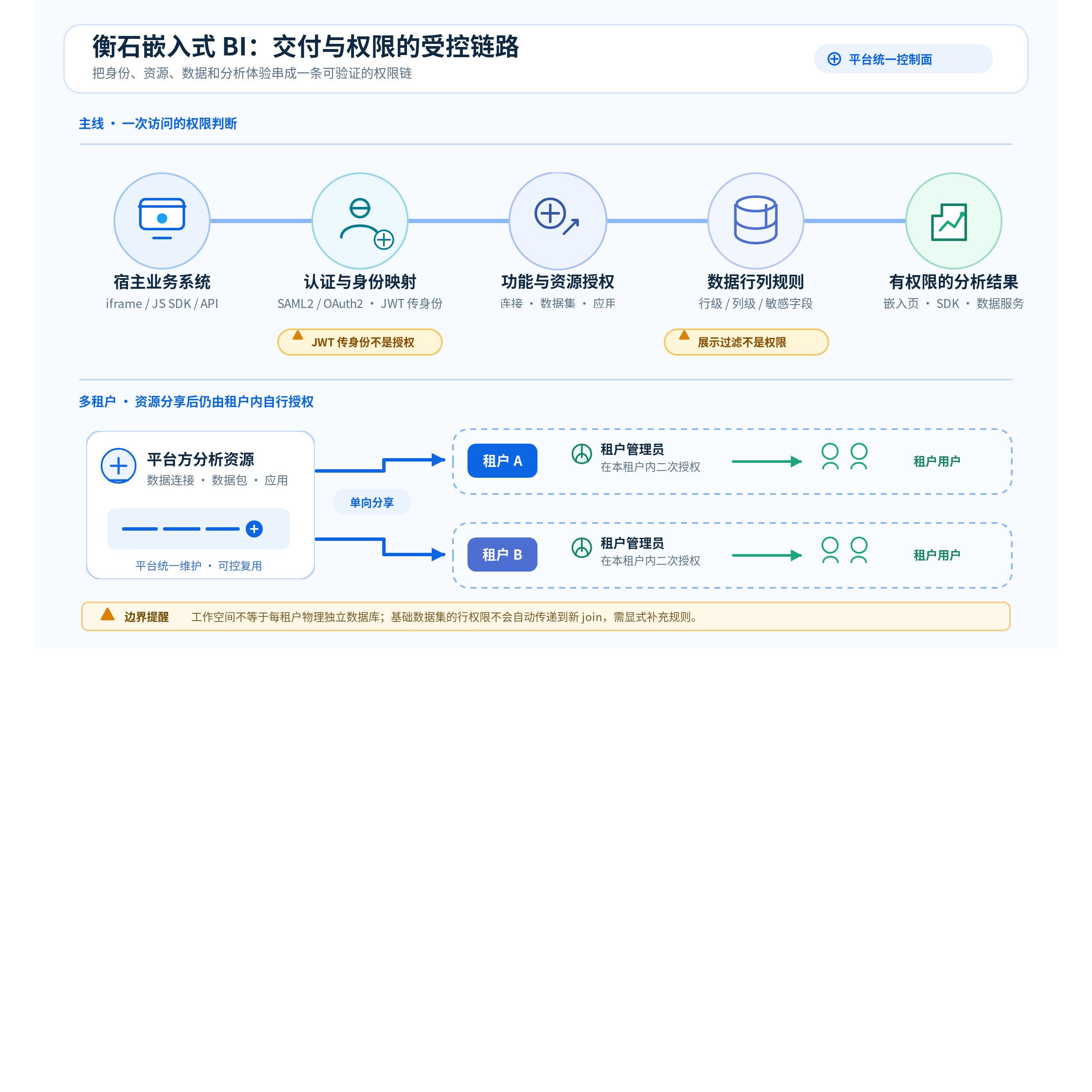
Figure: Embedded BI delivery and permissions. Identity mapping, resource authorization, data rules, and authorization within each tenant jointly determine which results are visible.
1 From Embedded Pages to Deliverable Analytics
Business systems often need an analytics experience connected to customer, order, store, or project pages rather than another standalone BI portal. A CRM user viewing a customer needs payment and opportunity trends. Channel partners need sales, inventory, and policy execution within their own accounts. SaaS vendors want analytics delivered as part of their products. These scenarios require reusable definitions, identities, and visualizations while allowing integrators to retain their navigation, processes, and branding.
HENGSHI addresses these needs through several delivery surfaces that can be combined. Product pages can generate embedding links and iframe examples for applications, dashboards, and charts. Embedded pages retain viewing actions such as refresh, fullscreen, and export; display parameters can adjust titles, margins, backgrounds, filter labels, or mobile styling. Parameters control presentation and do not grant access. Public links and authenticated links have different identity states. First establish who the visitor is and which resources they can access, then design the presentation. Application Display, Interaction, and Embedding documents the product entry points.
When a business page contains multiple charts, integrators can use HENGSHI’s JS SDK to load dashboards or charts in the host page. The SDK supports container dimensions, application and dashboard identifiers, clearing linked filters, and Shadow DOM style isolation. It reuses HENGSHI’s analytics and rendering, making it suitable for frontend teams that want layout control without rebuilding chart logic. The official manual specifies iframe integration and mobile limitations for authoring pages; published pages offer a display-oriented embedding route. Embedded Data Analytics and JS SDK Embedding should guide link generation and parameter selection.
When the host needs its own presentation layer or must pass analytical results into later business processes, it can use HENGSHI API services. Published aggregated-data APIs, detailed-data APIs, custom query APIs, and registered APIs cover chart aggregation results, dataset fields, connection queries, and wrappers for third-party interfaces, respectively. Publication, authorization, rate limits, and monitoring are part of delivery. APIs return data in formats such as Array or Object, enabling frontend teams to implement their own rendering and interactions. Those teams also take engineering responsibility for query parameters, call authorization, version changes, and presentation logic. API Services documents the publication and authorization boundaries.
2 Tenant Boundaries Follow Workspaces and Resource Delivery
HENGSHI’s tenant model supports one platform serving multiple enterprise customers. The platform creates, enables, disables, and manages tenants and can configure validity periods, user quotas, and engine allocation. Each tenant enters its own analytics space without visibility into other tenants. The platform’s ordinary tenant-management view focuses on tenant information rather than managing users inside tenant spaces. This separates platform operations from tenant usage; deployment owners must still manage infrastructure, backups, and operational access under their own security policies.
Tenancy provides more than account grouping. Under product rules, the platform can share data connections, data packages, team-space applications, and public-space applications with tenants in one direction. Tenant administrators then authorize their own members to use the received resources. Data packages and applications can include data-permission settings when shared, and team-space and public-space resources have their own sharing prerequisites. Platforms can thus deliver common data services, metrics, and analytics assets to multiple customers while each tenant models, analyzes, and grants access within its own workspace. Tenant Management explains the sharing scope and responsibilities.
Design tenant spaces, resource ownership, and data visibility separately. Multitenancy does not mean the system automatically injects one fixed business field into every SQL query, nor does it mean every project uses a separate database or schema. HENGSHI provides configurable tenant workspaces, resource sharing, and authorization. Whether connections, data packages, applications, and business topics are visible, and how rows and columns are filtered, must be verified against actual resource and rule settings. This supports both centrally supplied platform data and different industry organizations, sources, and delivery models.
3 Permissions: Identify the User, Then Control Resources and Data
Embedded projects sometimes mistake “the user is logged in” for “the user is authorized.” These must be handled separately. HENGSHI supports built-in authentication, LDAP, CAS, SAML2, OAuth2, JWT request parameters, and several enterprise collaboration platforms. External authentication can map fields including login name, email, roles, groups, organization, enterprise information, and session validity. JWT fits hosts that have already authenticated a user and need to carry that identity into an embedded page or SDK. Both sides must agree on signing algorithms, verification keys, encryption settings, claim mapping, and expiration. The token does not replace existing HENGSHI resource and data authorization. Authentication and JWT FAQ and Authentication Methods describe these settings.
After authentication, functional permissions determine which modules a user can use; resource permissions determine which connections, datasets, applications, and metrics they can manage or view; data permissions determine actual query results. HENGSHI roles cover system administration, data management, data analysis, data viewing, API management, metric management, and metric analysis. A user can hold multiple roles. Business topics can separately authorize administrators, editors, viewers, or tenant users, while topic access remains subject to underlying data-package row permissions. User Roles and Business Topics and Metric Permissions help define organizational responsibilities.
Data controls must be applied to actual resources. Connection permissions can grant name visibility, structure visibility, read-only access, or full access at connection, catalog, and table levels. Table-level read-only access can use simple filters, expression filters, or SQL expression filters for rows and can control column visibility. Application data permissions first require choosing the application-author, dataset-author, or user mode. Application managers can configure dataset row and column rules in the first two modes but cannot configure the same rules in user mode. Multiple row rules for one user on one dataset combine as a union; row and column permissions combine as an intersection. Base-dataset row rules do not automatically propagate to a newly created downstream join dataset and must be configured separately there. Host-supplied filters, hidden controls, and iframe styling affect interaction and presentation; they cannot replace connection, dataset, and application permissions. Connection Permissions and Application Data Permissions are the references for pre-release checks.
4 Data Agent: Choose the Right Entry Point for Questions and Creation
Data Agent adds conversational analysis, metric creation, visualization authoring, and intelligent dashboard interpretation to embedded products. Agent mode can retrieve content from the data marketplace, application marketplace, and application authoring areas within the user’s permissions, using the current page and user information as context. Dataset naming, field and metric descriptions, knowledge management, and vectorization preparation affect answer quality. Intelligent interpretation queries and summarizes existing and historical data to generate descriptive reports; it does not predict the future. Complex reports and complex tables are also outside this feature’s supported scope. Data Agent Usage lists capabilities and preparation requirements.
For integration, iframe fits the complete data-question page, the JS SDK fits chat windows and result cards, and APIs fit backend orchestration or multi-agent calls. HENGSHI still renders SDK results; the host owns entry points, containers, layout, and interaction. API integration serves backend calls and should not be equated with returning standard ECharts configurations. Agent mode, Agent API mode, and Workflow and its API also differ in supported scope: the first two can support questions without limiting the data source, while Workflow better suits predefined sources and processes. Choose the entry point by asking where users will see results, who initiates the call, and who owns rendering and auditing. Data Agent Integration Overview and Data Agent JS SDK provide the integration contracts.
5 Engineering Interfaces for Agents
When coding or resident agents need to perform data integration, HQL queries, dashboard generation, permission operations, and maintenance, HENGSHI CLI provides the hbi command surface. It supports structured JSON, YAML, and table output, repository-managed skills, and dry-run and SSE feedback in supported commands. It targets terminal tool calls and BI engineering execution, a different delivery surface from browser ChatBI and embedded chat components for business users.
This enables integration to follow responsibilities: business pages use iframe or SDK to deliver visualizations and conversational analysis, backends use APIs to orchestrate data services, and controlled engineering agents use the CLI for explicitly authorized BI operations. Every layer should follow the same identity, resource, and data-permission design. Pre-release validation should cover actual access paths, including anonymous or public links, logged-in users, tenant administrators, platform managers, and API callers. HENGSHI CLI describes current command scope and agent integration.
6 Conclusion
Embedded BI delivery depends on bringing analytics into business scenarios with the correct identity and permissions. HENGSHI covers different integration levels through page embedding, JS SDKs, APIs, tenant workspaces, resource sharing, row and column permissions, and Data Agent integration. Platforms and integration teams should first identify who builds the assets, where users log in, and which rules determine data visibility, then choose a combination of iframe, SDK, API, or CLI. This preserves the host’s product experience while making metrics, permissions, and analytics reusable enterprise assets.