
Article body
Full article
Abstract: HENGSHI CLI (
hbi) is an AI Agent-oriented BI command-line tool from HENGSHI AI Labs. Built in Rust, it standardizes the full BI engineering lifecycle as Agent-executable command trees and Skills. This article examines this terminal execution layer for Agentic BI across five dimensions: design philosophy, command system, Skills architecture, security mechanisms, and practical workflows.
I. Why Does BI Need a Command Line?
This question itself reveals HENGSHI CLI’s unique positioning—it’s not for humans, it’s for AI Agents.
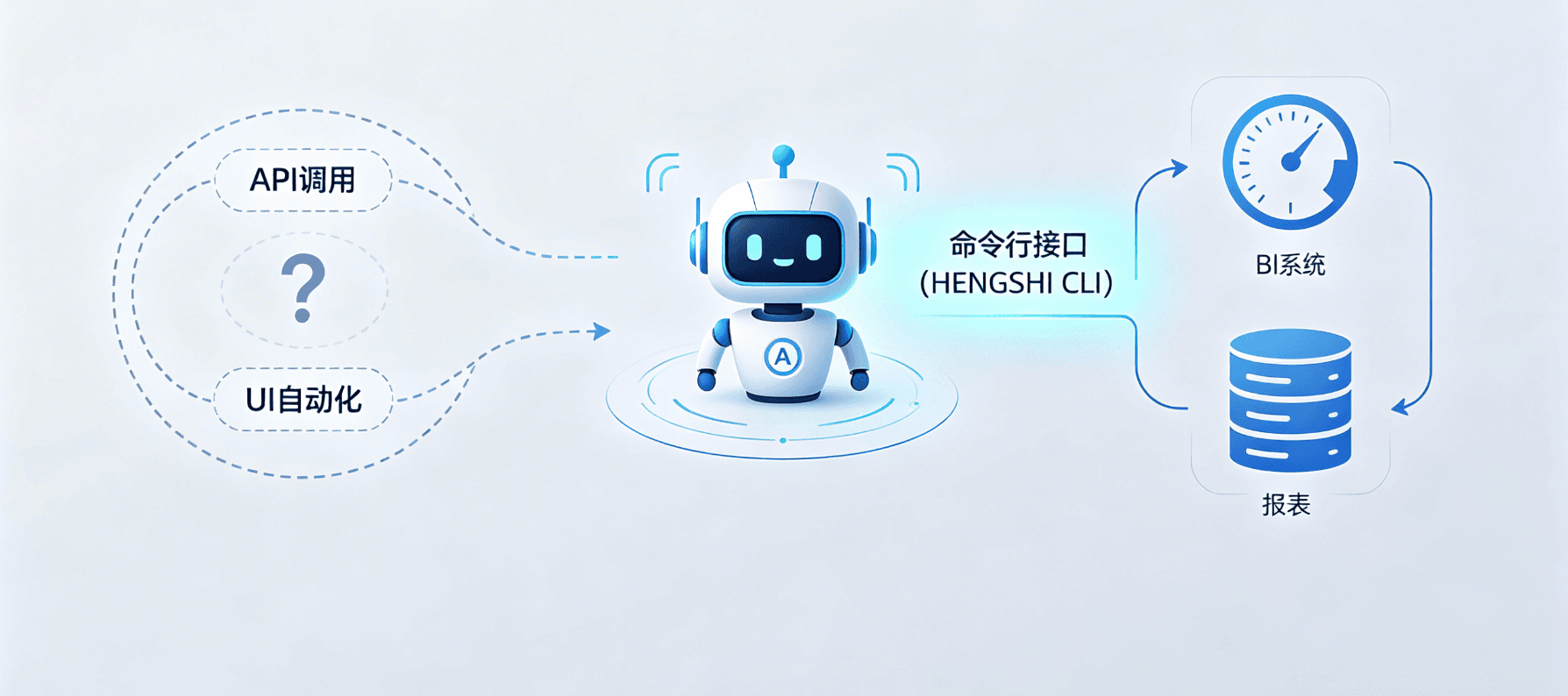
Before HENGSHI CLI appeared, AI Agents wanting to operate BI systems had only two paths:
- Go through APIs: Every BI operation (creating datasets, generating dashboards, configuring permissions) required writing independent API call code—Agents needed to understand dozens of different interfaces
- Go through UI automation: Simulating clicks—unstable and high maintenance cost
HENGSHI CLI’s approach: converge all BI operations into a unified command-line interface. Agents only need to learn one set of commands and parameters to complete everything from data connection to asset delivery. This isn’t a small technical innovation—it’s a paradigm-level design choice. BI operations should be like Git: programmable, scriptable, and callable by Agents.
II. Command System: Agent-First Tree Structure
HENGSHI CLI uses hbi as its unified entry point, splitting BI engineering’s core domains into subtree commands:
II.I Basic Operations
# Authentication and status
hbi auth status              # Check current login status and token info
hbi auth login               # Login to HENGSHI platform (OAuth/SSO)
hbi auth logout              # Logout

# App spaces
hbi app list                 # List all applications
hbi app portal --app <id> show --output yaml  # View app portal configuration
II.II Data and Connections
# Data connections
hbi connection list          # List all data source connections
hbi connection test <id>     # Test connection availability

# Datasets
hbi dataset list --app retail-ops             # List datasets under app
hbi dataset create --app retail-ops --file dataset.yaml  # Create dataset from YAML
hbi dataset query --app retail-ops --dataset sales_daily "SUM({amount})"  # Direct query
II.III Dashboards and Visualization
# Dashboard creation
hbi dashboard create --app retail-ops "East China Regional Sales Cockpit"   # Create new dashboard
hbi dashboard list --app retail-ops                          # List dashboards
hbi dashboard theme show CLASSIC --as-spec --output yaml     # Export theme configuration

# Chart operations
hbi element chart create --dashboard dsh_2048 --app retail-ops --dataset sales_daily line  # Create line chart
hbi element filter update filter_9 --dashboard dsh_2048 --app retail-ops --file filter.yaml  # Update filter
hbi element container create --dashboard dsh_2048 --app retail-ops --file layout.yaml       # Layout orchestration

# Plan application (batch generation)
hbi dashboard plan apply --app retail-ops --file plan.yaml  # Batch create dashboards from plan file
II.IV Permissions and Governance
# Authorization management
hbi authorize get app app_42              # View app permissions
hbi authorize grant app app_42 --user 123:editor --dry-run  # Preview authorization
hbi authorize revoke app app_42 --user 123:editor           # Revoke authorization

# User management
hbi user-group list                       # List user groups
hbi user-mgmt show --user 123             # View user information
II.V Automation and Scheduling
# Pipelines and scheduling
hbi pipeline list                         # List ETL pipelines
hbi pipeline trigger --id pipe_101        # Trigger pipeline execution
hbi scheduler list                        # List scheduled tasks
hbi notebook execute --id nb_42           # Execute Notebook
III. Skills Suite: 16 Repo-Managed Agent Skills
HENGSHI CLI isn’t just a command collection—it comes with a complete Agent Skills suite. These skills are designed as Agents’ “BI operation manuals,” letting Agents execute according to standardized runbooks without guessing parameters and flows.
III.I Skills Design Principles
- Split complexity by resource domain: Not one catch-all skill, but 16 focused independent skills
- Help-first convention: Each skill defaults to calling
hbi --helpto view subcommand help, reducing parameter guesswork - Cross-Agent reuse: Universal across Claude Code, Codex, OpenClaw, Hermes Agent, and CI pipelines
III.II Complete Skills List
| Group | Skill | Responsibility |
|---|---|---|
| Foundation Layer | hbi-core | Authentication, preferences, output formats, terminology |
hbi-app | App space management, portal configuration | |
hbi-permission | Authorization management, roles and permissions | |
hbi-user-mgmt | User and organization governance | |
| Data and Semantic Layer | hbi-data | Data connection and dataset management |
hbi-data-modeling | Join models, semantic modeling, HQL queries | |
hbi-indicator-center | Subject area metric definition and management | |
hql-expert | Translating business problems to HQL expressions | |
| Delivery Layer | hbi-dashboard | Dashboard creation, layout, and publishing |
hbi-dashboard-taste | Page design, themes, and color schemes | |
hbi-data-alert | Chart-level data alert configuration | |
hbi-data-agent | Data Agent backend governance and configuration | |
| Automation Layer | hbi-pipeline | ETL pipeline management and triggering |
hbi-notebook | Notebook creation and execution | |
hbi-scheduler | Scheduled tasks and plan scheduling | |
hbi-workflow | Cross-domain orchestration, multi-skill combined runbooks |
III.III Value of Skills for Agents
For enterprise development teams, the Skills suite means:
- Lower new Agent training costs: Agents don’t need to understand all of BI’s concepts—just how to call the corresponding skill
- Standardized execution: All Agents follow the same process for the same operation—results are predictable
- Auditable and debuggable: Skills execute by runbook, every step has logs, problems are traceable
IV. Three Design Features: Making Agent Execution Trustworthy
IV.I Dry-Run Preview Mechanism
Before actually executing changes, CLI supports the --dry-run parameter for preview:
$ hbi authorize grant app app_42 --user 123:editor --dry-run
Dry run passed · changes not applied
Preview: editor access -> retail-ops
The significance of this design: Agent operations must pass human review. Agents can first “demonstrate” what they’re going to do, and humans confirm before real execution. This transforms Agent automation from “black-box execution” to “white-box collaboration.”
IV.II SSE Real-Time Sync
CLI’s execution results are broadcast to Web UI via Server-Sent Events (SSE):
$ hbi element filter update filter_9 --dashboard dsh_2048 --app retail-ops --file filter.yaml
SSE broadcast published
Web UI refreshed · business owner can review instantly
This means: dashboards generated by Agents in the terminal can be seen by business personnel in the browser in real time. No refresh, no waiting. Human-in-the-loop isn’t post-hoc review—it’s real-time collaboration.
IV.III Agent-Runbook Scripting
CLI supports combining multi-step operations into runbook scripts:
# discover.state: Read context first
$ hbi auth status --output json
$ hbi dataset list --app retail-ops --output json
$ hbi data-model query --app retail-ops --dataset sales_daily "SUM({amount})"

# build.assets: Generate deliverables
$ hbi dashboard create --app retail-ops "Sales Cockpit"
$ hbi element chart create --dashboard dsh_2048 --app retail-ops --dataset sales_daily line

# deliver.control: Safe delivery
$ hbi authorize get app app_42
$ hbi authorize grant app app_42 --user 123:editor --dry-run
From reading context to asset generation to safe delivery, every step is a independently verifiable standard operation for Agents.
V. Security Architecture: Engineering-Grade Security Design
V.I Credential Management
HENGSHI CLI’s authentication tokens aren’t stored in local configuration files—they’re stored in the operating system’s Keyring (macOS Keychain, Linux Secret Service, Windows Credential Manager).
$ hbi auth status
Logged in as: admin@hengshi.com
Token stored in: macOS Keychain
Expires: 2026-06-11T16:00:00Z
V.II Authentication Protocols
- Supports OAuth 2.0 standard authentication flow
- Supports enterprise SSO (single sign-on) integration
- Tokens have validity periods and automatic renewal mechanisms
V.III Audit Trail
All CLI operations log complete audit trails, including operator, time, command, and result—meeting enterprise compliance audit needs.
VI. Compatible Agent Runtimes
HENGSHI CLI’s design goal is compatibility with all Agents with shell-calling capabilities, currently adapted for:
| Type | Representative Products | Scenarios |
|---|---|---|
| Coding Agents | Claude Code, Codex | Local repo IDE agents, CI/CD integration |
| Resident Agents | OpenClaw, Hermes Agent | Cloud-resident, message channels, long-running |
As long as the new generation of agents has shell or tool-calling capabilities, HENGSHI CLI can be their BI execution layer.
VII. Synergy with HENGSHI BOX
The HENGSHI BOX full-domain intelligent control cabin comes with a complete CLI environment pre-installed, where CLI can achieve higher security levels in BOX:
# Typical workflow in BOX environment
$ hbi auth status --output json
$ box-agent start --skill hbi-data --daemon
$ hbi dataset list --app retail-ops --output json
$ box-agent task submit "Generate East China sales dashboard"
BOX provides CLI with a hardware-grade security boundary—all command execution, data processing, and model inference are completed inside the chassis, with no data flowing externally.
VIII. Frequently Asked Questions
Q1: Does HENGSHI CLI need to be installed separately? What’s the relationship with HENGSHI SENSE?
A: CLI is distributed as a standalone binary and needs to be installed separately. It communicates with the HENGSHI SENSE platform via API/SSE. CLI doesn’t replace SENSE—it provides a standard interface for Agents to operate SENSE. Think of SENSE as the BI engine, CLI as the steering wheel that operates that engine.
Q2: Why design a CLI when APIs are available directly?
A: APIs are designed for program-to-program communication—each operation corresponds to an independent HTTP endpoint, and Agents need to understand dozens of different APIs to complete a full BI workflow. CLI converges these APIs into a single semantic command tree that’s easier for Agents to learn and less error-prone. More importantly, CLI comes with a skills suite, dry-run mechanism, and runbook mode—these are capabilities that bare APIs don’t have.
Q3: What are the benefits of developing CLI in Rust?
A: Rust provides zero-cost abstractions and memory safety guarantees, suitable for building long-running system-level tools. As the execution layer for resident Agents, performance and stability are critical—Rust-compiled single binary files start fast, have low resource usage, and have no runtime dependencies.
Q4: Can CLI’s skills be custom-extended?
A: The skills suite is managed as repository files, and enterprises can create custom skills based on their own business needs. For example, you can create an hbi-retail-kpi skill that encapsulates retail-industry-specific KPI query logic.
IX. Summary
HENGSHI CLI may seem like just another command line tool, but its design carries HENGSHI’s complete understanding of Agentic BI—
- Agents aren’t UI substitutes—they’re the new operators of BI engineering — Humans analyze via UI, Agents engineer via CLI
- Standardization matters more than intelligence — Agents don’t need to create new BI operation methods—they just need to stably execute standardized operations
- Auditability is a non-negotiable bottom line — dry-run, SSE echo, structured output—these features keep Agent execution always under human supervision
For enterprises evaluating their Agentic BI path, HENGSHI CLI provides a clear design reference: what Agents do and what humans do use the same standards—the only difference is the access method. This may be a critical step for Agentic BI moving from concept to engineering.