
Article body
Full article
Summary. The HENGSHI Digital Employee’s managed runtime receives enterprise tasks, invokes agents and business tools, and retains run records, workspaces, and deliverables. It returns results to the original work system or messaging channel as configured. Teams can track progress, resume unfinished work, and check execution, verification, business acceptance, and delivery.
After assigning an issue to a digital employee, an engineering team needs to see how far the investigation has progressed, whether code has changed, whether tests have finished, and whether a review has been submitted. After an interruption, whoever takes over must decide what can be reused and where to resume.
The HENGSHI Digital Employee’s runtime provides task management, visibility into execution, and delivery support for ongoing work. A company can add requests to the same task and use its records and outputs to check progress.
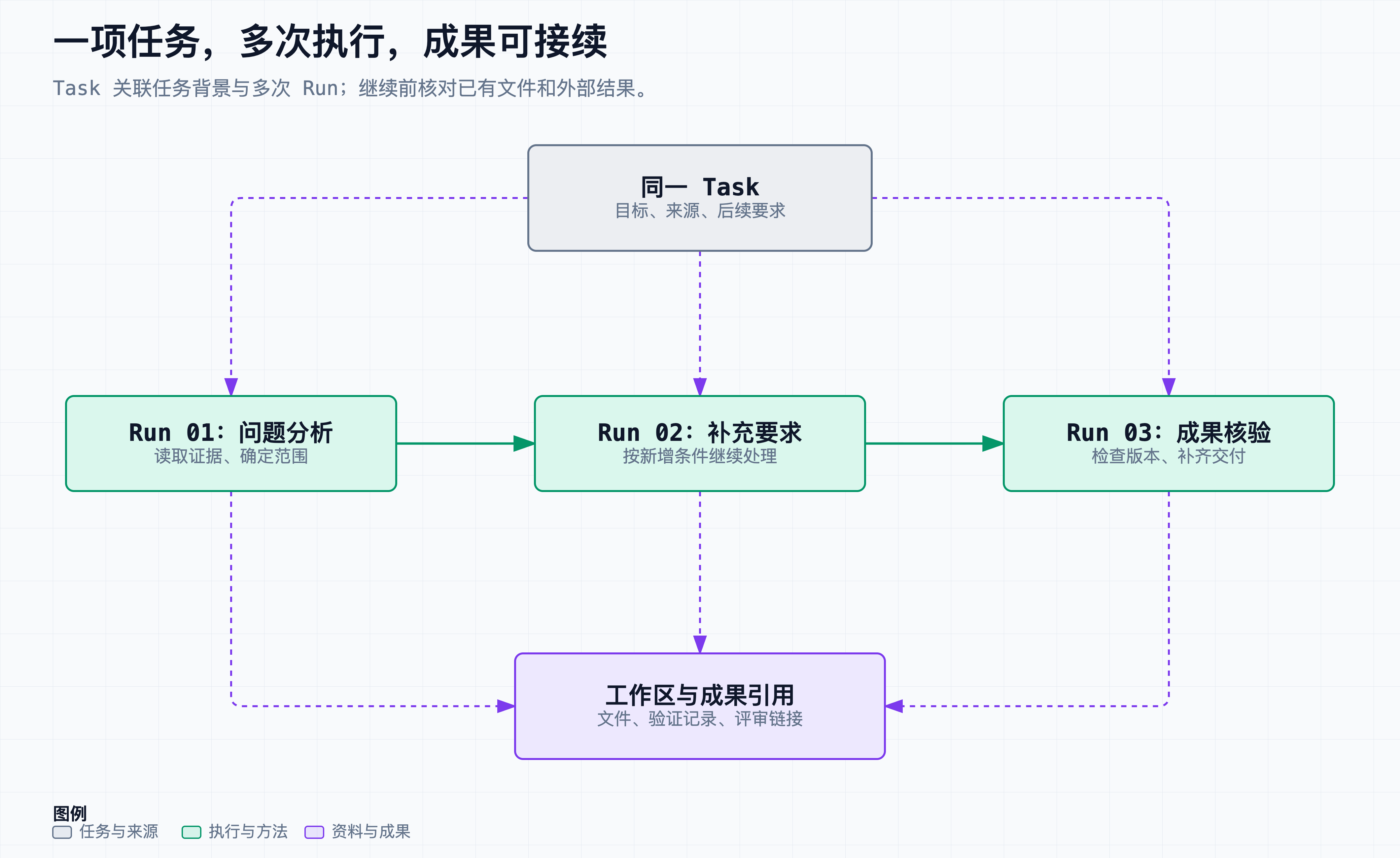
Figure 1. One task can have several runs. The run numbers are illustrative. Check the actual status and retention rules for workspaces and deliverables.
1. Receive Work Through the Team’s Existing Channels
The HENGSHI Digital Employee can connect to configured engineering systems and messaging channels. The runtime offers integrations with GitLab, GitHub, Jira, Feishu Project, TAPD, and ZenTao. Supported events and write-back behavior depend on the platform configuration.
A team can ask the digital employee to analyze an issue from a connected ticket or message. The runtime records the origin and reply destination, prepares the workspace, and starts the configured agent. When execution finishes, it writes the result back to the relevant ticket, review, or conversation.
Existing systems remain authoritative for business goals, permissions, and review status. Task records link to those systems so colleagues can inspect results and add requests from the channels they already use.
What Received, Started, and Finished Mean
A receipt means that the request entered the relevant intake process. The run record shows whether the agent has started. Waiting for resources, preparing the environment, and executing are distinct stages. Follow the task’s status before resubmitting a request that has yet to return output.
Once a run ends, check the deliverables and delivery receipt. This distinction makes it easier to see whether work needs capacity, more information, a tool fix, or recovery of the notification alone.
2. Record Every Run on the Same Task
The runtime distinguishes the task from each run. A task represents ongoing work. Each run records that execution’s input, agent, progress, and result. Initial analysis, additional requirements, and follow-up work can each have their own run under the same task.
This structure lets the team see where work stopped, what was added later, and what files or reports already exist. Later runs remain linked to that history.
Workspaces store code, documents, and related artifacts. The task records the workspace location, and deployment rules determine retention and cleanup. To resume, inspect existing files and external results before selecting a next action.
Leave a Short Handoff for the Next Run
A long-running task is easier to resume when its goal, verified outputs, evidence, and unfinished items are available. This example is a shared handoff for people and agents. In actual handoffs, link to real deliverables and leave out credentials and unnecessary sensitive data. The runtime does not treat this text as API output or configuration.
goal: Resolve the discrepancy between store filters and sales totals
confirmed:
  - Reproduced the issue on the target version
  - Prepared a code change for review
evidence:
  - Corresponding code revision and review target
  - Original reproduction and completed checks
unfinished:
  - Results of related verification are pending
  - The owner has yet to accept the delivery
next:
  - Check the outcome of the existing verification task
  - If needed, complete the checks and update the existing review
A handoff points to where work should resume. Check the current state in the originating system. If the handoff says verification is pending, it might have passed or failed in the meantime. Query the relevant version before restarting any work.
3. Use the Workbench to Track, Read, and Continue Tasks
The service provides a web terminal workbench, a status page, and product documentation. Append /status/terminal to the service address to select tasks, read ongoing conversations, or add requirements. /status displays delivery statistics and system settings. /docs/ contains documentation for the instance. The terminal workbench displays agent conversations and tool output. It is separate from the operating system shell.
After receiving an issue analysis, for example, an owner can ask the digital employee to check another version or revise the work based on review feedback. State the new request and check that earlier outputs still apply.
The runtime supports several agent adapters. Companies can choose an executor based on their models, tools, and accounts, then verify it in the target environment. Agent selection and work-system permissions are configured independently. An agent works within the tools and environment granted to it.
Inspect Tasks and Runs With Read-Only Commands
Operators can inspect tasks from an installed and configured instance. These examples were checked against the CLI help. Replace task-example with an actual identifier from the list. The queries do not start or continue work.
# The default list focuses on active tasks. --all also includes history.
jarvis-box tasks list --all --limit 20

# Replace this example identifier with the one from the list.
task_uid='task-example'

# Read details, lifecycle events, and execution logs.
jarvis-box tasks show "$task_uid"
jarvis-box tasks events "$task_uid"
jarvis-box tasks logs "$task_uid"
Details show the current stage, events show changes over time, and logs show execution activity. To request follow-up work or resume a task, use the workbench or the appropriate lifecycle entry point, subject to the operations available for that task.
4. Resume After an Interruption Using Existing Results
Network, tool, or executor failures can interrupt long tasks. The runtime retains execution evidence and errors and supports continuation under its operating rules. The recovery path depends on where the failure occurred, the agent’s capabilities, and what work is available.
Before resuming, verify that code and documents still exist, whether a commit or review was created, which version test results apply to, and whether the destination system agrees with the recorded state. Reuse confirmed results and investigate incomplete or uncertain work.
When changing agents, existing material can be reused while the task and workspace remain available. Native chat histories may not transfer completely between agents. Keep goals, key decisions, deliverable references, and unfinished work in readable records.
When an external operation times out without a definitive result, check the destination system first. Decide whether to retry after establishing what actually took effect, using the applicable tool’s rules to avoid duplicate records or messages.
Ask Three Questions When Resuming
Are the previous outputs still available? Check the associated workspace, code changes, formal deliverable references, and retention rules. Did the external action take effect? Check the commit, review, test, or notification in its own system. What does the next step depend on? Determine whether it needs information, permission, resources, or a business decision.
If a review was created but the notification timed out, verify the review and notification separately. If a test is still running, wait for or query that test. Continue the outstanding work from verified results.
5. Verify Each Part of Delivery
At the end of a run, the team still needs to check the work itself. A code change, passing tests, business acceptance, and message delivery each have their own evidence. The run records and the original business systems provide the basis for those checks.
| Stage | What to verify | Where to check |
|---|---|---|
| Execution outcome | Whether the agent completed normally and reported any errors or unfinished work | Status, output, and errors for the run |
| Deliverable verification | Whether changes or documents meet requirements and relevant checks passed | Changes for the relevant revision, tests, and hands-on checks |
| Business acceptance | Whether the deliverable meets the team’s agreed acceptance criteria | Review, acceptance, or owner confirmation in the original system |
| Delivery | Whether the response or deliverable reference reached its destination | Write-back result and delivery receipt |
If the work is complete and notification fails, investigate delivery using the existing result. If delivery is unknown, wait for evidence from the destination before taking further action.
6. Choose a Deployment That Fits the Company’s Tools and Data Boundaries
The managed runtime supports Native and Docker deployment. The company can choose based on its machines, tool dependencies, and operating practices, then configure agents, model connections, and business-system identities.
Determine deployment method, execution permissions, and data flows separately. Local deployment can call external models or services depending on configuration. What each tool can read or modify depends on the permissions granted by the company.
Verify one end-to-end path first: submit a task from the real entry point, invoke the necessary tools, produce an inspectable result, and return it to the intended destination. Expand to other systems and task types as needed.
7. Turn Ongoing Work Into Reusable Experience
Runtime records can guide knowledge maintenance. Recurring issues, effective handling methods, and human corrections show where to update enterprise knowledge, role-specific skills, or verification tools. Subsequent tasks show whether the updates help.
Assess performance using work outcomes. Did the task meet its requirements? Where did people have to intervene? Did the results reach their destination on time? Were existing methods reused? Those records help the company identify which work the digital employee can take on regularly.
Evaluate the Whole Delivery Path
For a set of real tasks, record whether the output was accepted, where manual intervention and waiting occurred, whether delivery succeeded, and whether later tasks reused the same approach. Distinguish execution time, wait time, and human effort. Keep task scope and complexity visible when comparing quality.
If the same stage repeatedly blocks a task, update the asset or process that owns the problem. Fill gaps in knowledge or skills, fix runtime dependencies, or ask the business owner to clarify acceptance criteria. Observe subsequent tasks to see whether the change helped.
For commands and workbench entry points, see the official Jarvis Box CLI reference and the terminal workbench and status page documentation. The interface and commands depend on the installed version. The handoff and diagram are illustrative.
Founded in 2016, HENGSHI develops enterprise analytics for the Data and AI era, with a focus on Agentic BI. Its portfolio combines the HENGSHI SENSE enterprise analytics platform, the HENGSHI Digital Employee, the HENGSHI CLI execution engine, and the privately deployed HENGSHI BOX control environment. Through its Powered by Hengshi ecosystem and a decade of BI experience, HENGSHI works with software vendors across industries to support trusted, private AI analytics for enterprise operations and decision-making in manufacturing, financial services, retail, government, and other sectors.