
Article body
Full article
Abstract: “Data finding people” brings important changes to a named owner at the right time. HENGSHI SENSE lets teams configure chart-metric conditions, detection frequency, and notification strategies, and send dashboards to internal and external users on a set schedule. After receiving a signal, recipients can use Data Agent for further conversational analysis and metric and dashboard creation. Connecting these capabilities with business responsibilities, action records, and permission boundaries makes detection, verification, action, and review an operating practice.
1. Send metric changes to a named owner
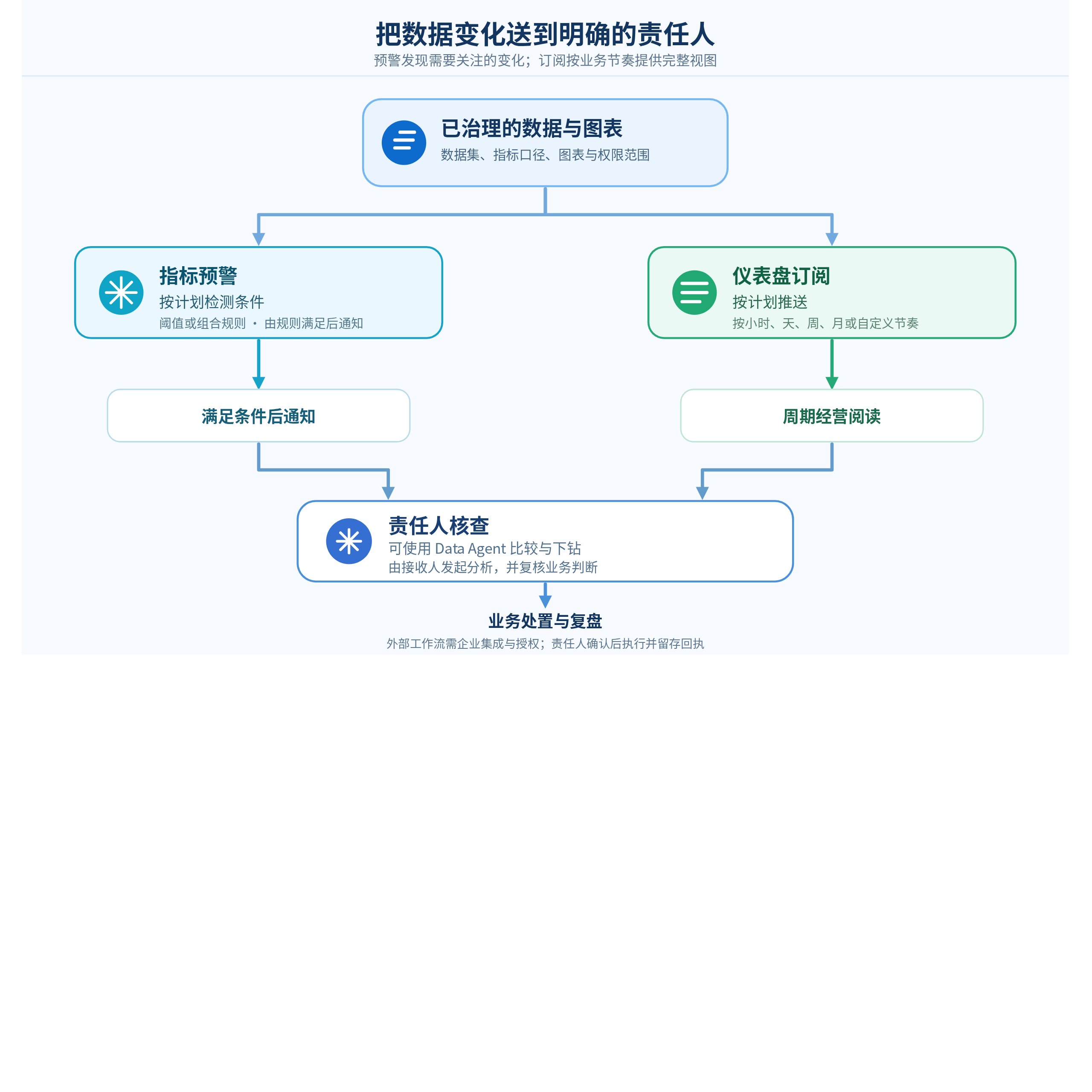
Many teams already have sales, operations, supply-chain, or service dashboards, yet business changes are often discovered only at weekly meetings or reviews. The problem is not always missing data. Metrics, recipients, and actions may lack a stable connection: business users do not know which chart to watch, analysts do not know when to intervene, and managers receive information without enough context to judge it.
HENGSHI’s approach can start with measurable, explainable business metrics within an application. Data integration extracts, filters, transforms, joins, unions, and aggregates data from different sources to establish the analytical foundation. Teams then configure alerts or subscriptions around chart metrics in the application. Alerts answer whether a metric meets configured conditions; subscriptions answer who needs an up-to-date business view at a given time. Their different purposes require different notification designs.
| Mechanism | Question it addresses | HENGSHI SENSE capabilities | Design the team must supply |
|---|---|---|---|
| Metric alerts | Has a chart metric reached a predefined condition? | Select a chart and metric, configure one or more rules, and trigger when any or all rules are met; check hourly, daily, weekly, monthly, or at a custom frequency | Metric definitions, thresholds, recipients, one-time or continuing notifications, and handling of task failures |
| Dashboard subscriptions | Who should receive the overall business picture on a regular schedule? | Send application dashboards immediately or on schedule through email, WeCom, Feishu, Webhook, DingTalk, and other methods, with content tailored to audiences | Weekly reports, morning meetings, and business-review schedules, plus data-permission scopes for internal and external recipients |
| Data Agent-assisted investigation | Which dimensions should be checked after a change appears? | Conversational interaction for immediate business-data analysis, metric creation, and dashboard generation | Authorized analytical scope, priority dimensions, finding reviewers, and escalation to a dedicated analysis |
| Business-system action | How should a confirmed issue lead to a ticket or business action? | Send alert content to a company-defined HTTP service through Webhook, with configurable method, headers, and body | External interfaces, approvals, action permissions, write-back fields, and audit rules; these are integration choices, not default alert actions |
Table 1. Responsibilities of metric alerts, subscriptions, Data Agent, and business action.
This distinction directly affects the user experience. A sales leader needs a subscription summary containing several core metrics each morning. A regional business owner cares more about a scheduled check detecting attainment below a warning threshold. After receiving that alert, an analyst needs the linked dashboard or Data Agent to investigate modeled dimensions such as region, channel, category, and time. Scheduling subscriptions around reading habits and alerts around business risk keeps priorities clear.
Check the actual entry points as well. The current public manual states that metric alerts are temporarily unavailable in an application’s published state, while tenant scenarios support alerts for applications shared by the platform provider. During deployment, verify the actual version, application state, and account permissions. Being able to browse an application does not by itself mean alerts can be configured in that state.
2. Build a trustworthy alert chain from metric definitions
Trust starts with the metric, before the threshold. Confirm that chart metrics state their population, time window, filters, and data-update cadence. Daily paid sales and daily order value are different definitions; regional sales also depends on maintained regional assignments. Unstable definitions spread uncertainty quickly even when the rules are configured correctly.
HENGSHI SENSE allows multiple alert rules on a chart and triggering when any or all rules are met. This translates business language into checkable conditions. A single boundary can use attainment below target; reducing false positives might require both low attainment and a year-over-year decline. These rules express business judgments explicitly configured by the team. Platform alerts should not be described as automatically learning thresholds or recognizing arbitrary anomaly patterns by default.
| Setting | Recommended practice | Example | What to verify |
|---|---|---|---|
| Business object | Give each alert one clear business concern | Paid-sales target attainment for the previous complete business day in East China | Actuals and targets use the same date, region, and definition |
| Trigger conditions | Start with explainable single or combined conditions, then adjust using action records | Attainment below 85% and a decline of more than 10 percentage points from the same weekday last week | Calculate year-over-year, period-over-period, or difference measures as chart metrics first; this example triggers on all conditions |
| Detection frequency | Match data refresh and the decision window | Check yesterday’s settled data daily at 10:00; check hourly metrics separately each hour | Avoid comparing an incomplete current day with a complete historical day; investigate freshness if data has not updated |
| Notification strategy | Distinguish the first reminder from continuing reminders | Notify once when conditions are first met; continue notifying at each qualifying check for critical cases | The platform supports notify-once and continuous-notification settings |
| Failure handling | Make failures of the task itself visible | Retry transient failures; pause after an agreed number of consecutive failures and notify the application owner | Confirm retry interval, retry count, and task owner, and review execution regularly |
Table 2. Alert-rule and action-design checklist.
Checks can run hourly, daily, weekly, monthly, or at a custom frequency. For consecutive checks that meet the conditions, notify once suppresses another notification at the next qualifying check, while continuous notification keeps sending. Failed tasks can retry or pause. These settings turn the questions of whether to notify, when to notify, and who learns about task failure into operational rules.
3. Use subscriptions for the overall picture and alerts for changes
Subscriptions and alerts can coexist with different sending logic. Subscriptions support recurring business reading: managers receive dashboards before morning meetings, project managers receive progress applications before weekly meetings, and external partners receive reports within their permission scope at agreed times. HENGSHI subscriptions can send immediately or on hourly, daily, weekly, monthly, or custom schedules, with task priority, retry counts, and prerequisite waiting times.
Alerts address changes that merit interrupting attention. The system signals when key metrics meet threshold conditions. Messages can use template variables including application title, dashboard title, chart title, alert-item title, and chart preview data; Webhooks can also carry dashboard links. A message can speak directly to the business, for example: “East China daily sales attainment is below 85%; please check the regional operating dashboard.” Recipients then open the relevant page to verify it.
Define recipient scope during design. Subscription guidance states that content sent to internal users follows application data permissions, while content for external users relates to the application author’s permissions. Email alerts also offer a setting to export data as the alert creator. Before sending data outside the system, check the actual export identity, application permission mode, attached data, and public links. When messages reach an external HTTP service, the receiving system must continue enforcing access boundaries.
4. Use Data Agent to assist investigation, with business confirmation
An alert identifies where to look; it does not establish a causal explanation. Recipients can enter the linked chart or dashboard context and ask Data Agent precise questions: “Break down today’s difference from the same weekday last week by region, channel, and category”; “List categories contributing most to the decline and show order count and average order value”; or “Save this analysis as a reusable metric or dashboard.” Data Agent shortens the path from a question to analytical operations, while correlation still requires investigation before being accepted as a root cause.
Chart metrics, rules, and schedules detect the signal; Data Agent helps recipients continue querying and authoring. If campaign, inventory, or external-environment information is needed, first confirm that it is connected and that its time periods align. When Webhooks or other integrations connect tickets and knowledge bases, agree on interfaces, authorization, and result reporting.
For complex situations, use a lightweight investigation checklist: first check update times and metric definitions, then explore authorized business dimensions, and finally record observations, business judgments, and follow-up tasks. This preserves conversational efficiency and gives conclusions traceable data support.
Alert: East China daily sales target-attainment reminder
Triggered at: 2026-10-22 10:00
Reporting period: Complete business day of 2026-10-21, compared with 2026-10-14
Conditions: Attainment below 85% and down more than 10 percentage points from the same weekday last week
Illustrative result: Attainment 82%; prior comparable day 94%; difference -12 percentage points
Initial check: Data refresh completed; continue checking differences by channel and category
Hypothesis to verify: Whether inventory changes affected order fulfillment; further business evidence required
Action: Regional owner initiates inventory and order checks
Review: Check the outcome on 2026-10-23 and link the charts and verification notes
The aim is a useful team memory for every reminder. After several weeks, teams can see which rules found real issues, which scenarios suit scheduled subscription reading, and which questions need more metrics or datasets. Alert effectiveness can then be judged by outcomes as well as message receipt.
5. Keep business action and feedback traceable
Alerts can deliver content to a company-specified HTTP address through Webhooks using GET, POST, PUT, or DELETE, with custom headers and bodies. This connects ticketing, collaboration, and business systems. It does not mean the platform executes discounts, account freezes, order changes, or other high-impact actions by default. Actions involving customers, funds, accounts, or prices should follow the external system’s permissions and approvals, with records of owners, approval results, and write-back information.
A practical classification has three groups: information actions notify the owner; investigation actions create tasks and request explanations; execution actions enter an explicitly authorized business-system workflow. HENGSHI provides data, charts, alerts, subscriptions, and analysis, while the company defines its own responsibilities, ticket processes, and external action permissions. These boundaries help proactive practices operate sustainably in real business.
6. Start with one small, complete scenario
Choose a first problem with clear metrics, stable updates, named owners, and verifiable outcomes, such as regional daily sales attainment, key-project delivery progress, or inventory turnover days. Build the dataset and chart, configure one explainable rule, set frequency and recipients, and agree on the investigation steps and action record. After some operation, adjust rules, frequency, or subscriptions using delivery records, execution status, and business feedback.
Once the chain is stable, gradually connect more metrics, applications, and external collaboration. HENGSHI brings together data integration, metric analysis, application alerts, dashboard subscriptions, and Data Agent analysis so teams see the same trustworthy data sooner when conditions change and complete verification and collaboration with fewer context switches. Business decisions continue to follow explicit authorization.