
Article body
Full article
A sales leader checks this month’s sales on a dashboard, a regional manager views the same metric on a page embedded in a business system, and finance reconciles it in a monthly report. All three say “sales,” yet the results may differ. The cause often lies in a mixture of metric formulas, filters, time definitions, and data permissions. HENGSHI metric management captures calculation logic on top of datasets and models, then organizes metrics into business topics for analysis. Reuse across channels means sharing traceable definitions while making each result’s filters, authorized scope, and data timestamp clear.
A metric definition does not replace every query condition
The HENGSHI manual defines a metric as an aggregation calculation based on a dataset or model. Its definition specifies which fields to calculate and by what rules; its value still changes with analytical dimensions and filters. Sales by region and sales by store use different aggregation levels. This month and this quarter use different time ranges. A dataset containing only paid orders differs from one that includes unpaid orders. Fix these conditions before comparing results across channels.
Models translate physical tables into business objects. Order IDs, payment amounts, payment times, and order statuses in an order fact table become orders, stores, regions, and dates that business users understand through datasets, associated models, field types, and dimension relationships. HQL can express the calculations for atomic metrics; business metrics also bind analytical dimensions, qualifying conditions, and a time axis. A metric name is only the entry point. Models and business configuration constitute its reusable semantics.
Build a verifiable metric: “Paid Sales”
Start with a clear business definition
Suppose a retailer wants to reuse Paid Sales in a headquarters dashboard, store operations pages, and monthly reports. Business owners must first confirm order status, the amount field, refund handling, and the time field. A testable definition could be: sum payment amounts for orders whose payment status is paid; assign reporting periods by payment date; define refunded amounts as a separate metric; and, where a net amount is needed, create Net Sales with an explicit deduction rule. Tax-inclusive and tax-exclusive values should also be separate, clearly named metrics, rather than relying on page titles to communicate the definition.
metric_name: Paid Sales
calculation_meaning: Sum of payment amounts for orders with payment status "paid"
reporting_time: Payment date, assigned according to the business calendar
analytical_dimensions: Region, store, product category
related_metrics: Refunded Amount, Net Sales
owners: Joint confirmation by sales operations and finance
chatbi_validation: Use fixed questions in the same authorized model and business topic to check candidate metrics, dimensions, and time scope
This configuration example is for review. Its field names do not represent a HENGSHI API, import template, or HQL syntax. During implementation, data developers configure the aggregation expression in dataset metric management, while business stakeholders confirm display formats, metric descriptions, and analytical dimensions. Business topics in the metric marketplace can organize related metrics for scenarios such as sales and store operations, and make them available for viewing and analysis to authorized users.
Include time, filters, and permissions in acceptance conditions
“This month” needs a calendar rule and time zone. “Store sales” needs a store filter. “Sales” needs an explicit decision about refunds. A refresh policy also needs more than the label “real time”: record how the source refreshes, the latest data timestamp, and the reporting delay the business can accept. A metric definition does not replace these operating conditions. Specific configuration below for metrics, topics, and permissions refers to the public v6.2 manual; verify the installed version, licensing, and environment for the actual deployment.
Permissions further change visible data scope. An application can use the application author’s or dataset author’s data permissions as its foundation, combined with application-level row and column rules distributed to users or groups. Consumer mode uses the currently signed-in user’s source data permissions. A regional manager and a headquarters user may therefore obtain different values for the same metric and month because of row permissions. This reflects different authorized scopes rather than drift in the metric definition. Consumer mode also cannot use the acceleration engine. Performance design must assess direct queries, connection permissions, and row-permission modeling together.
| Comparison dimension | Headquarters dashboard | Embedded business-system page | Acceptance record |
|---|---|---|---|
| Metric source | References Paid Sales | References the same metric in the same dataset | Record the metric name, dataset, and business topic |
| Query conditions | October 2026, East China region | October 2026, East China region | Fix time, dimensions, filters, and parameters |
| Permission scope | Headquarters role | Regional manager role | Record identity, data permission mode, and the effect of row permissions |
| Data timestamp | Record the data update time at query execution | Record the data update time at query execution | Check whether both channels read the same refresh batch |
Only when metric source, query conditions, permission scope, and data timestamp all align should the two channels be required to show identical values. The first two establish a basis for comparison; the latter two determine result scope and data batch. If permissions or refresh batches differ, record “consistent definition, different result scope” or “recheck at the same data timestamp,” rather than forcing two pages to display the same number.
Shared semantics support reuse; query conditions determine result scope
The HENGSHI website describes metric management as defining once for use in multiple places, with HQL decoupling data storage and computation from metric logic. The product manual explains that metrics that are online and associated with business topics can be used in the metric marketplace and metric analysis dashboards. A metric can also belong to multiple business topics. Metric marketplaces, analysis dashboards, and embedded pages can therefore organize experiences around the same metric assets.
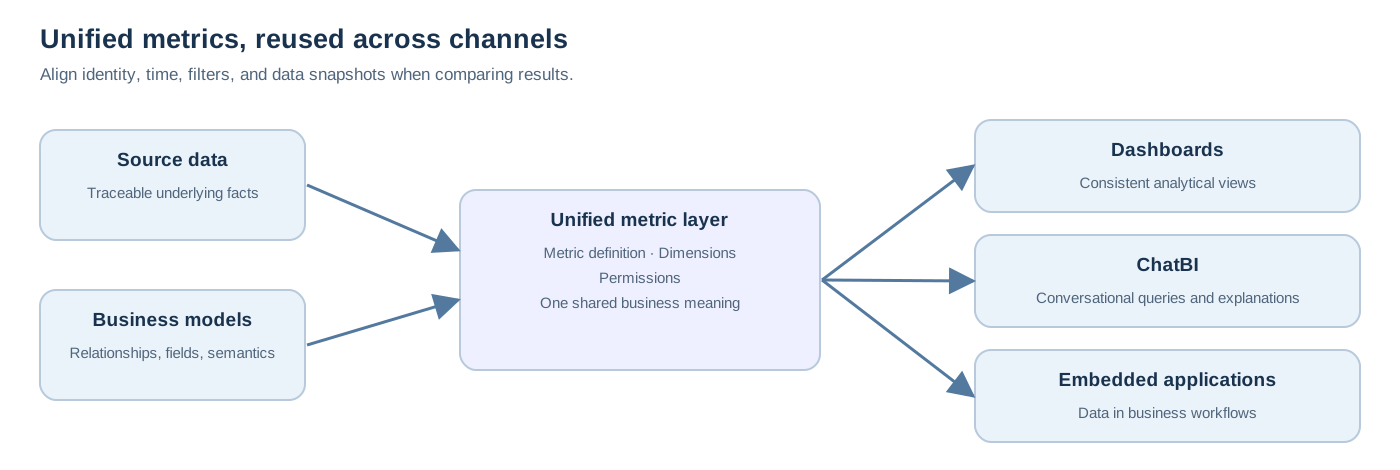
Embedded delivery also requires authentication, resource authorization, and data permission design. The HENGSHI BI PaaS white paper lists embedding at chart, dashboard, application, and module levels, with iframe and JavaScript SDK approaches. It also lists API categories for data queries, report rendering, user-system management, and metric monitoring. Choose the integration according to the deployed version, authorized scope, and API documentation. Integration capability does not mean every API is available by default, nor does it permit the frontend to read data directly while bypassing authentication and permissions.
For projects using ChatBI, design acceptance questions within the same authorized data model and business topic. For example, ask, “What was Paid Sales in the East China region in October 2026?” Record the candidate metric, dimensions, filters, and time range the system uses, then compare with a dashboard under fixed conditions. If ambiguity appears, improve the metric description, field names, topic authorization, or question wording and retest. This validates semantic preparation and permission boundaries; a natural-language answer is not proof of a consistent definition without further checks.
Include change and performance in governance
Changes to a metric definition require collaboration among business owners, data developers, and the owners of consuming channels. The HENGSHI manual describes management actions including descriptions, grouping, copying, editing, taking metrics online or offline, and checking references from other metrics or charts when deleting a metric. Teams can incorporate these into a change process: propose a new definition, copy or edit a candidate metric, compare fixed samples and cross-channel scenarios, identify affected pages and the publication window, and let the responsible owner decide when to switch. Whether to retain the old definition, for how long, how to label it, and who retires it are organizational governance decisions that should be recorded explicitly.
Teams should specify a retention plan, validity period, and retirement owner for old definitions, plus a refresh strategy, completion signal, and data timestamp for each source type. Performance acceptance should cover the target permission mode, filter combinations, and concurrency, recording cache or acceleration configuration, post-refresh query results, and reconciliation against the source. HENGSHI materials describe different cache and acceleration options at chart, metric, dataset, and warehouse levels. Select and validate configurations in the target environment against data freshness and query performance.
Conclusion
Reuse across channels begins with unified metric definitions. Delivery criteria also include models, dimensions, filters, time, permissions, and data timestamps. Once these conditions are established for Paid Sales, headquarters dashboards, store pages, and embedded applications can share the same calculation meaning and explain differences in results with evidence. Metric management can then extend beyond repeated calculations in report building to become a common language for business collaboration.