
Article body
Full article
Enterprises adopting Agentic BI often conflate answering one question with working reliably in everyday business. The former can begin with a natural-language query. The latter must withstand real conditions: metric definitions, account permissions, empty data, interrupted pages, and definition changes. More mature analysis does not naturally confer more business authority. For many teams, keeping agents at the analytical assistance layer already creates reusable value.
HENGSHI’s AI analytics capabilities include ChatBI, Data Agent, and integration through SDKs, APIs, and iframes. They connect natural-language questions, charts, and analytical assets. The HENGSHI AI Analytics Agent product page provides an overview. This article uses the HENGSHI SENSE 7.0 Data Agent, ChatBI, and integration manuals as its baseline, without equating analytical output with business decisions or execution in external systems.
Define stability first: reviewable conditions beyond the answer
When a sales owner asks why East China’s monthly attainment is below target, a chart alone does not complete delivery. Confirm at least that the owner sees only authorized regions; attainment uses the currently effective target version and time window; nulls, delayed refreshes, and hidden fields are not misinterpreted as business conclusions; and other roles receive results consistent with their respective data scopes.
This is also the starting point for human–agent responsibilities. An agent can help turn a question into queries, charts, or drafts. Data owners maintain definitions and data objects. Business owners judge whether the question is valid and the explanation fits actual conditions. Permission administrators confirm data scope. Integration teams own embedded pages and external invocation behavior. A model’s answer is no reason to skip acceptance when any of these participants is missing.
In 7.0, ChatBI is a standalone read-only analytics entry point. Users can inspect answers, charts, data scope, and processing progress. Query scope stays fixed to the application/data package or metric subject area selected for the conversation; changing scope requires a new conversation. The global Data Agent’s Ask mode is also read-only. Only Act creates or edits BI resources within the current user’s permissions. This distinction places query validation and resource creation behind different acceptance criteria, preventing a question and answer from being mistaken for publication or modification authority.
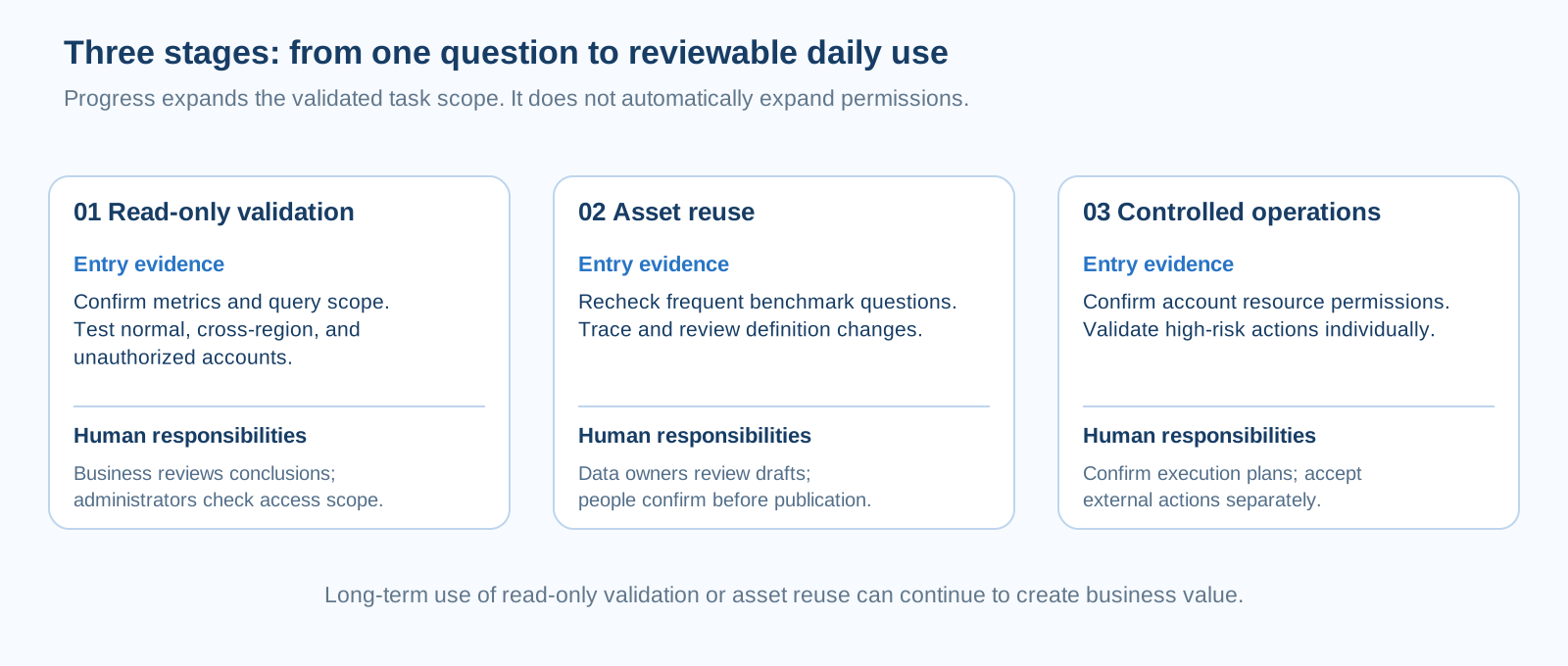
Figure: Entry evidence and human responsibilities for a three-stage rollout.
Stage one: read-only validation, from an answer to a reviewable result
Choose a clearly bounded business question with manageable impact, such as regional performance review, store sales comparison, or customer service volume trends. Use realistic, non-sensitive sample questions to check whether ChatBI or Data Agent identifies the correct data objects, metrics, and filters. Outputs are for reading, discussion, and human review. They do not trigger purchases, tickets, messages, or ERP writes.
For a regional sales review, business staff first provide an agreed definition: “Attainment = confirmed sales / current month’s target, excluding unreconciled returns.” Analysts ask the same question using a normal account, a cross-region account, and an account without permission. The business owner spot-checks results against existing reports. Empty results first require checks of filters, refresh status, and permissions, rather than letting the agent guess that no business activity occurred. Deliverables can include sample questions, checking results, and a list of ambiguities requiring governance. If a page briefly closes or changes, do not immediately repeat the question. The 7.0 server preserves turns and run status; inspect that status on return to avoid duplicate submissions.
Acceptance criteria should refer to specific questions instead of a general “accuracy threshold.” Key answers should identify metrics and time ranges; unauthorized accounts must not see restricted data; empty results must be clearly marked; and synonyms, regional aliases, and month boundaries must be checked by people. When an answer uses the wrong definition, return to metrics, field descriptions, synonyms, and permissions for correction. One correct answer is not a long-term guarantee.
Stage two: reuse analytical assets, with human judgment before publication
Once frequent stage-one questions are clear, teams can reuse confirmed metrics, charts, dashboards, and question templates in monthly reviews, regional reviews, or service-quality monitoring. The global Data Agent’s Act mode can create or edit BI resources within the account’s existing permissions. Desktop ChatBI can also add answer charts to an editable target dashboard or create a formal dashboard from the conversation. Operational capability still does not mean immediate publication authority. Before publication, business and data owners should check names, definitions, filters, data update time, target application, and intended audience.
For example, a retail chain reviews sales, attainment, and stockout rates each week. Validated questions can develop into dashboard drafts with fixed time ranges and regional filters. Business analysts check whether anomalies relate to promotions, holidays, or stockouts. The data team confirms target versions and return rules. Store owners add on-site explanations. The agent assists with retrieval, slicing, chart drafts, and text summaries. It does not decide whether to launch a promotion or turn descriptive statistics directly into causal claims.
Add revalidation after change. When metric definitions, target tables, field meanings, role permissions, or refresh logic change, rerun the same benchmark questions. Intelligent interpretation here organizes existing and historical data. Forecasting future trends requires separate validation of the method, its applicability, and its error. Two phenomena changing together do not establish business causality from statistical contribution alone. Teams can record human review in their own acceptance ledger, but should not assume the product automatically tracks suggestion adoption, judges business outcomes, or grants authority for the next stage.
Stage three: controlled operations, with external actions treated as separate engineering scope
Stage three does not imply that mature analysis must lead to automatic execution. It means running validated BI creation and operational tasks within explicit permissions and controls. The global Data Agent’s Act mode in 7.0 can handle BI resource creation, modification, and configuration without exceeding the current account’s permissions. High-risk operations are opened individually. Creating an execution plan currently requires user confirmation. Updating, deleting, starting, or stopping execution plans, along with publication, sharing, export, permissions, credentials, and permanent resource deletion, are not general operational capabilities. Rejected or unavailable actions should return to the product’s existing entry points.
HENGSHI provides iframe, full UI SDK, and data client SDK integration. The server runs a unified model and tool loop, checks permissions, and saves conversation history. The full UI SDK currently limits execution mode to Ask, with dashboard writing disabled by default. If the host explicitly enables and handles writing, target-resource editing permissions must still be verified. Read-only consumption pages such as the application marketplace, shared links, and portals also provide no Ask/Act switching or dashboard writing entry point. Interface capability does not mean that an external process is authorized, or that HENGSHI includes purchasing execution, ERP writeback, external approval lists, or automatic permission upgrades. External tool writes, notifications, approvals, and audit must be separately designed, integrated, and accepted by integrators and business-system owners according to actual deployment, permission models, and compliance requirements.
Begin controlled operations with the smallest action: pass a reviewed analytical reference or create a draft in a test environment, then let business staff confirm the next step. To expand scope, define invocation identity, writable objects, trigger conditions, exception handoffs, and audit evidence one by one. Irreversible or high-impact actions belong in separate risk review. Analytical maturity cannot substitute for actual authorization, and unverified automatic rollback, cross-system recovery, or writeback capabilities should not be promised.
Classify actions and risks, rather than levels of autonomy
| Work unit | Risk assessment | Analytical collaboration the agent can provide | Necessary human and system responsibilities | Acceptance focus |
|---|---|---|---|---|
| Query authorized data and generate chart drafts | Lower | Interpret the question, locate scope, and return chart or text drafts | Business staff check definitions and conclusions; permission administrators ensure minimum data scope | Account permissions, metric definitions, empty results, and time boundaries |
| Create or edit metric, chart, and dashboard drafts | Medium | Assist with HQL expressions, chart configuration, and layout suggestions in Act mode | Data owners review definitions; publishers confirm audience and version | Formulas, filters, refresh status, and pre-publication review |
| Connect reviewed results to external tickets, messages, or business applications | Higher | Provide structured analytical results or references | Integrators define service identity and failure handling; business-system owners grant and audit external permissions | External authorization, writable objects, duplicate triggers, and exception handoffs |
| Irreversible or high-impact external business changes | High | Provide analytical material for human review only | Separate business approval, risk review, and system controls jointly determine whether to act | Outside this stage’s default scope; separate review required |
The table helps teams match verification depth to an action’s impact. A read-only query from a complex model need not expand permissions. A seemingly simple external write from a mature analytical process still needs separate authorization. Many production scenarios will remain in the first two rows for the long term. This creates value through faster, more reusable, reviewable analytical collaboration.
Make acceptance records traceable evidence
Every stage acceptance should cover at least four situations: whether real-account permissions behave as expected; whether empty data is correctly handled in the page and interpretation; whether benchmark questions are rechecked after metric or definition changes; and whether the team reads server-preserved turns and run status after embedded-page, network, or conversation interruption before retrying or handing over to a person. Rehearse the last case for the actual deployment and integration. A single demonstration cannot establish cross-system recovery guarantees.
The following is an example project ledger for preserving acceptance facts. It is not a HENGSHI API, product field definition, or runtime schema. Adapt fields to the enterprise’s existing testing and change processes.
{
  "scenario": "Monthly sales attainment review for East China",
  "release_context": "Target deployment version and integration method recorded",
  "checks": {
    "account_permissions": "Normal, cross-region, and unauthorized accounts tested",
    "empty_result": "Empty-result presentation and business interpretation confirmed by a person",
    "definition_change": "Benchmark questions revalidated after the target version changed",
    "page_interruption": "Check server-side turns and run status on return to avoid duplicate submissions"
  },
  "human_review": {
    "metric_owner": "Definitions and time scope confirmed",
    "business_owner": "Descriptive conclusions confirmed as suitable for review"
  },
  "external_action": "none"
}
Accumulate value through an evidence chain
A practical Agentic BI path preserves reviewable conditions with every use: what was asked, which metrics supported it, which account saw it, where a person confirmed it, and how it was revalidated after definitions changed. HENGSHI’s ChatBI, Data Agent, and integration capabilities can extend questions into charts, dashboards, and reusable analytical assets. Stable operation comes from an evidence chain combining data governance, human judgment, permission boundaries, and project acceptance.
Once teams reliably validate read-only analysis and asset reuse, business objectives and authorization conditions should determine whether to introduce controlled operations, whether to connect external tools, and how far those integrations should go. Effective, lasting analytical assistance is itself a meaningful Agentic BI outcome.