
Article body
Full article
What business analysis often loses is not the number itself, but the conditions that accompany it when it reaches the next colleague: metric definitions, budget versions, data timestamps, and the distinction between verified findings and assumptions awaiting business confirmation. If these remain in a single conversation or screenshot, teams still have to ask again, retrieve the data again, and explain it again.
HENGSHI’s public product information describes a Data Agent Family spanning modeling, report creation, conversational analytics and insights, as well as data interpretation and report generation. ChatBI is built on NL2Metrics and a modeling semantic layer. In a business setting, the priority is to organize analysis into tasks that can be checked and handed over, without labeling every step “agent collaboration.” Using the product boundaries of HENGSHI SENSE 7.0 as its baseline, this article explains how querying, interpretation, BI resource operations, and external business actions can each deliver clear inputs and outputs.
1 Why business questions become distorted at handoff
“Why is East China’s sales revenue below budget this month?” contains at least four conditions: whether tax is included, the budget version, the time period, and regional attribution. When an ad hoc query is followed by a forwarded chart, its original filters and data refresh time can easily disappear.
Reusable business analysis should deliver both its factual scope and the scope of its explanation. The former includes metrics, dimensions, filters, time, and data status. The latter includes breakdowns supported by data, hypotheses requiring business evidence, and the next responsible person. Natural-language questions should map to governed metrics and semantics; they should not be treated as arbitrary SQL.
Here, collaboration means handoff quality, rather than multiple models answering simultaneously. Queries deliver factual scope; analysis delivers evidence and items to validate; BI resource operations deliver confirmed changes; and business owners deliver final decisions. Ask and Act are two execution modes in the product. They are neither separate Agents nor another name for treating an API as a Workflow.
2 Write the task brief before starting analysis
A business question does not need a lengthy requirements document, but every handoff should preserve a minimum set of information. The following table can serve as a task brief for regular review meetings or map to an enterprise’s own ticketing or task system.
| Handoff object | What must be specified | Deliverable | What still needs human confirmation |
|---|---|---|---|
| Question scope | Metric, comparison, time, and organizational or business scope | An actionable question | Whether the metric definition is correct |
| Data conditions | Application/data package or subject area, refresh time, and filters | Query scope and results | Whether the data supports the comparison |
| Analytical interpretation | Verified breakdown dimensions, evidence, and unverified hypotheses | Insight summary and items to check | Whether the business explanation holds |
| BI assets | Charts, dashboards, metrics, and target resources to create or change | Change plan or saved assets | Whether editing and publication conditions are met |
| External action | Recommended next step, responsible person, and location in an external system | Ticket, task, or decision record | Whether an authorized person approved the action |
For example: “Compare East China’s July net sales with budget; break down the variance by channel and category; use the sales application; record the data refresh time; and return the three largest verified differences and causes awaiting confirmation.” This is enough to turn a vague follow-up into a reproducible task. When scope, definitions, or evidence are unclear, first improve asset names, descriptions, relationships, synonyms, and business rules.
3 From discovery to handoff: four independently verifiable steps
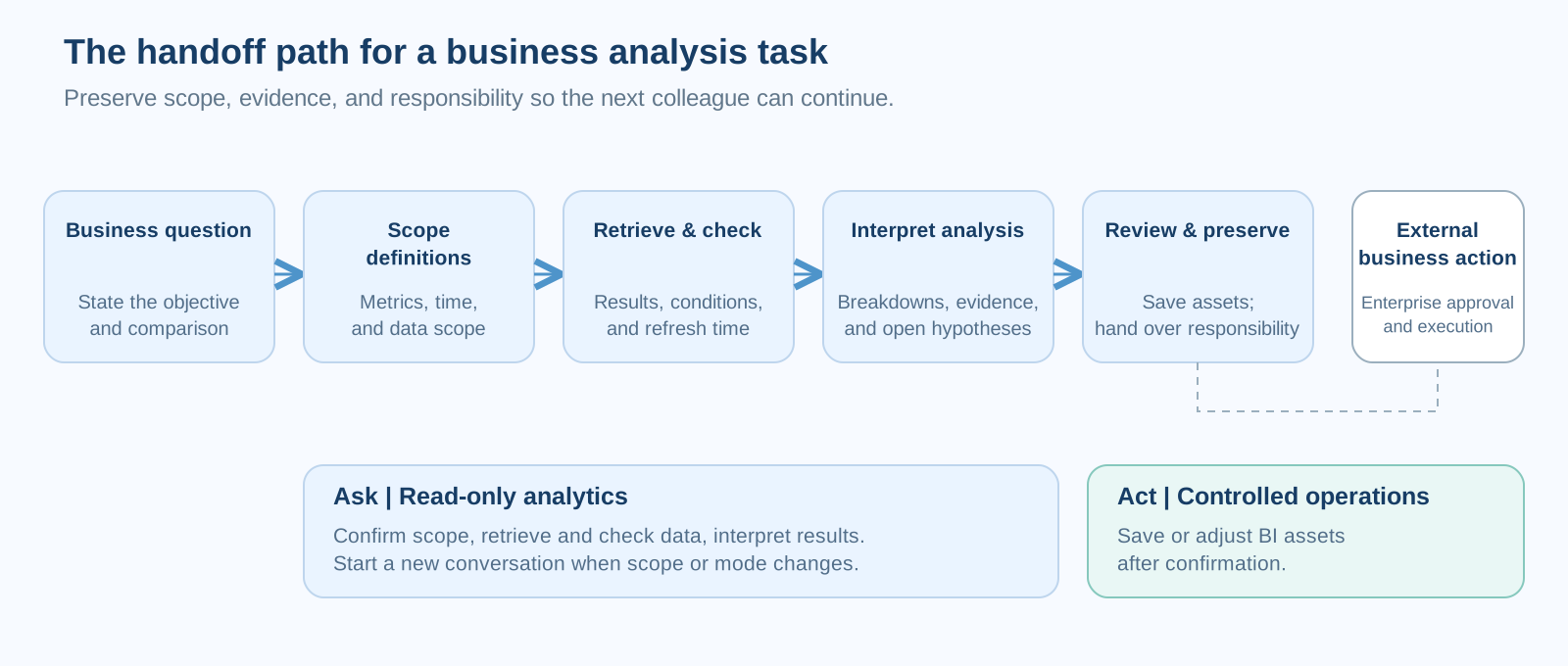
3.1 Use Ask to establish facts, without describing a query as an operation
In 7.0, standalone ChatBI and the global Data Agent’s query mode both belong to read-only Ask. A new query conversation can be scoped to an application/data package, a metric subject area, or a saved dashboard. Without a selected scope, the system locates business objects only among resources accessible to the current user; multiple possible matches require user confirmation. Changing scope requires a new conversation. Results should therefore describe scope and data status, rather than simply forwarding a chart.
The first output should be restrained: metric name, time range, filters, result, the application or dataset actually used, and the data refresh time. If net sales already has a published definition, start there. If the user uses colloquial terms such as “collections” or “sell-through,” record the metric or field actually matched. The next reader can then judge whether the result is reusable or needs to return to modeling.
3.2 Attach evidence to explanations, without turning correlation into causation
After discovering a month-over-month decline, a common mistake is to immediately conclude “insufficient promotion” or “customer churn.” A better approach is to break potential causes into testable dimensions: channel, category, customer tier, order count, unit price, returns, and changes to budget version or regional attribution. Each breakdown should answer two questions: how much it contributes to the overall variance, and which filters apply.
A saved dashboard can start a read-only intelligent interpretation conversation that takes visible filters into account. Unsaved page changes should be saved first. Filters are analytical hints; they cannot bypass server-side data permissions or turn unsaved page state into access or editing capability. In this example, intelligent interpretation only describes, decomposes, and prepares drill-down material from established facts. It can help organize where the variance lies, but cannot infer why it happened from association alone, or approve replenishment, pricing, or marketing actions for the enterprise.
3.3 When definitions are incomplete, switch to Act and start a new conversation
Some problems cannot be solved by asking more questions. Two reports might use different denominators for budget attainment, or “channel” might mean both contracting channel and shipping channel. The issue has shifted from whether the answer is correct to whether the assets can express the business question. Return analysis to data preparation and governance, adding field descriptions, relationships, default filters, and metric definitions. Switch from Ask to Act when BI resources need to be created or changed. Switching modes starts a new conversation, keeping read-only retrieval and writing contexts distinct within the task chain.
Act can create, modify, and configure BI resources within the current user’s permissions; it does not expand account privileges. Creating an execution plan requires user confirmation and rechecks permissions, resources, content, and validity. High-risk actions such as publishing, sharing, exporting, permissions, credentials, and permanent deletion are outside general operational capability. Official business definitions should still follow the team’s existing definition, review, and publication processes.
The deliverable should be a change description, not merely “fixed”: which resources were created or adjusted, their scope, and which historical analyses need rechecking. Recording asset changes separately from business conclusions lets the team distinguish business changes from definition changes.
3.4 Preserve confirmed results as formal assets
A report or dashboard should help readers see the basis for a conclusion. A result package for a business review meeting should include conclusions, key figures, comparison baselines, breakdown paths, data timestamps, and items awaiting confirmation.
In desktop standalone ChatBI, users can add charts from answers to an existing formal dashboard or create a formal dashboard from a conversation. They must choose an editable target and check metrics, filters, and theme before saving. Published application marketplace apps, shared links, and application portals are read-only consumption contexts. The full UI SDK currently also supports read-only querying, with dashboard writing entry points hidden by default. Integrators must explicitly handle writes and meet the target resource’s editing conditions.
The following is a design example of a handoff protocol, not a HENGSHI API or schema. It illustrates information a team could transfer. Field names, transport, authentication, and approval processes must be designed and validated for the actual system.
{
  "task": "Check the variance between East China's July net sales and budget",
  "facts": {
    "metric": "Net sales (published definition)",
    "scope": "East China; 2026-07; budget version V3",
    "data_as_of": "Use the data refresh time in the runtime result"
  },
  "evidence": ["Variance breakdown by channel and category"],
  "open_questions": ["Whether returns booked across periods affect this month's comparison"],
  "next_owner": "Regional business owner",
  "action": "After human confirmation of the cause, decide whether to create a business ticket"
}
4 A retail example: hand a sales decline to the right person
Suppose a retail regional manager discovers that East China’s net sales are below budget. The following is a task design example, not a customer case, and does not imply that the product automatically performs the business actions described.
The manager first asks a comparison question in standalone ChatBI, scoped to the sales application, East China, the current month, and the published budget version. The Ask result becomes the factual layer: variance amount, metric, time, and filters. Analysts then break down the variance by channel and category, finding that the decline is concentrated in two distribution channels and three SKUs. This only establishes where the variance lies. Whether returns crossed periods, shipments were delayed, or policy changed remains to be checked by the channel owner.
If “distribution channel” has inconsistent meanings across datasets, stop extending the conclusion and move to BI asset adjustments handled by Act or the normal data governance process. Clarify field descriptions, data relationships, or metric definitions, and mark affected historical reports. After asset review, save the confirmed charts or dashboard content. Promotions, replenishment, and customer communications still depend on the enterprise’s external business systems, approval processes, and authorized people.
This collaboration does not require several roles to answer simultaneously. It requires evidence at every handoff: Ask delivers factual scope, analysis delivers breakdowns and hypotheses, Act delivers change status, and the business delivers a decision record. Every step can pause, be reviewed, or return for correction, preventing an analytical result from being mistaken for an approved business action.
5 Integration capability does not orchestrate enterprise business processes
In 7.0, iframe, the full UI SDK, the data client SDK, and HTTP API all call a unified server-side conversation service. The server runs the model and tool loop, checks permissions, saves history, and manages tasks. Integration forms determine who owns pages, conversation events, and state recovery; they do not define the enterprise’s task protocol or approvers.
An iframe reuses the complete ChatBI page. The full UI SDK embeds a complete read-only chat interface. The data client SDK supports a fully custom interface. HTTP API supports calls from a business backend or other systems. An API is an integration and invocation boundary, not a Workflow. External orchestration does not automatically provide user identity, metric definitions, or business approval permissions. Integrators still need to define identity mapping, event consumption, failure recovery, result writeback, and human confirmation.
Permissions also belong in the task protocol. Data Agent operates within the current user’s configured permissions. SDK resource IDs, clientContext, and mode parameters cannot increase permissions. External pages must establish the correct login state or short-lived authorization, then validate access to target applications, data packages, metric subject areas, and dashboards in the actual environment. The product page’s SDK, API, iframe, Dify, and Coze collaboration directions offer integration and orchestration choices. Organizations must still define their task protocols and approval boundaries.
6 Three checkpoints for reliable collaboration
At the start, check facts: whether the question maps to a published metric; whether data covers the required time, scope, and granularity; and whether results include scope, filters, and refresh time.
At handoff, check interpretation: whether every proposed cause has a supporting breakdown or business evidence; which items remain hypotheses; and whether definition changes explicitly identify their impact.
At implementation, check responsibility: who saves or publishes BI assets, who decides external business actions, and who manages logs, audit, and retention. The product provides analysis, operations, and integration capabilities. Enterprises implement the complete business loop using their own permissions, governance, and processes.
Good business analysis preserves enough facts and boundaries at every handoff. Data Agent can then become a verifiable part of enterprise analytical collaboration, while managers can clearly distinguish what the data supports from what still requires a human decision.