
Article body
Full article
Summary: When orders, production, inventory, and finance reside in different databases, the challenge extends beyond connectivity. Teams need reusable business definitions and computation that fits each dataset’s capabilities, freshness requirements, and source-system load. HENGSHI SENSE organizes this chain through connections, datasets, HQL metrics, and charts: analysts define metrics in a common expression language, while data administrators explicitly choose direct query or the acceleration engine for each dataset and verify that choice through results and execution records. This article describes that configurable, verifiable approach to multi-source analysis.
1. Unify business definitions before discussing execution
A manufacturing dashboard often needs production progress, shipment amounts, receivables collections, and inventory turnover together. These may come from MES, ERP, warehouse systems, and finance databases, with different field names, primary keys, update times, and permission boundaries. Putting SQL from each system directly into charts may provide quick visibility, but over time it can produce inconsistent definitions for identically named metrics, refreshes that slow source databases, or inconsistent data after updates.
HENGSHI brings source connections, dataset modeling, and metric expressions into the same analytical process. For “recognized revenue,” for example, a team first agrees on recognition status, currency, refund handling, reporting date, and organizational attribution, then records those rules in a reusable HQL metric. Charts, dashboards, and data services reference the same definition. Adding a source then centers on field mapping and granularity, rather than having every consumer reconstruct the business rules.
Multi-source projects must unify business semantics while respecting connection versions, preset code, field types, dataset types, and the actual scope of chart interactions. When adding functions or migrating connections, verify those conditions on the target dataset. A shared metric definition becomes a basis for collaboration while keeping underlying differences visible.
2. Direct query and acceleration: configure execution per dataset
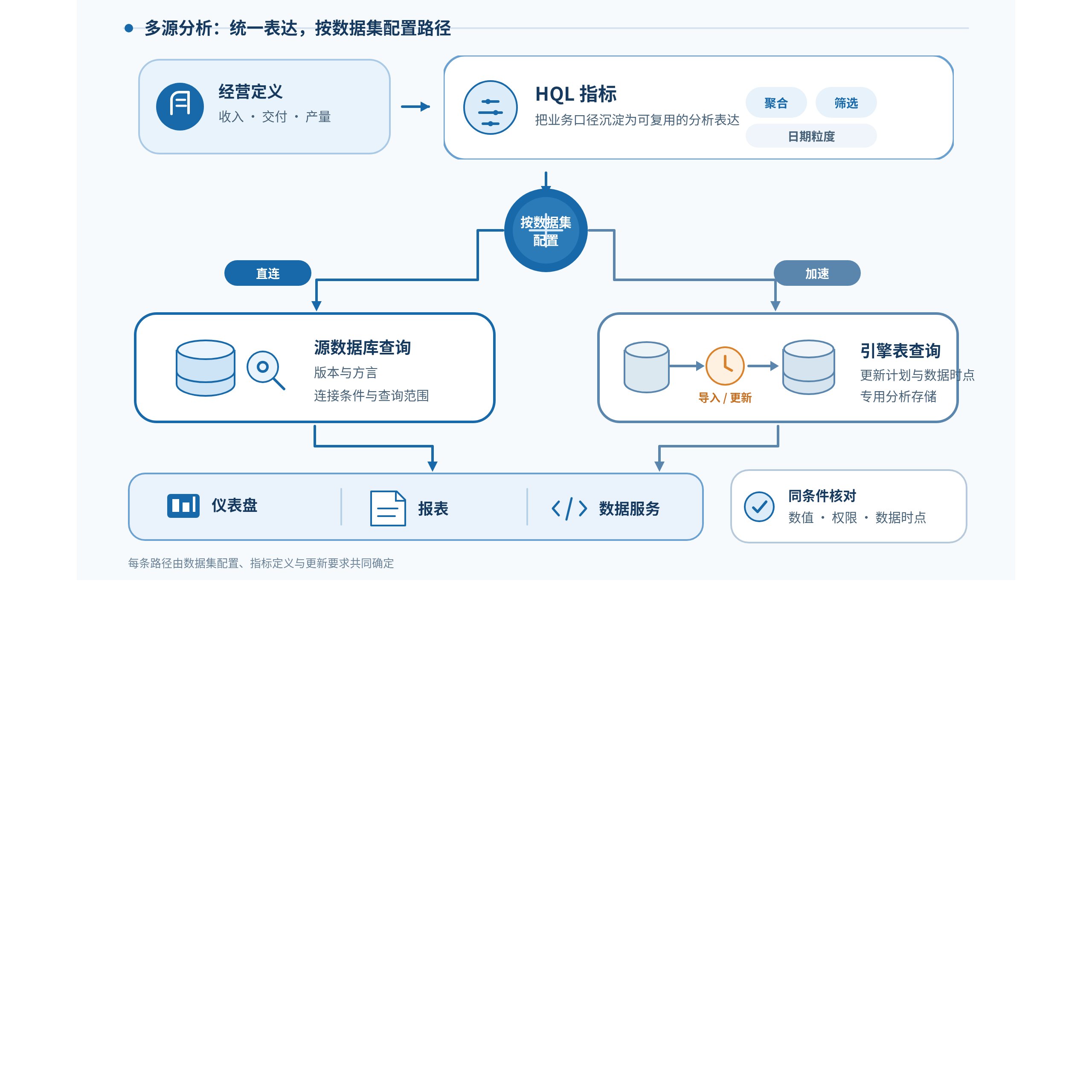
Business definitions become HQL metrics for aggregation, filtering, and date granularity. Each dataset explicitly selects direct source-database queries or import/update followed by engine-table queries. Dashboards, reports, and data services consume the results; verify values, permissions, and data timestamps under the same conditions.
2.1. Direct query: treat the target database as an explicit execution boundary
A dataset can use direct query when the business needs the latest source records, the query scale is manageable, or data should not be copied. Direct SQL datasets must follow the target database’s dialect. For MySQL, for example, the official instructions require SELECT SQL to conform to MySQL syntax. Connection versions and preset code are also runtime conditions: a MySQL connection must pass a connectivity test, and omitting preset code can make some functions unavailable. During development or migration, validate a small sample on the actual connection rather than extending assumptions from another database.
For datasets connected to MySQL 5 or earlier, the official manual explicitly states that window functions and chart advanced calculations are unsupported. If these capabilities are needed, the acceleration engine must be explicitly enabled. Administrators can use this constraint to select the execution path during modeling and check the affected metrics before switching.
2.2. Acceleration engine: import, query, and update form one path
Enabling the acceleration engine imports the dataset’s data into the engine; subsequent queries against that dataset directly access the engine table. In validated scenarios, this can provide dedicated analytical storage or functions unavailable at the source, and it supports joins between datasets from different sources. Disabling the engine returns the dataset to direct access to its original table. If fields or metrics use functions supported by the engine but not by the original database, loading or charts may fail. A configuration change must therefore verify both the data path and metric compatibility.
Acceleration does not make a one-time import continuously current. After source rows change, imported datasets need an immediate update or an update plan to maintain freshness. Plans can configure schedules, upstream dependencies, retries, priority, and alerts; the latest completed update time should also enter acceptance records. For large-data sources such as Hive, Spark, Impala, Presto, and MaxCompute, the manual advises against large-scale engine imports because import does not support streaming replication and may consume substantial memory. Evaluate direct queries and data volume first in these cases.
2.3. Serve different freshness needs with the same metric definitions
Direct query and acceleration can divide responsibilities around one business model. A dashboard for current-shift output may use a direct-query dataset, while reports that repeatedly aggregate historical data across dimensions for monthly reviews can evaluate an accelerated dataset. Both share metric names, business definitions, and permission design, while explicitly defining their own query entry points, update cadence, and scope. Business users need not relearn “revenue,” “output,” or “delivery” in every report, and data teams need not send all data through one physical path.
Three questions should guide the choice: what query load the source can sustain, how much delay the result permits, and whether the required functions and charts are available under the dataset configuration. Start with one topic and a few core metrics, then expand to more factories, channels, or organizations. Managing connections, models, metrics, charts, and update plans together helps teams trace sources, adjust models, and maintain analytical applications.
3. HQL makes analytical logic reusable as metrics
HQL captures aggregation, filtering, grouping, and time semantics in readable, reusable metrics. Conditional aggregation can use FILTER. The following expression sums only completed orders. Page filters, data permissions, and the dataset’s own filters must still be checked alongside the metric:
sum({order_amount}) FILTER (WHERE {order_status} = 'completed')max_by(ARG, COMPARE) returns ARG from a row with the maximum COMPARE value. This can express logic such as “the product with the highest sales in a category.” If maximum values tie, the manual states that one is returned randomly. It must not be described as a stable tie-breaking rule. For stable presentation, first define a business-approved secondary ordering or use a calculation that can express it.
For example, after a finance system changes connections, an administrator first checks whether document status, currency, organization codes, and date fields in the new table map to the existing revenue dataset, and whether detail granularity remains one document line. Analysts continue using the existing FILTER condition and revenue metric name, then combine them by factory, product line, and month on dashboards. Datasets own data paths and field mappings, metrics own aggregation and business definitions, and dashboards own filtering and presentation. Teams do not have to copy formulas into every chart.
Chart advanced calculations also cover percentages, percentiles, period comparison, accumulation, moving calculations, repetition, retention, activity, and window calculations. The public matrix describes data-source support for these nine chart capabilities. For example, the relevant columns for MySQL 8 and Engine are all supported; TiDB, MySQL 5, and MongoDB do not support chart advanced calculations; and MaxCompute does not support percentiles. This matrix does not mean that every HQL function is fully supported on every source. Date-related period comparison, accumulation, moving calculations, activity, and retention also depend on date fields in the dataset and the chart’s time-dimension settings.
4. Build a verifiable multi-source model around one business topic
The following manufacturing dashboard is a modeling example, not a real customer benchmark. The team defines “recognized revenue” as amounts on posted finance documents, converted into the agreed currency and handled under refund rules. “On-time delivery rate” is the proportion of order lines delivered by their promised date. Both metrics record their datasets, field mappings, time zones, filters, denominators, and null rules, and are presented by factory, product line, and month.
During implementation, the day’s MES work-order progress can initially remain on direct query to meet tighter freshness needs. Historical finance detail that is repeatedly aggregated can be evaluated for acceleration after checking volume, update cadence, and permissions. Record each dataset’s path, update time, and dependencies as model configuration. If cross-source figures differ, examine metric definitions, update times, join keys, and source-record scope first, then determine whether the cause is a definition mismatch, update delay, or data-quality issue.
The practical benefit is an explainable path choice. Business users see consistent metrics; data teams can identify the source dataset, whether the query uses direct access or an engine table, when the latest update completed, and which charts need retesting after a change. Common expressions and explicit dataset configuration let teams manage connection differences while maintaining business definitions.
5. Validate the choice through results, freshness, and load
Prepare small, manually checkable samples covering nulls, duplicate keys, tied maxima, month boundaries, and refunds. On both direct-query and accelerated paths, verify metric values, filtering interactions, date granularity, and permission visibility. For acceleration, compare the time of the source change, the scheduled trigger, and the engine-table update. A faster query that returns data outside the freshness requirement does not pass acceptance.
Evaluate performance against real workloads. Fix the metrics, time range, dimensions, user role, and dataset version, then record execution time, scan scope or returned rows, refresh delay, source-database load, and success rate and tail latency under concurrency. Record the environment and query conditions so conclusions can be reproduced and compared. If direct-query pressure is excessive, narrow the query, adjust the model, or evaluate acceleration. If refresh delay on the accelerated path is too large, revisit update plans and business freshness requirements.
HQL preserves business semantics, direct query and acceleration provide configurable query paths, and update management makes freshness inspectable. When teams add sources, functions, or charts, they have a clear validation entry point and can explain where results come from and which boundaries apply.