
Article body
Full article
Abstract: Enterprises repeatedly building sales dashboards, regional applications, and executive reports need analytics assets that can be delivered, extended, and traced. HENGSHI organizes datasets, data models, metrics, chart libraries, and applications as managed objects. HQL and metric management carry business calculations, the data marketplace carries data packages and permissions, chart libraries support dashboard reuse, and Data Agent assists with analytics and creation over authorized assets. Reuse becomes a verifiable delivery chain rather than a copied report.
Begin with explainable business semantics
The same “sales” metric may appear in a headquarters cockpit, a regional dashboard, and an embedded business page. An identical name does not guarantee an identical calculation. First define order statuses, amount fields, refund handling, reporting time, and available analysis dimensions. Capture those rules in HENGSHI datasets, data models, and metrics. HQL expresses the calculations, while metric management combines calculation logic with business configuration so analysts do not have to rebuild the same rules in every chart.
HENGSHI distinguishes atomic metrics from business metrics. An atomic metric stores an aggregate calculation definition. A business metric adds qualifying conditions, analysis dimensions, a time axis, and path attribution for a specific analysis scenario. When several business metrics need the same dimensions, time axis, and qualifying conditions, they can reference a shared metric granularity. Changes to that granularity synchronize the corresponding configuration of referencing metrics, so such changes require sample reconciliation and downstream impact checks.
Consistent semantics answer how the same business concept is calculated. They do not replace query conditions or data permissions. Regional managers see their own region while headquarters sees all regions. Both can use the same metric and still obtain different values because the visible data scope differs. Acceptance records should include the metric name, dataset or model, filters, time range, data timestamp, and access identity so differences can be checked.
Users must also be able to find the assets. HENGSHI’s metric marketplace organizes atomic and business metrics by business topic and subtopic, with filters for metric type, dataset, creator, and group. Frequently used metrics can be added to My Favorites, retaining their topic paths. Metric management, the metric marketplace, and metric analysis dashboards provide a consistent global search entry point. Topic permissions determine whether users can view or use a metric. Favorites and search improve discovery without expanding access.
Organize reuse around five asset types
| Asset | What can be reused | Boundaries to confirm during implementation |
|---|---|---|
| Metrics and metric granularity | Aggregation logic, qualifying conditions, analysis dimensions, and time axes | Reuse shares calculation meaning. Page filters, identity permissions, and data refresh still affect each query. |
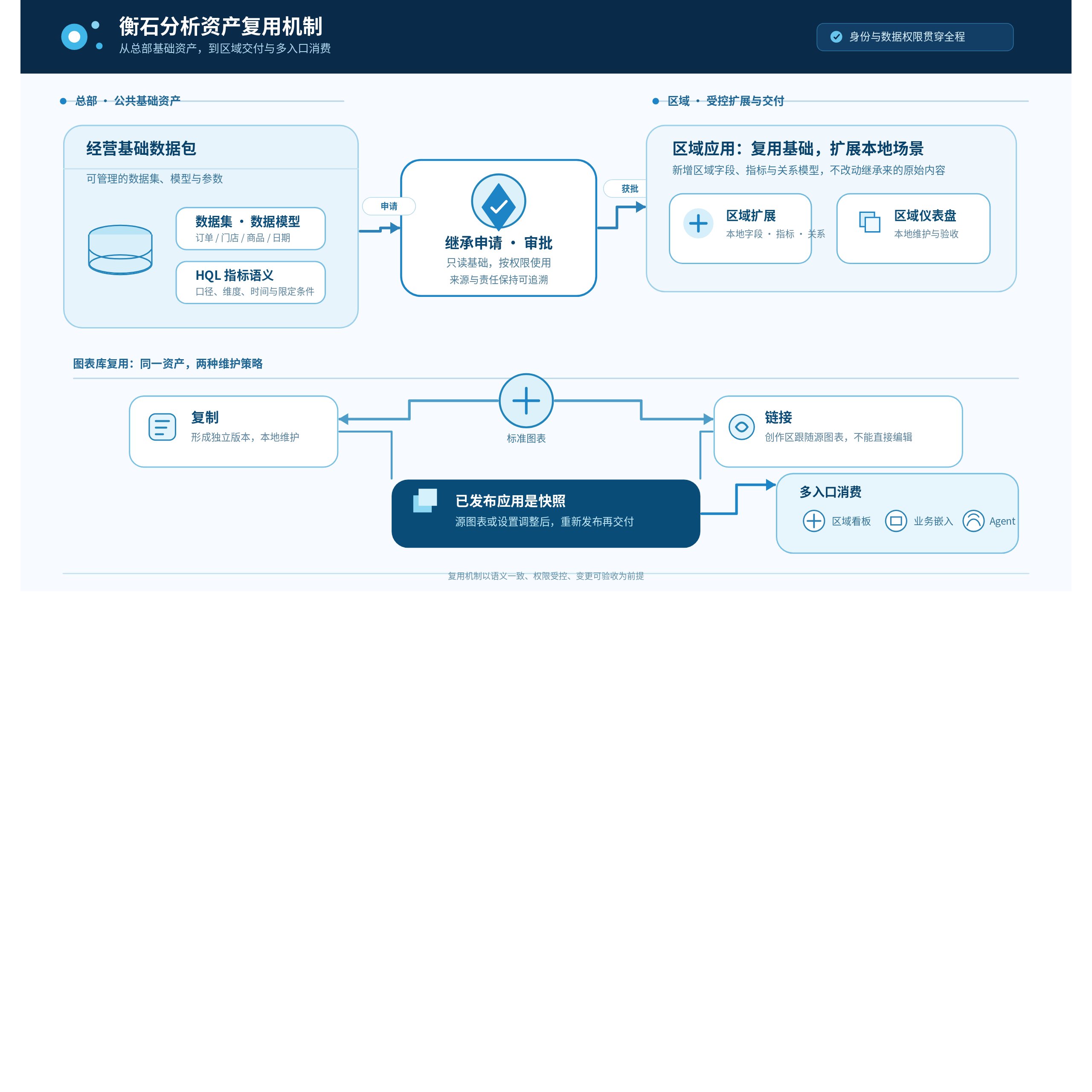
| Data packages and inherited datasets | Datasets, data models, parameters, and shared foundational data | Applications must apply and receive approval from the data package manager. Inherited content stays read-only; applications can add fields, metrics, datasets, and relationship models. |
| Chart library charts | Frequently used business charts, consistent presentation, and calculation configuration | Copies can be changed independently. Linked charts follow chart library changes and cannot be edited directly. Publishing an application or exporting a template materializes linked charts and removes the reference relationship. |
| Data package templates | An analytics foundation of datasets, chart libraries, data models, and related objects | After importing a template into a new data package, verify connections, data, and authorized users. A template is a starting point, not a substitute for target-environment permission and data checks. |
| Application templates and the template marketplace | Standard dashboard structures, consistent layouts, and complex report examples | Marketplace listings convert the datasets used into Excel sample data for display. Before listing, verify that the sample is suitable for the intended audience. Cross-environment imports also require rebinding to available data packages. |
These objects cover reuse from semantics and data to presentation and delivery. Data packages in the data marketplace can be exported as templates or turned into independent assets through duplication or copy-to operations. The template marketplace distributes standard analysis examples and similar dashboards that would otherwise be rebuilt repeatedly. Use links for standard charts that must stay aligned and copies when a local variant is explicitly required. The maintenance responsibilities differ; choosing incorrectly can make later changes unexpected.
Data package inheritance suits an organization in which headquarters supplies common foundational data and regions extend analysis locally. Inheritance retains the source package identity and protection boundary. Regional teams can add business fields, regional metrics, or new relationship models, but cannot modify inherited original content. Applications containing inherited datasets cannot be exported as templates. Deleting a source data package causes dependent charts to fail. Include these dependencies in change review rather than treating inheritance as cost-free copying.
Illustrative example: headquarters and regions reuse one analytics foundation
Consider a chain retailer. Headquarters creates a Business Operations Foundation data package in the data marketplace, models orders, stores, products, and dates, and defines metrics such as paid sales, refund amount, and inventory turnover days. The data team captures calculation rules, time axes, and common dimensions using HQL and metric configuration, then uses data package permissions to control who can manage, edit, or view the assets.
East China applies to inherit the package. After approval, the regional application receives usable foundational data, parameters, and models. Regional analysts add local metrics such as East China sales after promotions and place store operations charts in a regional dashboard. A standard store trend chart that must follow headquarters can be imported as a link into the regional application’s authoring area. Where the region needs different presentation rules, it copies the chart and maintains a local version. When a published application is delivered to business users, subsequent source-chart changes require republishing and acceptance. Headquarters retains ownership of foundational semantics and standard content, while regions retain room for business extensions and local delivery.
When a business user asks, “Which East China product categories had declining sales this month?”, Data Agent can assist with retrieval and analysis within authorized datasets, existing metrics, and business topics, and turn visual results into charts or dashboards that can be maintained afterward. The team must still check the selected metrics, dimensions, filters, and data timestamp. The agent consumes existing analytics assets; it cannot bypass data permissions or replace the business owner’s approval of definitions.
Make reuse an engineering capability that can be delivered
HENGSHI’s open integration capabilities bring analytics assets into portals, business systems, and automated workflows. Teams can choose embedded pages, JavaScript SDKs, or APIs based on interface and system boundaries, placing dashboards, natural language analytics, and analysis results inside existing products. Before integration, confirm the calling identity, resource authorization, row and column permissions, parameter passing, and acceptance definitions. A published application is a snapshot taken at publication. Changes in the authoring area require republishing to reach the published area. Design external embeds and links around stable application identifiers so internal object changes after republishing do not leak into business systems.
An actionable delivery process can start with a frequent business scenario:
- Select one business topic and confirm metric owners, calculation definitions, available dimensions, time rules, and authorization scope.
- Establish data packages, models, and shared charts in the data marketplace, and assign maintenance responsibilities for packages, charts, and applications.
- Choose inheritance, links, copies, or template imports for regional or project applications, then validate data scope and results using the target identities.
- Include stable dashboards, embedded entry points, and agent questions in release and change processes. Recheck affected objects when definitions, source data, or permissions change.
HENGSHI connects HQL metric semantics, data package governance, dashboard authoring, and open integration into an asset chain. Enterprises do not need to rebuild every analysis as an isolated project. Headquarters can maintain a common foundation, regions can extend it within controlled boundaries, and business systems and agents can consume prepared analytics assets. As ownership, references, and change records improve, reuse becomes an analytical capability the organization can accumulate over time.