
Article body
Full article
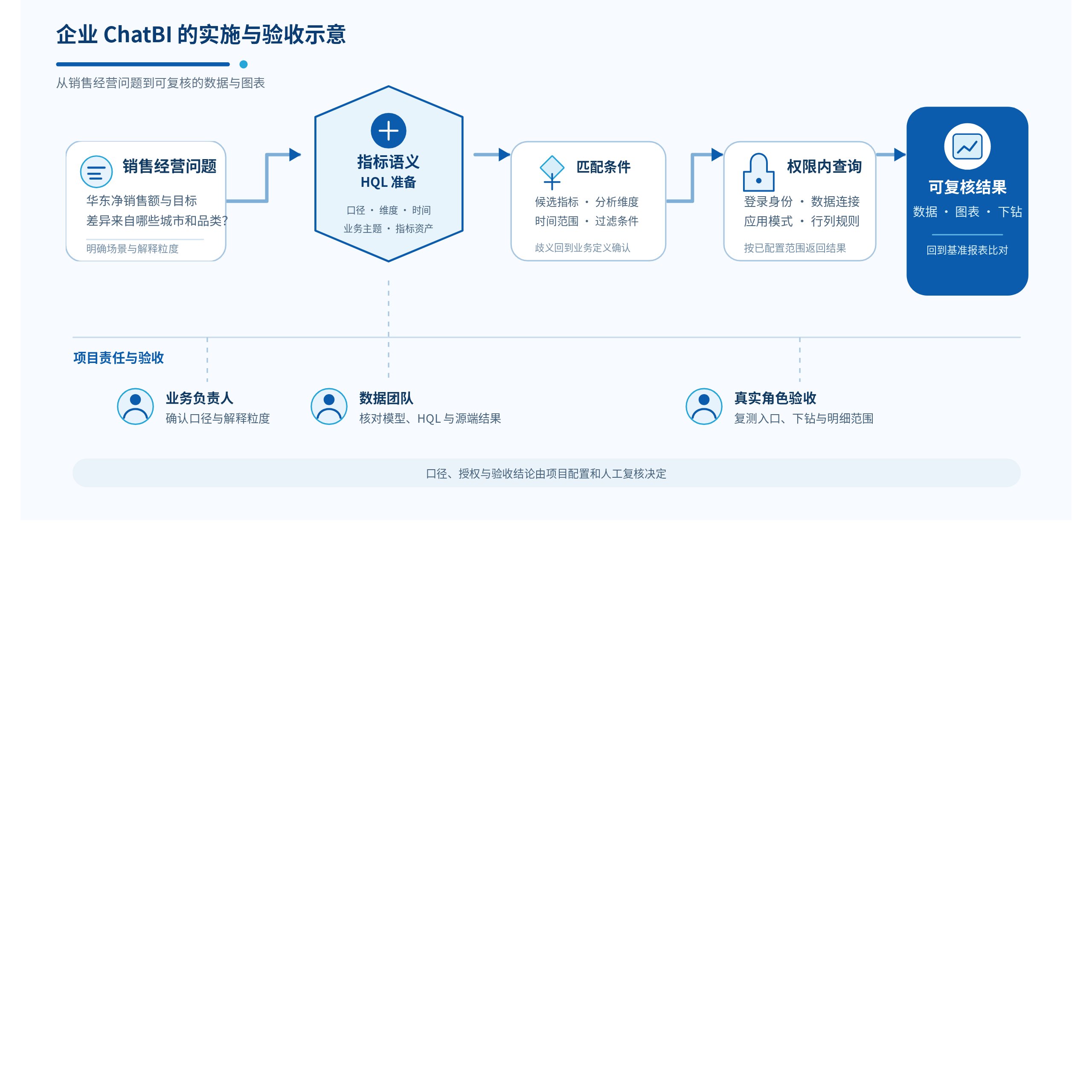
The first task in an enterprise ChatBI deployment is to ensure that business questions stay within explainable data, metric definitions, and permission boundaries. Without that preparation, a question such as “Why are East China sales declining?” may receive a plausible explanation that cannot be checked. With it, a sales leader can follow up by region, store, product, and time window, checking every query against the same business definitions.
HENGSHI builds this process on existing BI engineering. Datasets, models, and HQL capture metric semantics; metric management organizes business topics; and NL2Metrics, built around the modeling semantic layer, maps natural language to the enterprise’s existing metrics, dimensions, time ranges, and filters. Data Agent can support conversational analytics, metric creation, and dashboard generation. The enterprise remains responsible for data quality, definition approval, authorization, and acceptance results. The following sales analysis example describes an implementation path suitable for an enterprise pilot.
Start the pilot with one business question
Illustrative example: The sales director of a consumer goods company needs to assess each week whether East China is meeting its interim target and identify underperforming stores and major product lines. What appears to be a simple question—“What are this quarter’s sales?”—actually requires five decisions: whether sales are measured by orders placed, payments received, or shipments; how refunds are deducted; whether reporting uses calendar months or business weeks; which regions the director and regional managers may see; and how far the team must drill into detail when a number looks unusual.
Write the pilot question as a verifiable business statement, for example: “As of this week, how far are East China’s paid sales from the interim target, and which cities and product categories account for the difference?” This statement defines the modeling boundary. Orders, payments, refunds, targets, and organizational assignments become the initial data scope. Paid sales, refund amount, net sales, and target attainment become the first metrics. Region, city, store, category, and date become the first analysis dimensions. A narrow business scope gives stakeholders time to confirm definitions and lets the data team reconcile results item by item with existing management reports.
Establish sales semantics with HQL and business configuration
HENGSHI metric management is based on aggregate calculations over datasets or models. The data team can model order facts, stores, and organizational relationships for business use, then express atomic metric aggregation, filtering, and calculation logic in HQL. In this example, the team can define paid sales as the sum of amounts in a paid status and refund amount as the sum of refund records. Business metrics then specify the dimensions, time axis, and qualifying conditions used for net sales and target attainment. Maintain the business name, calculation expression, description, and display format together. A page title cannot substitute for a metric definition.
An easily missed point is that one metric does not mean one fixed number. Paid sales will produce different results for East China, a particular store, this week, or this quarter because dimensions and filters differ. Include payment dates, refund handling, data refresh times, and applicable organizational levels in the acceptance rules. If finance uses settlement dates while sales uses payment dates, create clearly named metrics or business definitions for each. Do not leave the model to guess during a conversation.
This is the value of HENGSHI HQL and the metric semantic layer. Calculation logic moves out of individual charts and temporary SQL, allowing metrics to be organized by business topic and consumed in multiple places. Dashboards, management reports, embedded pages, and ChatBI can use the same definitions. Each entry point must still carry its own filters, time range, and data timestamp so differences can be explained rather than mistaken for calculation errors.
Align questions and metrics with NL2Metrics
HENGSHI’s NL2Metrics approach places natural language analytics on top of the modeling semantic layer. When the sales director asks a question, the system needs to identify candidate metrics, time ranges, analysis dimensions, and filters, then query within the prepared data and metric semantics. A user can ask, “Which East China cities are behind target for net sales this quarter?” while the data team checks whether the question matched the right sales metric, target version, and geographic hierarchy.
Data Agent can support this conversational analysis and assist with creating metrics and generating dashboards. To improve business relevance, maintain dataset names, field names, field and metric descriptions, synonyms, and objects excluded from analysis. Use real questions to find missing definitions over time. Model output still needs to be checked against a fixed sample set, especially when similar terms such as sales, revenue, and cash collected have different business meanings. When ambiguity appears, add descriptions, constrain the question, or ask the business owner to confirm a candidate definition. One plausible answer should not immediately become a management conclusion.
Make permissions part of the analytics path
The sales director may see national totals, the East China manager only regional data, and store managers may also need customer contact details and personal commission fields hidden. HENGSHI connection permissions, application data permission modes, and dataset row and column permissions can form separate parts of this boundary. Row rules can distribute data by user, user group, parameters, or certain user attributes; column rules can restrict field visibility. First decide whether the application runs with the application author’s, dataset author’s, or current user’s data scope. Application-author and dataset-author modes allow in-application row and column permissions. User mode uses the current user’s source data permissions, so the same rule configuration cannot simply be copied from the other two modes.
Checking one dashboard total is insufficient. When joins or transformations create a new dataset, verify permission rules on that target dataset. For example, upstream dataset row permissions are not automatically propagated to a new joined dataset; configure and test them on the new object. Real roles should also test ChatBI, standalone pages, embedded pages, and bots. If different permissions produce different values, the acceptance record should explain the scope difference. If the same role can access inappropriate detail through another entry point, investigate the connection, application mode, and target dataset in turn.
Turn a working conversation into a verifiable delivery
The first pilot can cover a fixed set of sales questions: this week’s East China net sales, target attainment by city, refund changes at a particular store, and the scope visible to national and regional roles for the same metric. For every test, record the signed-in role, dataset and metric names, time window, filters, data refresh time, returned values, and comparison with the reference report. When a difference appears, determine whether it comes from definitions, permissions, data batches, or question ambiguity before deciding which layer to change.
Use two acceptance loops. In the first, the business owner confirms sales definitions and the required level of explanation, while the data team checks HQL calculations against source results. In the second, regional roles retest questions, drill-downs, and visible detail. Expand to adjacent categories, channels, or business topics only when the fixed questions yield explainable results for the specified roles and entry points. Assign owners for definition approval, review, and business action, and retain the reasoning in the acceptance record.
Choose integration and expansion around business responsibilities
Once the pilot is stable, employees can use a standalone ChatBI page, or the enterprise can choose iframe, JS SDK, or API integration to suit its product. An iframe reuses a complete page; the JS SDK embeds a chat window or result cards in a custom page; the API lets the enterprise backend own orchestration and presentation. Integration choices define interface and system boundaries. They do not replace acceptance of metrics, authentication, or data permissions.
Enterprise ChatBI should connect real business questions to governed BI assets. HENGSHI provides HQL, metric management, NL2Metrics, Data Agent, and integration options along this path. Validate semantics, permissions, and reconciliation in the sales pilot before expanding to finance, supply chains, or customer operations. Business teams can then use natural language analytics in daily decisions, while the data team can explain where each number came from, who may see it, and how to verify it.