
Article body
Full article
When business users judge whether ChatBI is fast, they usually remember the wait between sending a question and seeing a conclusion. For implementation teams, that wait includes at least three different events: the interface’s first visible feedback, the arrival of usable metrics or charts, and the completion of the explanation. Combining them into one number mixes data queries, model generation, frontend rendering, and data updates, leaving optimization without a clear direction.
HENGSHI ChatBI does more than translate natural language into a single query. It lets users ask questions about datasets and business metrics within their role permissions and organizes results as data and charts. If the enterprise establishes metric definitions, dimensions, and permissions first, ChatBI can work within its existing semantic and governance boundaries. Using regional sales analysis, this article explains how to design an end-to-end path that provides early feedback and allows results to be checked.
Confirm definitions before optimizing a regional sales question
Suppose the East China sales manager asks: “What are this month’s actual East China sales and target attainment? Which cities drive food and non-food sales?” This requires more than a returned number. The team first needs to establish whether sales include tax, how returns are treated, which numerator and denominator define target attainment, and whether the manager may see only East China data.
HENGSHI metric management and the ChatBI analytics scope provide a place to establish these definitions. Configure actual sales, sales targets, and target attainment as governed business metrics, and define region, category, and city as available dimensions. The system can then align user language with metrics and dimensions rather than having the model infer meaning from a large collection of field names. This is the purpose of NL2Metrics: narrowing semantic choices reduces the likelihood of follow-up questions, rephrasing, and rerunning queries caused by a misunderstood definition. It does not replace metric governance, and the model cannot decide business definitions on behalf of a department.
Fix the permission context before performance acceptance. ChatBI documentation states that users query datasets and business metrics according to their role permissions. A result produced by an administrator is not a valid proxy for a regional manager’s experience. Regional managers, sales directors, and administrators should separately verify visible metrics, available dimensions, drill-down scope, and returned content.
Separate response time into three user-visible milestones
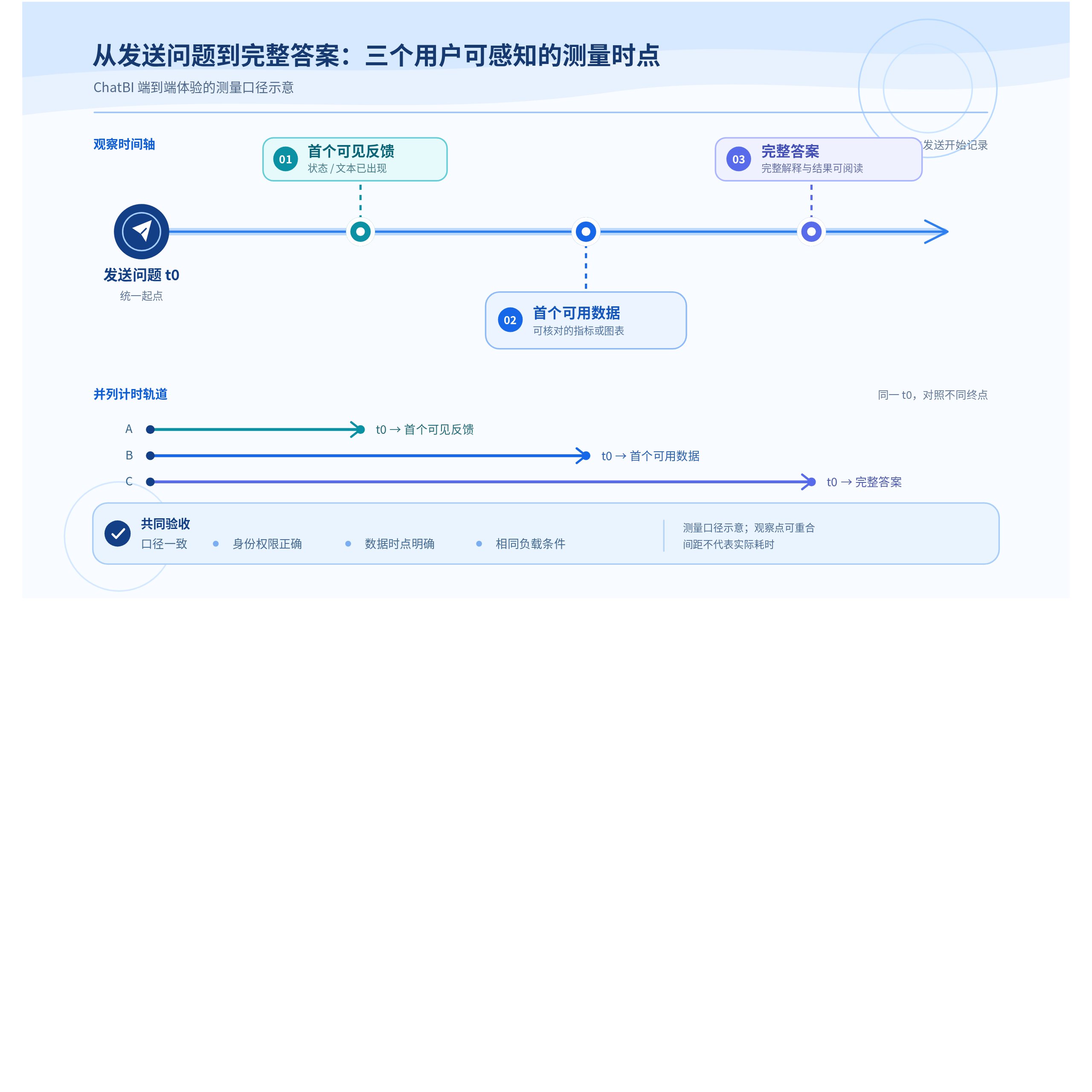
| Measurement | Start and end | What it tells you |
|---|---|---|
| First progress feedback | From sending the question to the first visible interface status | Whether the user knows processing has started |
| First usable data | From sending the question to a verifiable metric result or chart | Whether the data path and querying dominate the wait |
| Complete answer | From sending the question until the conclusion, explanation, and charts are all readable | Whether generation, rendering, or multi-step analysis needs further investigation |
HENGSHI’s general model configuration provides ENABLE_STREAM, which controls streamed model output and is enabled by default. An enterprise using the HTTP API also needs stream=true in the request. The English Data Agent manual lists stage statuses, incremental text, chart events, and completion events, which integration teams can use to show progress and a progressively delivered answer. Verify the model-side setting and API-side output mode separately. First usable data still means a metric or chart produced after permission constraints and the actual query have been applied. The first text fragment only indicates that interaction has begun.
Locate query bottlenecks along the data path
After definitions are confirmed, a regional sales question may use a business metric query or enter an HQL query stage. Streaming statuses exposed by the Data Agent HTTP API include metric querying, HQL querying, and analytical summarization, allowing integration teams to record the current stage. Questions such as “Which cities drove growth?” may require multiple retrieval and aggregation steps. Acceptance should record observable query conditions and query counts.
If the baseline query is slow, first reproduce the chart or dataset query outside ChatBI using the same metric, time range, filters, and sorting. HENGSHI’s performance and freshness guidance describes the trade-offs: prefer direct connections when data volumes are modest and the latest source data is essential; consider a warehouse or scheduled synchronization after data integration for complex calculations or cross-source analysis; and consider chart cache periods when traffic and repeated-query rates are high. The acceleration engine exchanges import and update work for query performance, so record data freshness alongside every test.
Stable, recurring analysis scenarios can be evaluated for aggregate datasets and acceleration paths, but first document the lowest required drill-down granularity. Target attainment, distinct customer counts, and period-end balances cannot simply be calculated by adding lower-level results. Retain the numerators, denominators, dates, or detail needed to recalculate them, and compare definitions with the same question set before and after acceleration. This takes additional modeling effort but avoids improving a demonstration with a faster incorrect answer.
Measure P50, P95, and result quality in the same environment
Performance acceptance should use test data in the target deployment environment. Model providers, data source locations, data volumes, permission rules, concurrency, and update jobs all affect results. Select two anonymized samples: a frequent question with few filters, such as “What are this month’s actual East China sales?”, and a question with more dimensions, such as “Explain changes in target attainment by category and city.” For each, record the median and P95 of first progress feedback, first usable data, and complete-answer time.
Change only one condition per round, such as the time range, concurrency, cold or warm cache state, or update window. Keep the original question, user role, metric version, dataset version, and browser environment unchanged. Alongside speed, check four things: whether the returned metric matches its definition; whether regional users are prevented from seeing unauthorized data; whether chart filters agree with the answer; and whether the most recent successful data update meets business requirements. For failures or anomalies, retain execution logs from conversation cards and browser request-response evidence to locate issues in the model, retrieval, permissions, data, or frontend interaction.
Optimize through capabilities that remain governable
A good ChatBI path starts with metric semantics, queries within permission boundaries, reduces blank waiting through real execution statuses, and lets users verify results. HENGSHI provides business metrics, ChatBI analytics, HQL querying, datasets and acceleration, and streaming configuration for agents. Enterprises still need to make trade-offs according to freshness requirements, analytical granularity, and deployment conditions. Measure first feedback, first usable data, and the complete answer separately before deciding whether to optimize semantics, the data path, model configuration, or page rendering. Performance improvements will then leave evidence that can be reproduced and checked.