
Article body
Full article
From time-based questions to reusable metrics
Business analysis must both aggregate values and define the time range to which each record belongs. Month-to-date sales must reset at the start of the month. GMV for the same period last year needs a baseline for the corresponding date. User retention requires a baseline date and an observation interval. HENGSHI SENSE provides advanced calculation functions for accumulation, comparison, moving statistics, retention, and continuous activity. Analysts still need to define business objects, date granularity, and interval endpoints. Recording these conventions in metrics helps teams explain the same numbers when they change charts, add dimensions, or switch filters.
| Business question | Time semantics the metric must fix | What to check first |
|---|---|---|
| Collections accumulated this month | Aggregate by day and reset at the start of the month | Date field and reset period |
| Comparison with seven days earlier | Show the current value alongside the aggregate for an explicit baseline date | Baseline date and missing dates |
| First-week retention | Objects present on the first day reappear in a subsequent observation interval | User identifier, endpoints, and denominator |
1. Accumulation: aggregate first, then reset by period
date_accumulate addresses questions such as MTD, QTD, and YTD. Its first argument contains two levels of aggregation: the inner level performs the base aggregation at the date granularity, and the outer level accumulates along the time series. The date expression must match the chart’s time dimension. When used in summarize, that date expression must also appear among the non-aggregate arguments. Supported reset periods are hour, day, week, month, quarter, and year.
date_accumulate(sum(sum({order_amount})), day({order_date}), 'month')For example, if daily order amounts for the first three days of a month are 100, 120, and 80, the displayed results should be 100, 220, and 300. This example only illustrates the calculation definition. A real project must also confirm refunds, canceled orders, and time-zone assignment. HENGSHI’s chart-level advanced calculations also provide accumulation settings; the chart’s date dimension and granularity remain part of the result.
2. Comparison: distinguish the baseline, current value, and growth rate
date_compare uses an explicit date expression to obtain the aggregate for a comparison baseline. It does not directly return a growth rate or subtract the baseline from the current value. If GMV on January 8 is 130 and GMV on the date seven days earlier is 100, the following expression returns 100. A report that needs a growth rate must calculate it separately from the current and baseline values using a business-approved formula. In this example, (130 - 100) / 100 = 30%.
date_compare(sum({gmv}), day({biz_date}), dayadd(day({biz_date}), -7))previous uses the chart’s time axis to retrieve the value for a preceding comparison period. It accepts year, quarter, month, week, day, or hour, together with an integer offset. If granularity is omitted, the system uses the smallest time-axis granularity in the chart. It does not mean “the previous row”: in the official example, January 7 is followed directly by January 9, and the daily comparison result for January 9 is empty. When business users encounter an empty value, they should first establish whether source data, date members, or the required baseline period are missing, then decide whether to complete the date series or adjust the presentation.
3. Express rolling statistics at the date granularity
date_shift shifts item by item along the time series and calculates statistics over the specified preceding and following offsets. Its first argument likewise requires an outer calculation and an inner base aggregation; both offsets are numeric arguments. In a complete daily date series, the following expression calculates the mean of daily aggregates for the current day and the preceding six days, which can help smooth a transaction-value trend.
date_shift(avg(sum({gmv})), day({biz_date}), -6, 0)For example, when daily GMV is 100, 120, and 80 on three consecutive days, the mean over that three-day window is 100. A small sample can reveal whether the formula and chart granularity align. When dates are missing, the team must first agree whether a gap means zero, a non-business day, or incomplete data. The offsets “-6 to 0” alone do not establish that missing days are counted as zero or that the denominator is always seven. Check window boundaries, participating values, and null behavior before naming the chart. Chart moving calculations require a date dimension and restrict the available date aggregation methods; deliver these conditions with the metric definition.
4. Retention and continuous activity: endpoints and observation periods define the question
retention returns a retention count or activity count over a specified interval under a date dimension. If the business definition is “users who reappear at least once from day 1 through day 7 after the first day,” the upper bound must be the day after the actual end date. The following example counts user IDs against the event date. A retention rate still needs a separately defined denominator; formatting a retention count as a percentage does not make it a retention rate.
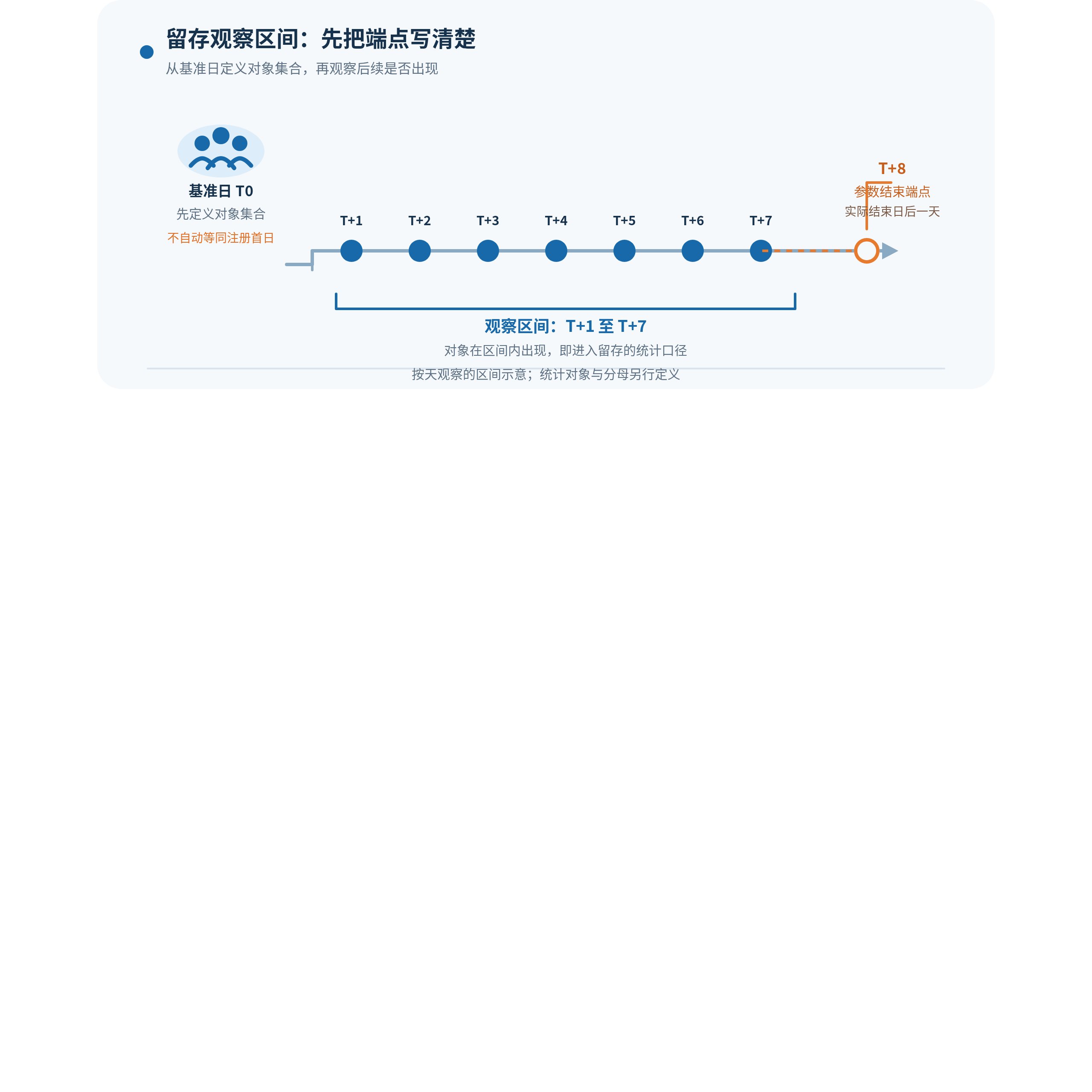
Retention interval: define the object set on baseline day T0, then observe reappearance from T+1 through T+7. Pass T+8 as the ending endpoint. T0 is not automatically a registration date; define the counted objects and denominator separately.
retention({user_id}, day({event_time}), dayadd(day({event_time}), 1), dayadd(day({event_time}), 8))The function’s four optional condition arguments also represent date intervals: inclusion start, inclusion end, exclusion start, and exclusion end. They must all be supplied in their fixed order or all omitted; they are not four Boolean switches. continuous_retention measures continuous activity. Alongside the same date-dimension and endpoint rules, it requires a period of day, week, month, quarter, or year. Align the meaning of “continuous” with the business calendar before choosing the function.
Retention across non-time dimensions such as channel, region, or version can be grouped with the static_retention family. “Static” means the output dimensions are not primarily time-based. It does not remove the date expression or the two comparison intervals: the function still needs the object, date field, start and end dates, and comparison start and end dates. Both ending dates must be one day later than the actual end date.
5. Turn function expressions into maintainable metrics
In HENGSHI SENSE, time-related advanced calculations can become new metrics defined by function expressions, while charts supply dimensions, filters, and presentation. Chart-level capabilities include period comparison, accumulation, moving calculations, retention, and activity, but support depends on the data source, date fields, and date aggregation methods. Additional dimensions also participate as filters. The same formula in different charts therefore does not automatically represent the same business definition.
A reusable metric definition should specify at least the counted objects and deduplication method, base aggregation, date field and granularity, reset or comparison interval, denominator and null rules, default filters, and dimensions that the target chart must retain. Before delivery, use small samples to check accumulation resets, missing baselines, retention endpoints, and date gaps, then verify results on the target data source at the intended chart granularity. Business users then receive metrics they can explain, inspect, and continue to use.
6. Combine metrics on one business dashboard
For daily GMV by product line, a business leader can place daily GMV, month-to-date GMV, the baseline from seven days earlier, and a rolling mean on one dashboard. Daily GMV explains what happened today. date_accumulate shows whether the gap to the monthly target is narrowing. date_compare puts today’s value against an explicit historical baseline. date_shift helps distinguish one-day volatility from a change over a period. All four values need the same date field and base aggregation so readers do not compare incompatible granularities.
For example, if daily GMV is below the baseline from seven days earlier, but month-to-date GMV remains close to target and the rolling mean over a complete date sample has not also declined, the team can first investigate promotions, inventory, or channel events that day. A single-day change does not directly establish a monthly trend. Conversely, if the baseline comparison, accumulated target gap, and rolling mean all point in the same direction, drill into channel, region, or product. Those charts must retain the original metric’s date granularity and filter explanations because added dimensions participate in advanced calculations. This combination records the review path in the dashboard and lets later reports reuse the same business language.
Include time definitions in metric delivery
Time functions shorten expressions, but they do not decide business definitions for the team. HENGSHI SENSE makes common patterns such as accumulation, comparison, moving calculations, and retention composable and reusable. Define the time axis, endpoints, objects, and denominator first, then preserve the formula and chart rules together as metrics. Time-series analysis can then develop from a one-off report into a stable analytical asset.