
Article body
Full article
ChatBI lets users access data through natural language, while Agentic BI takes ownership of a complete analytical task. A sales scenario makes the boundary clear. When a user asks, “What was East China’s revenue this month?”, and the system returns a number, that is conversational analytics. When the user asks it to “find the causes of the revenue decline, prepare review materials, and give the priority account list to the sales team,” the system must plan, analyze, produce deliverables, and initiate actions. That is when it becomes Agentic BI.
Analysis Agents Own the Evidence Chain
After receiving a business objective, an analysis agent first builds a problem tree. A revenue decline may arise from changes in customer count, average order value, product mix, or refunds. The system reads metric definitions one by one, calls query tools and compares the results, then adjusts subsequent paths according to the intermediate evidence. It must retain the metrics, filters, and data sources used at every step; otherwise, business users cannot verify the conclusion.
A capable analysis agent also manages uncertainty. When data is insufficient, it should identify the gap and offer verifiable hypotheses. When metric definitions conflict, it should pause and request confirmation. Enterprises need an explainable analytical process, not merely a confident-sounding paragraph.
Operations Agents Connect Business Systems
An operations agent turns conclusions into executable tasks. It can create dashboards, update subscriptions, generate customer lists, or invoke CRM, ticketing, and notification systems. Each type of action requires explicit parameters, permissions, and status feedback. The system must also handle timeouts, partial failures, and repeated calls to prevent one retry from creating two tasks.
High-risk actions should use a Dry Run. The agent first shows the objects to be changed, the scope of impact, and the expected result, and executes only after the user confirms. After a write is complete, the operations agent returns the result to the analysis agent, which continues to observe metric changes. This is how analysis, decision-making, action, and feedback form a closed loop.
The Two Engines Share Three Types of State
Collaboration requires a shared state model. The first type is business state, including objectives, constraints, and success criteria. The second is analytical state, including verified hypotheses, query results, and confidence levels. The third is execution state, including approvals, progress, errors, and rollback points. Without any one of these, the system can easily lose context in a long-running task.
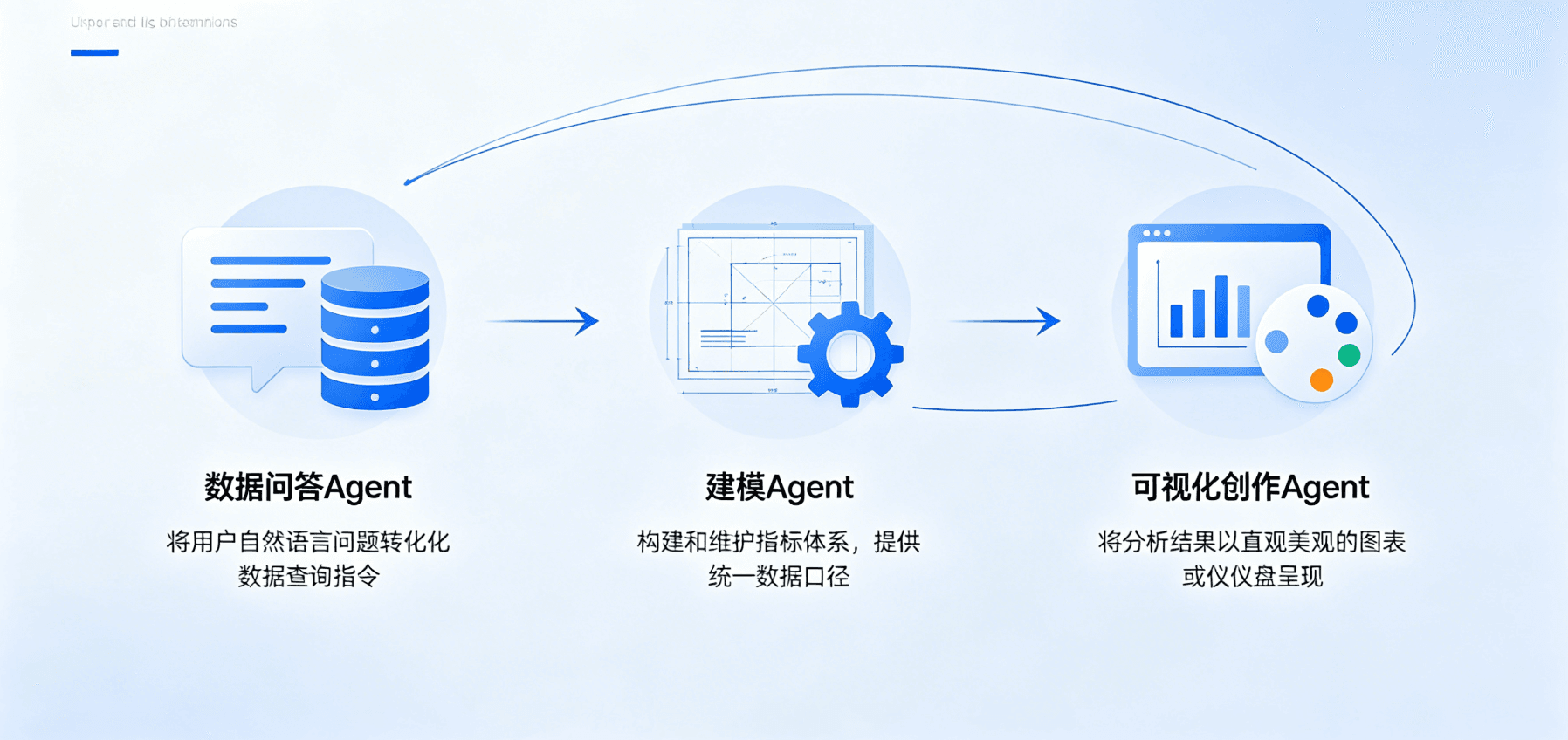
A multi-agent architecture also needs clear responsibility boundaries. A modeling agent maintains data relationships, a conversational analytics agent interprets metrics, a content-creation agent produces visualizations, and an operations agent handles external actions. The orchestrator manages dependencies and retries, the semantic layer provides a common business language, and the permission system determines what each tool may do. Teams can replace one model or tool without rewriting the entire chain.
Enterprise Procurement Should Look at Completion Rates
One successful question-and-answer exchange in a demo does not prove Agentic capability. Procurement testing should use 10 to 20 real tasks and record task completion rates, the number of human interventions, error recoverability, definition consistency, and audit completeness. A platform that can only generate recommendations remains an analytics assistant. A platform has the engineering foundation for Agentic BI only when it can reliably deliver resources and actions within authorized boundaries.
Engineering Details and Implementation Notes
I. Engineering Challenges in ChatBI: Why “Querying Data in Natural Language” Is Not Enough
1.1 ChatBI’s Core Technical Approach
Before analyzing Agentic BI, we need to understand ChatBI’s technical approach and its limitations.
A typical ChatBI technical flow looks like this:
User natural language → LLM intent parsing → Text-to-SQL → database query → result formatting → natural-language responseThis flow works well for “single-table queries,” such as “What were sales last month?” and “How many customers are in East China?” But when the query becomes more complex, every stage in the flow can fail.
1.2 ChatBI’s Five Engineering Challenges
Challenge 1: Context explosion
An enterprise data warehouse typically contains hundreds of tables, thousands of fields, complex star or snowflake schemas, and multi-level nested dimensional relationships. Even with today’s largest context windows, it is impossible to feed an entire data-warehouse schema into an LLM.
Common “optimization” approaches, such as supplying only the schemas of relevant tables, introduce a new problem: the LLM must first decide which tables are relevant. Making that decision itself requires an accurate understanding of the data-warehouse structure. This creates a chicken-and-egg circular dependency.
Challenge 2: The semantic gap
There is a major semantic gap between the language of business users and that of databases:
- When users say “revenue,” the database may contain multiple fields such as
revenue_amount,gross_sales, andnet_revenue. - When users say “East China,” the database may use a hard-coded mapping such as
region_id IN ('SH', 'JS', 'ZJ'). - When users say “year-over-year,” the database may require complex window functions or self-join queries.
Text-to-SQL must accurately map business language to database language. Without a precise semantic layer, it is difficult for this mapping to achieve enterprise-grade accuracy.
Challenge 3: The conflict between hallucinations and deterministic queries
Large language models generate probable answers. Enterprise data analytics requires deterministic query results: the same query must return exactly the same data.
When SQL generated by an LLM contains errors such as a misspelled field name, an incorrect JOIN condition, or a missing filter, the result may be completely wrong. Such errors are often hard to spot because the LLM can still produce a plausible-looking explanation for the incorrect result.
Challenge 4: Breaks in long-running workflows
Real enterprise analytics needs are rarely completed in one step. A typical analytical process may include:
- Finding relevant data sources
- Understanding data structures and business meaning
- Building a data model (multi-table relationships and calculated fields)
- Defining analytical metrics
- Creating visualizations
- Exploring interactively (filtering, drilling down, and comparing)
- Sharing and collaborating
ChatBI can handle simple queries in step 6 of this process, not the full analytical workflow.
Challenge 5: Missing enterprise-grade capabilities
Access control: “I am the East China sales manager, and I can see only East China data.” Data security: “Customer mobile-phone numbers must be masked.” Auditability: “Who changed which report, and when?” Metric consistency: “Finance and sales must use the same definition of ‘revenue.’”
These enterprise capabilities are the core strengths that BI platforms have accumulated over many years, and ChatBI has almost none of them.
1.3 The Essential Difference Between ChatBI and Agentic BI
| Comparison dimension | ChatBI | Agentic BI |
|---|---|---|
| Technical positioning | Natural-language query interface | Full-stack analytics agent |
| Scope | A single query step | A complete analytical workflow |
| Core technologies | LLM + Text-to-SQL | Agent + semantic layer + API |
| Data modeling | Cannot handle it | Agent can complete it autonomously |
| Metric definitions | Relies on presets | Agent can create and manage them |
| Visualization | Simple tables/charts | Complete dashboard creation |
| Error handling | Cannot self-heal | Automatic retry and learning |
| Hallucination control | Relies on prompt engineering | The semantic layer prevents hallucinated fields and metrics |
| Enterprise capabilities | Largely absent | Fully supported |
II. Agentic BI Architecture: Three-Layer Decoupling and Agent Orchestration
2.1 Core Architecture: Headless + CLI + Agent as an Integrated Whole
HENGSHI’s Agentic BI architecture can be abstracted into three layers:
Why decouple these three layers?
Independence of the Agent layer: the Agent layer understands user intent and orchestrates task workflows, but it should not operate databases or render charts directly. The Agent invokes Headless-layer capabilities through the CLI, preserving separation of concerns. Teams can replace the Agent with a different LLM or agent framework without affecting the underlying engine.
Standardization of the CLI layer: the CLI (Command Line Interface) provides a programmatic, standardized interface layer rather than a traditional command-line tool. It encapsulates every Headless-layer capability as a standardized command or operation. HENGSHI’s Data Agent and third-party agents such as OpenClaw can invoke those capabilities through the CLI.
Stability of the Headless layer: the Headless layer is the deterministic foundation of the entire architecture. No matter how “uncertain” the upper Agent layer is because of LLM randomness, Headless query results, permission checks, and metric calculations must be 100% deterministic. This combination of a deterministic foundation and an intelligent upper layer is what distinguishes Agentic BI from pure ChatBI.
2.2 Task Planner: Technical Implementation of Multi-Agent Orchestration
The Task Planner is the most important component in the Agentic BI architecture that looks least like BI. It is a task decomposition and orchestration engine responsible for breaking a user’s natural-language request into a sequence of executable subtasks.
Key implementation challenges:
Accuracy of task decomposition: When a user says, “Help me analyze sales for the previous quarter,” the request is extremely vague. The Task Planner needs to:
- Identify the analytical scope (the previous quarter = a date-range filter)
- Infer the analytical dimensions (sales may involve amount, quantity, region, product, and other dimensions)
- Determine the presentation format (dashboard, table, or chart)
- Consider user preferences (has the user performed similar analysis before, and what chart types do they prefer?)
Managing task dependencies: If the task sequence is “create a dataset → create a dashboard based on the dataset → add charts to the dashboard,” then “create a dashboard” depends on the output of “create a dataset” (the dataset ID), and “add charts” depends on the output of “create a dashboard” (the dashboard ID). The Task Planner must manage these dependencies correctly to ensure the right execution order.
Error recovery and retries: When a subtask fails, for example because SQL syntax is invalid when creating a dataset, the Task Planner needs to:
- Capture the error message
- Analyze the cause of the error
- Attempt an automatic correction (for example, correcting the SQL syntax)
- Retry the execution
- If retries still fail, report to the user and provide correction guidance
2.3 The Semantic Layer: The Technical Foundation for Eliminating Hallucinations
In an Agentic BI architecture, the semantic layer is the technical foundation for eliminating AI hallucinations.
The semantic layer’s core role:
The semantic layer builds a “business-semantics translator” between the database and the Agent:
Business language              Semantic layer              Database language
─────────────────              ──────────────              ─────────────────
“Last-quarter revenue”  →     Metric: revenue_q     →     SELECT SUM(amount)
                               Definition: SUM(order.amount)     FROM orders
                               Filter: order_date >= Q_START     WHERE order_date >= ?
                               Grain: month                       AND order_date <= ?
The semantic layer eliminates hallucinations through three mechanisms:
- Boundary constraints: The semantic layer defines a “whitelist” of all available fields, metrics, and dimensions. The Agent can select only from the whitelist and cannot invent fields or metrics that do not exist. The whitelist prevents hallucinated fields and metrics.
- Type safety: The semantic layer defines precise data types, aggregation methods (
SUM/AVG/COUNT, etc.), and dimensional relationships for every field and metric. Query requests generated by the Agent must pass the semantic layer’s type checks, ensuring that the query is valid. - Consistent definitions: Metric definitions in the semantic layer are unique and authoritative. No matter which context the Agent uses to reference the “revenue” metric, it receives exactly the same definition and calculated result, eliminating synonym ambiguity and conflicting definitions.
III. HENGSHI CLI: A Standardized Bridge Between Agents and the Platform
3.1 CLI Design Principles
On April 1, 2026, HENGSHI launched HENGSHI CLI, 15 days before the 6.2 release. The CLI was a key prerequisite for the Agentic BI architecture.
The design principle of HENGSHI CLI is to make every platform capability programmatically callable, rather than available only through GUI operations.
The capabilities of traditional BI platforms are “GUI-First”: users access functions by clicking buttons and dragging components. To let AI agents invoke those capabilities, platforms must either simulate GUI operations, which is fragile and unreliable, or build another API layer on top of the GUI, which adds maintenance cost.
HENGSHI CLI instead exposes standardized command interfaces directly at the platform core, alongside the GUI rather than as a wrapper over it. This means CLI and GUI are peer invocation methods that directly operate the same underlying engine.
3.2 Core CLI Capabilities
HENGSHI CLI provides the following core command categories:
| Command category | Description | Typical use case |
|---|---|---|
| Data connections | Manage data-source connections | Create, test, and update database connections |
| Datasets | CRUD datasets | Create datasets, configure relationships, and preview data |
| Semantic models | Manage the semantic layer | Define metrics, configure dimensional relationships, and manage definitions |
| Dashboards | CRUD dashboards | Create dashboards, add charts, and configure layouts |
| Permissions | Manage permissions | Configure roles, grant data access, and audit logs |
| Exports | Export data | Export CSV/Excel and schedule export tasks |
| Pipelines | Data pipelines | Configure ETL flows and monitor pipeline status |
3.3 The CLI’s Ecosystem Significance
HENGSHI CLI makes platform capabilities callable by HENGSHI’s Data Agent and any third-party AI agent.
Through the CLI, third-party agent frameworks such as OpenClaw, AutoGen, and LangGraph can:
- Connect to the HENGSHI platform through the CLI
- Invoke HENGSHI BI capabilities, including data modeling, metric calculation, and visualization
- Integrate HENGSHI BI capabilities into larger agent workflows
This means HENGSHI is no longer a closed “BI platform,” but an open “BI-capability provider”: any AI agent can access HENGSHI BI capabilities through standardized CLI interfaces.
IV. Core Engineering Characteristics of Agentic BI
4.1 Adaptive Correction: Automatically Recovering from Errors
One of the most impressive technical characteristics of Agentic BI is adaptive recovery. HENGSHI agents can automatically retry and correct based on database errors, directly taking over labor-intensive data-engineering work.
Technical implementation of the self-healing flow:
Typical self-healing scenarios:
- Scenario 1: SQL generated by an Agent references a field that has been renamed. The database returns “column not found.” The Agent parses the error message, searches the semantic layer for a similar field name, replaces it automatically, and retries.
- Scenario 2: The structure of a data source changes, with columns added or data types modified. The Agent detects the schema change and automatically updates the dataset’s metadata and relationships.
- Scenario 3: A complex query times out. The Agent automatically splits the query into multiple subqueries, adds index recommendations, or adjusts aggregation granularity before retrying.
4.2 Continuous Learning: Evolving from User Behavior
Another key technical characteristic of Agentic BI is continuous learning. Agents can continually learn from user actions, feedback, and preferences, continuously improving their analytical capabilities.
The learning mechanism has three levels:
- Immediate adaptation: Within a conversation, the Agent remembers the user’s previous instructions and corrections and automatically applies this context in later interactions. For example, if the user says, “Do not use a bar chart; use a line chart,” the Agent will automatically use line charts in subsequent chart creation.
- Cross-session memory: The Agent records a user’s long-term analytical preferences, including commonly used dimensions, preferred chart types, and common filters. In a new session, it automatically applies these preferences.
- Organization-level learning: In an environment with many users, the Agent can learn from the organization’s overall analytical patterns. For example, if most users group sales data by region and product, the Agent will automatically suggest those two dimensions for a new sales-analysis request.
4.3 End-to-End Automation: Full-Workflow Coverage
The core promise of Agentic BI is end-to-end automation: an Agent can drive the entire analytical process, from data ingestion to visualization.
Technical implementation of the end-to-end flow:
┌───────────────┐   ┌──────────────────┐   ┌───────────────────┐   ┌────────────────┐
│ Data ingestion│ → │ Semantic modeling│ → │ Metric definition │ → │ Visualization  │
│ Connect       │   │ Model            │   │ Metric            │   │ Visual         │
└───────────────┘   └──────────────────┘   └───────────────────┘   └────────────────┘
        │                    │                      │                       │
  Agent can             Agent can              Agent can               Agent can
  configure data        build JOIN             create calculated        generate
  connections           relationships           metrics                  dashboards
In this flow, the Agent completes every step by calling Headless-layer APIs through the CLI, ensuring full-workflow automation and determinism.
V. Summary: Agentic BI Is the Inevitable Direction of Data Analytics
Returning to the question at the start of this article: why does Agentic BI represent the next architectural evolution in data analytics?
Because ChatBI solves the “last mile” problem: how to make data querying more convenient for users. Agentic BI solves the “whole journey” problem: how to let an AI Agent take over the full data-analytics workflow, from data modeling to visualization, and from metric definitions to permission controls.
ChatBI is a “query tool”; Agentic BI is an “analytics platform.” ChatBI means users write less SQL; Agentic BI means users do less of everything except “having ideas.”
HENGSHI SENSE 6.2 has demonstrated the technical feasibility of Agentic BI. The Headless architecture provides the deterministic foundation, the CLI provides standardized interfaces, and the Data Agent provides intelligent interaction. Together, the three form the complete Agentic BI technology stack.
But this is only the beginning. As AI capabilities continue to improve and agent frameworks mature, Agentic BI will continue to evolve in the following directions:
- More complex analytical reasoning: Agents will execute explicit instructions and proactively discover anomalies, trends, and opportunities in data.
- Multi-agent collaboration: Agents in domains such as data, business, and security will work together to complete complex analytical tasks.
- Adaptive learning: Agents will learn from an organization’s overall analytical patterns and provide increasingly precise analytical recommendations.
- Cross-platform integration: Through standardized CLI and APIs, Agentic BI capabilities can be embedded in any enterprise application.
Sources and Verification Notes
Internal materials are used to organize HENGSHI capabilities and engineering practices; competitor and version information was checked against official pages accessible on August 26, 2026. Product functions can vary by version, region, license, and deployment model, so another on-site confirmation should be completed before formal procurement or release.