
Article body
Full article
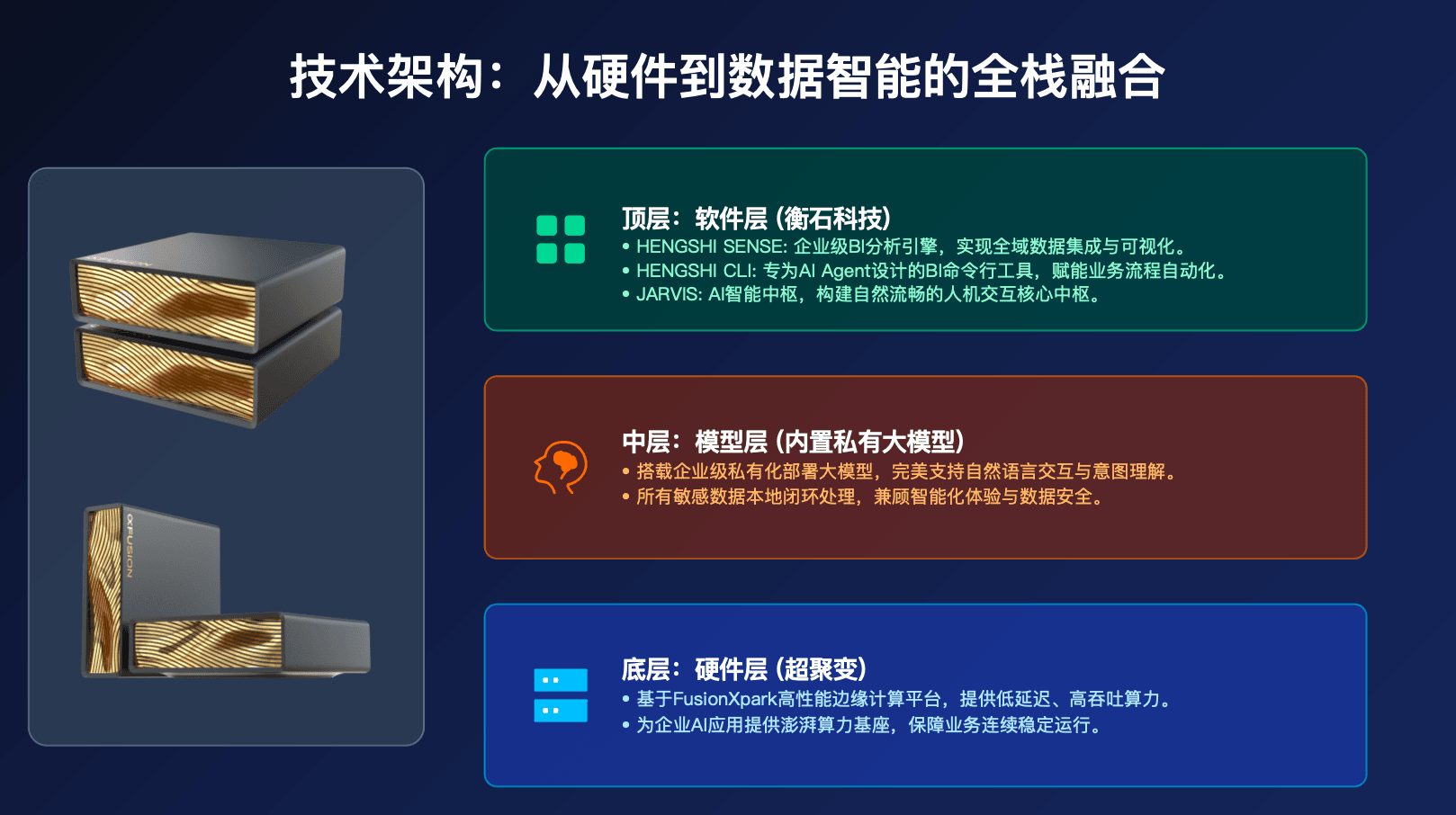
HENGSHI BOX is Hengshi Technology’s all-in-one Agentic BI solution. It pre-installs Data Agent, local LLM inference, vector database, and BI analytics platform on a xFusion server, achieving “data never leaves the box, inference is local, zero Token cost.” This article provides a complete hands-on guide from unboxing, deployment, and configuration to operations monitoring.
1. What Is HENGSHI BOX
HENGSHI BOX is not a software product, but a plug-and-play BI control cabin. Inside it is pre-installed: the complete HENGSHI SENSE platform (full Agentic BI capabilities), three Data Agent AI agents (Ask, Model, Deliver Agent), HENGSHI CLI, HENGSHI JARVIS, a local large language model (quantized and fine-tuned private inference engine), a vector database (enterprise knowledge base and context storage), and GPU or NPU hardware acceleration.
The data flow in a traditional BI plus cloud AI solution: data flows to cloud servers via public network, is processed by AI models, and results are returned via public network. Risks include data crossing borders, network latency, and Token costs. The HENGSHI BOX solution data flow: data is inferred locally and results are returned locally. Core value: data never leaves the box, low latency, zero Token consumption.
2. Unboxing and Hardware Initialization
The standard kit includes the xFusion server host, dual power cables (redundant power), network cables, rack rail kit, quick start guide, product serial number card, and service activation code.
Physical installation steps: install rack rails and secure the server, ensuring level placement with ample cooling space; connect dual power supplies and confirm the power indicator light is solid green; connect the management port (BMC, for remote management); connect the business port (for BI access and Agent scheduling); press the power button and confirm the front panel indicator light is on; wait for system initialization (approximately 3 to 5 minutes for first boot).
For network configuration, the management port default IP is in the 192.168.1.100 subnet (accessed via BMC), and the business port defaults to DHCP auto-acquisition (static IP is recommended). After logging in via the BMC console, you can configure the business network interface IP address, subnet mask, gateway, and DNS, then test network connectivity.
3. System Initialization Configuration
After first boot, access the BOX Web management interface via browser to enter the initialization wizard. Steps in order: accept the license agreement, set administrator password (minimum 12 characters, including uppercase and lowercase letters, numbers, and special characters), configure system timezone and NTP server, set hostname, enter service activation code to bind the license, and select deployment mode (standalone mode for single-machine deployment, cluster mode for multiple BOX units in a cluster).
After initialization, the management console provides a comprehensive overview of system status: system running status, CPU and memory usage, storage usage and space proportion, GPU status (temperature and utilization), local model version and readiness status, network connection information, and service uptime.
4. Platform Service Configuration
After starting core services, you can view the status of each service. Core services include HENGSHI SENSE platform (Web access port), CLI execution service, local model inference service, vector database, ETL scheduler, and audit log service. Service restarts can be completed via management commands.
When configuring the local model, you can view model version, quantization level (such as INT4), context length, GPU memory allocation, and inference speed. You can adjust model parameters (temperature coefficient, maximum Token count, etc.) and verify model response time and quality through test prompts.
When configuring Data Agent, assign local models to each of the three agents, ensuring all analytics tasks complete inference within the BOX. You can view each Agent’s running status (active, idle) and recent activity time.
5. Data Access and Security Configuration
BOX can connect to enterprise internal databases with data never leaving the enterprise intranet. Create data connections (MySQL, PostgreSQL, etc.), then create data synchronization pipelines to sync data to BOX local storage. Synchronization mode supports incremental and scheduled syncs (such as every two hours).
Security hardening includes: enabling network access control (allowing enterprise intranet IP ranges, rejecting all external access), enabling data export control (setting approval requirements, maximum export row count per session, automatic watermarking, and blocking external downloads). The security baseline check can output firewall status, data external transmission blocking status, storage and transmission encryption methods, model inference scope, remote access status, and audit log status with one click.
6. Operations Monitoring
The daily monitoring panel displays real-time CPU, memory, disk, GPU memory, and GPU temperature values, status, and alert thresholds. Performance monitoring tracks average query time, P95 query time, queries per minute, model inference times per minute, and active session count.
Alert configuration: you can create resource alerts (such as CPU high load exceeding 80% for 5 minutes notified via email, disk space below 85% notified via enterprise WeChat), and view alert history records.
Log management: you can view system logs and model inference logs, and configure log rotation strategy (retain 90 days, daily rotation, enable compression).
7. Backup and Recovery
Regular backup strategy: create full backups (containing data, configuration, and models), create incremental backups (data only), and configure automatic backup schedules (such as full backup at 1 AM daily).
Disaster recovery: when restoring from backup files, first perform a dry run (check backup integrity and restore scope), then execute the formal restore after confirming correctness.
8. Agent Scheduling in Practice
Start a resident Data Agent on BOX, specifying the Skills to use (such as data query, dashboard generation, HQL expert), running in daemon mode with a name. You can view the Agent’s running status, including process ID, status, loaded Skills, completed task count, and runtime.
When submitting an analytics task, describe the requirement in natural language (such as “Analyze last month’s sales trends by region, generate an East China cockpit”), the Agent completes inference locally with data never leaving BOX. You can query task progress and final results (including generated dashboard ID, chart elements, and summary).
Agent operation results are pushed to the frontend in real-time via SSE (Server-Sent Events). Whenever the Agent creates a dashboard or adds chart elements, the web interface automatically refreshes, and business people can see the Agent’s work in real time.
9. Performance Tuning
Model inference optimization: adjust model batch processing size, enable inference cache and set validity period, and view cache hit rate and occupied space.
Query performance optimization: configure query result cache (set validity period and intelligent mode) and create materialized views (set scheduled refresh period).
10. FAQ
Q1: How many concurrent users can BOX support?
Depends on hardware configuration. The standard configuration can support 50 to 200 concurrent analytics users. Agent tasks have no concurrency limit and are scheduled in queue mode.
Q2: Can BOX’s local model be upgraded?
Yes. Hengshi regularly releases model update packages, upgradeable via management commands. The upgrade process does not affect data and analytics assets.
Q3: Will BOX lose data if there’s a power outage?
No. BOX uses redundant power supply design (dual-circuit power supply), and data is stored in RAID-protected disk arrays. After power outage recovery, the system automatically completes data consistency checks.
Q4: Can BOX work with Hengshi’s cloud platform?
Yes. BOX supports hybrid deployment mode, where sensitive data is processed locally on BOX, and non-sensitive analytics tasks can be routed to the cloud platform, fully utilizing cloud computing power.
Conclusion
The core problem HENGSHI BOX solves is: when an enterprise needs AI-driven data analytics but cannot afford the risks of data crossing borders and Token cost, providing a safe, efficient, zero-operations-burden “turnkey” solution. From unboxing to launch, this article covers the complete process of hardware installation, system configuration, Agent scheduling, security hardening, operations monitoring, and performance tuning. If you are evaluating enterprise ChatBI on-premises deployment solutions, BOX offers an option worth serious consideration.